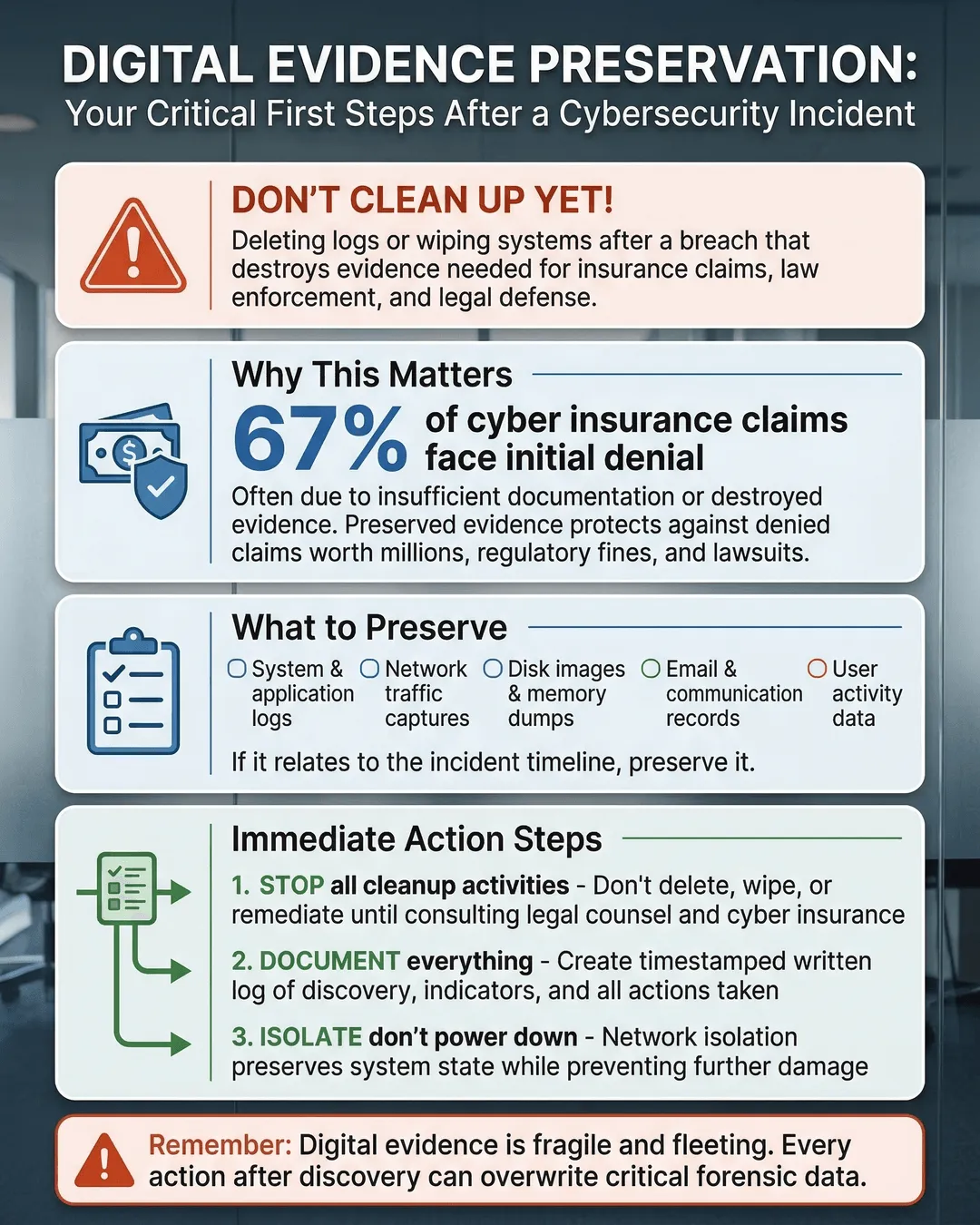
Deleting logs or wiping systems too quickly after a breach can destroy the evidence you need for insurance claims, law enforcement, and legal defense.
You just discovered a cybersecurity incident. Your IT team is already moving to contain it, isolate infected systems, and restore operations. Someone suggests wiping the compromised servers to get clean systems up and running fast. Another person wants to delete suspicious log files to free up storage space. It feels productive. It feels like progress.
But here’s the problem: you might be destroying the very evidence you need to prove what happened, recover your losses, and protect your business legally.
When a cyberattack hits, your first instinct is to clean up the mess and move on. But jumping straight to remediation without preserving digital evidence can cost you far more than the attack itself. Insurance carriers may deny your claim without proper documentation. Law enforcement cannot investigate without intact evidence. And if litigation follows, you will struggle to defend your organization without a clear record of what occurred.
This is not about paranoia or expecting the worst. It is about protecting your business from avoidable consequences. Let’s walk through how to preserve digital evidence after a cybersecurity incident without slowing down your recovery efforts.
Why Digital Evidence Matters More Than You Think
Digital evidence is the trail left behind by attackers. It includes log files, system snapshots, network traffic data, email headers, and any other digital artifact that shows what happened during and after an incident. This evidence serves multiple critical purposes.
First, it supports your cyber insurance claim. Most cyber insurance policies require detailed documentation of the incident, including proof of when the breach occurred, what systems were affected, and what data was compromised. Without preserved evidence, insurers can dispute your claim or reduce your payout¹. In fact, 43% of cyber insurance claims face delays or denials due to insufficient documentation².
Second, it enables law enforcement to investigate. If you report the incident to the FBI, Secret Service, or local cybercrime units, they need intact evidence to trace the attackers, understand their methods, and potentially recover stolen assets. Wiping systems before law enforcement arrives destroys their ability to help you.
Third, it protects you in potential litigation. If customers, partners, or employees sue your organization over data exposure or business disruption, you need evidence to establish what happened, when it happened, and how you responded. Your legal defense depends on having a clear, documented timeline.
Finally, it helps you understand the attack and prevent future incidents. Digital forensics can reveal how attackers gained access, what vulnerabilities they exploited, and whether they left backdoors in your systems. Without this information, you are flying blind during recovery.
What Happens When You Delete Evidence Too Soon
The consequences of premature cleanup are real and costly. Consider a mid-sized healthcare provider that suffered a ransomware attack in 2024. Their IT team immediately wiped infected servers to restore operations. When they filed an insurance claim, the carrier requested forensic evidence proving the attack timeline and data exfiltration scope. The company could not provide it. The insurer reduced the claim payout by 60%, citing lack of documentation³.
Or take the manufacturing firm that discovered unauthorized access to their network. Before contacting law enforcement, they deleted suspicious user accounts and cleared log files to “clean up” the system. When the FBI arrived to investigate, they had no evidence to trace the attacker or determine what intellectual property was stolen. The case went cold.
Deleting logs, wiping drives, or resetting systems destroys chain of custody. Chain of custody is the documented chronological record showing who handled evidence, when they handled it, and how it was stored. Courts, insurers, and investigators require this documentation to verify evidence authenticity. Once you break the chain, the evidence loses credibility and may become inadmissible in legal proceedings.
You also risk destroying metadata. Metadata includes file creation dates, modification timestamps, access logs, and other hidden information that reveals attacker behavior. This data is fragile. Rebooting a system, running antivirus scans, or modifying files can overwrite metadata, making forensic analysis impossible.
The financial impact adds up quickly. The average cost of responding to a cybersecurity incident without proper evidence preservation is 37% higher than incidents with documented evidence chains⁴. You pay more for redundant forensic work, extended downtime, legal fees, and reduced insurance payouts.
How to Save Evidence After a Cyberattack
Preserving digital evidence does not require forensic expertise or expensive tools. It requires a methodical approach and clear communication with your team. Here is how to do it right.
Stop making changes immediately. The moment you suspect a cybersecurity incident, instruct your team to stop modifying affected systems. Do not reboot servers, delete files, run security scans, or install updates on compromised machines. Every action you take alters the digital crime scene. If you need to contain the incident, isolate affected systems from the network without shutting them down. Disconnect network cables or disable network adapters instead of powering off machines.
Document everything in real time. Start a written incident log immediately. Record the date and time you discovered the incident, who discovered it, what symptoms you observed, and what actions you took. Include screenshots of error messages, suspicious emails, unusual network activity, or ransom notes. Photograph physical evidence like unplugged cables or devices. This log becomes the foundation of your chain of custody documentation.
Create forensic images before cleanup. A forensic image is a bit-by-bit copy of a storage device that preserves all data, including deleted files and hidden metadata. Before you wipe or rebuild any compromised system, create forensic images of hard drives, USB devices, and mobile devices. You can hire a third-party forensic firm to do this, or train your IT team to use free tools like FTK Imager or dd. Store these images on write-protected external drives in a secure location. Label each image with the device name, date, time, and the person who created it.
Preserve log files immediately. System logs, firewall logs, application logs, and network traffic logs contain critical evidence of attacker activity. Export and save these logs as soon as you discover the incident. Many systems overwrite logs automatically after a set period, so you cannot wait. Save logs in their native format and also export them to CSV or text files for easier analysis. Store copies in multiple locations, including offline storage that attackers cannot access or delete.
Maintain chain of custody records. Create a simple spreadsheet tracking every piece of evidence you collect. Include the evidence description, collection date and time, who collected it, where it is stored, and who has accessed it. Every time someone handles evidence, they should sign the log. This documentation proves the evidence remained intact and unaltered from collection to analysis.
Involve professionals early. Contact your cyber insurance carrier immediately, even before you fully understand the incident scope. Many policies require notification within 24 to 48 hours. Your insurer can recommend approved forensic firms and legal counsel. Engaging these professionals early ensures evidence preservation follows industry standards and meets legal requirements. If you plan to report the incident to law enforcement, do so before making any major system changes.
Separate incident response from evidence preservation. You can contain the attack and preserve evidence simultaneously. Assign one team or individual to focus solely on evidence collection while others work on containment and recovery. This division of labor prevents evidence destruction during the rush to restore operations.
Digital Forensics Basics Small Business Owners Should Know
You do not need to become a forensic expert, but understanding a few basics will help you make better decisions during an incident.
Volatile data disappears when you power off. RAM, active network connections, running processes, and open files exist only while a system is powered on. If you shut down a compromised machine, you lose this data forever. If forensic analysis is needed, capture volatile data first using tools like Volatility or by creating a memory dump. If you are not equipped to do this, leave the system running and isolated until a forensic professional arrives.
Time matters more than you realize. Many businesses wait days or weeks before preserving evidence, assuming they can always go back and retrieve it. By then, logs have rotated, systems have been patched, and attackers have covered their tracks. Evidence preservation must happen within hours of discovery, not days.
Cloud environments require different approaches. If your incident involves cloud services like Microsoft 365, AWS, or Google Workspace, evidence preservation works differently. Cloud providers control the underlying infrastructure, so you cannot create traditional disk images. Instead, preserve evidence by exporting logs, emails, file access records, and configuration snapshots through the cloud provider’s admin console. Enable audit logging if it is not already active, and export all available logs immediately.
Legal privilege protects your evidence. Engage legal counsel before beginning forensic analysis. When you work with forensic firms under attorney direction, your findings may be protected by attorney-client privilege. This protection prevents attackers or opposing parties from accessing your internal investigation results during litigation. Without this protection, everything you discover could be used against you.
Common Mistakes That Destroy Evidence
Even well-intentioned teams make mistakes that compromise evidence integrity. Here are the most common ones to avoid.
Running antivirus scans on infected systems. Antivirus software modifies or deletes malicious files, destroying evidence of how the attack worked and what the malware did. Quarantine suspicious files instead of deleting them, and create forensic images before running any cleanup tools.
Resetting passwords immediately. Changing passwords sounds like a smart security move, but it can alert attackers that you discovered them and prompt them to escalate their activities or destroy evidence. Coordinate password resets with your incident response plan, and preserve logs showing previous authentication attempts before making changes.
Allowing too many people to access affected systems. Every person who touches a compromised system can alter evidence. Limit access to essential personnel only, and document who accessed what and when.
Assuming backups are sufficient evidence. Backups are critical for recovery, but they are not forensic evidence. Backups typically do not include log files, volatile data, or metadata showing attacker activity. You need both backups for recovery and forensic images for evidence.
Failing to preserve evidence from third-party systems. Attackers often move laterally through vendor systems, cloud services, or partner networks. If your incident involves third-party platforms, request that those providers preserve their logs and access records immediately. Many third parties automatically delete logs after 30 to 90 days, so early notification is essential.
Building Evidence Preservation Into Your Incident Response Plan
The best time to plan for evidence preservation is before an incident occurs. Add these steps to your incident response plan now.
Designate an evidence custodian. Assign one person or role responsible for overseeing evidence collection and chain of custody documentation during an incident. This person coordinates with forensic firms, legal counsel, and law enforcement.
Create evidence preservation checklists. Document exactly what logs to preserve, what systems to image, and what documentation to collect. Include step-by-step instructions your team can follow under pressure.
Pre-arrange forensic support. Establish relationships with cybersecurity forensic firms and legal counsel before you need them. Many firms offer retainer agreements that guarantee rapid response when incidents occur.
Train your team on evidence handling. Conduct tabletop exercises that include evidence preservation scenarios. Make sure your IT staff understands what not to do when they discover an incident.
Enable comprehensive logging now. You cannot preserve logs that do not exist. Configure your systems to capture detailed logs and retain them for at least 90 days. Centralize log collection in a security information and event management system or cloud logging service that attackers cannot easily access or modify.
Conclusion
Preserving digital evidence after a cybersecurity incident is not optional. It is a critical step that protects your insurance coverage, enables law enforcement action, supports your legal defense, and helps you understand what happened so you can prevent future attacks.
The natural instinct to clean up quickly and move on is understandable. But taking a few hours to preserve evidence before remediation can save you months of headaches and hundreds of thousands of dollars in denied claims, legal costs, and repeat incidents.
You do not need to be a forensic expert. You need to stop making changes, document what you see, create copies before cleanup, and involve the right professionals early. These steps are simple, but they make the difference between a manageable incident and a catastrophic business disruption.
Set up your evidence preservation process today, before you need it. Because when an incident happens, you will not have time to figure it out on the fly.
Key Takeaways
- Deleting logs or wiping systems before preserving evidence can invalidate insurance claims and prevent law enforcement from investigating your incident.
- Digital evidence includes log files, system images, network traffic data, and metadata that proves what happened during an attack and when it occurred.
- Create forensic images of compromised systems before cleanup, and export all relevant logs immediately after discovering an incident.
- Maintain chain of custody documentation showing who collected evidence, when they collected it, and how it was stored to ensure admissibility in legal proceedings.
- Engage cyber insurance carriers, legal counsel, and forensic professionals within hours of discovery to ensure evidence preservation meets industry and legal standards.
- Build evidence preservation checklists and training into your incident response plan now, before an attack occurs.
Citations
- Coalition Cyber Insurance, “Claims Denial Analysis Report,” 2024.
- Verizon, “Data Breach Investigations Report,” 2024.
- HIPAA Journal, “Ransomware Insurance Claim Case Studies,” 2024.
- IBM Security, “Cost of a Data Breach Report,” 2024.