The clock starts ticking the moment someone clicks a malicious link. What you do in the next hour determines whether it is a scare or a full-blown breach.
Nobody wants to get that call.
“Hey, I think I clicked something I shouldn’t have.”
Your stomach drops. Your mind races through worst-case scenarios. You wonder if every customer database, financial record, and internal email is about to leak across the internet.
Here’s the good news: if an employee clicked a phishing link, you are not automatically doomed. What happens next depends entirely on how you respond in the first 60 minutes. Act fast and follow the right steps, and you can contain the damage before it spreads. Hesitate or guess your way through it, and a minor incident becomes a major breach.
This guide walks you through exactly what to do after a phishing attack, broken down minute by minute so you can respond with confidence instead of panic.
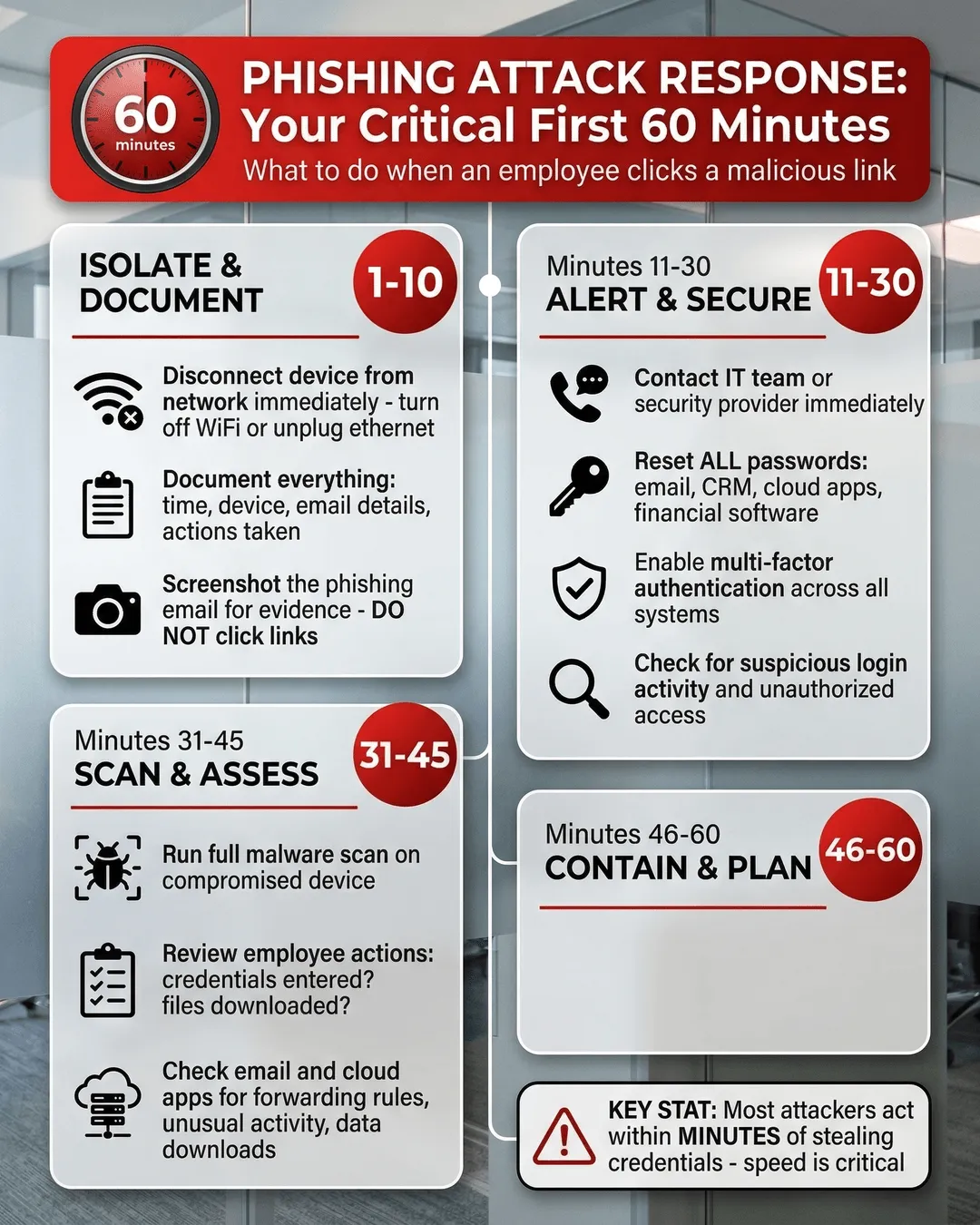
Minutes 1-10: Isolate and Document
The moment you learn an employee clicked a suspicious link, your first priority is containment. Do not wait. Do not investigate further. Do not hope it was harmless.
Start here:
Disconnect the device from the network immediately. If the employee is on WiFi, turn off WiFi. If they are plugged into ethernet, unplug the cable. If they are using a laptop, close the lid and power it down completely. The goal is to prevent malware from spreading to other systems or exfiltrating data.
Do not rely on the employee to do this correctly under pressure. Walk them through it or have IT handle it remotely if possible.
Document everything while the details are fresh. Write down the time the click happened, which device was used, what the employee remembers about the email or message, and any actions they took afterward. Did they enter credentials? Download a file? Reply to the sender?
You will need this information for your incident response and potentially for regulatory reporting later.
Take a screenshot or forward the phishing email if it is still accessible. Do not click any links or open attachments yourself. Just capture evidence of what the employee received. This helps your security team or IT provider analyze the threat and check if other employees received the same message.
Think of this phase as stopping the bleeding before you assess the injury. Speed matters more than perfection.
Minutes 11-30: Alert Your IT Team and Reset Credentials
Now that you have isolated the compromised device, it is time to bring in reinforcements and prevent unauthorized access.
Contact your IT team or managed security provider immediately. If you have an internal IT department, loop them in now. If you outsource IT support, call them. Explain what happened, share the documentation you collected, and ask them to begin their phishing incident response steps.
Even if you are a small business without dedicated security staff, your IT provider should have a process for handling this. If they do not, that is a red flag worth addressing after this crisis passes.
Reset the employee’s passwords across all systems. Start with email, then move to any cloud applications they access like your CRM, project management tools, file storage, and financial software. If the phishing email tricked them into entering their password on a fake login page, assume attackers now have those credentials.
Do not just reset the password on one account and hope for the best. Attackers move fast. They will try those stolen credentials on every platform they can find.
Enable multi-factor authentication if you have not already. This will not undo the current incident, but it will make future attacks much harder to execute. A stolen password alone becomes useless when attackers also need a code from the employee’s phone.
Check for suspicious account activity. Look at recent login locations, sent emails, file access logs, and permission changes. Attackers often act within minutes of stealing credentials. They might forward emails to external addresses, download sensitive files, or change account settings to maintain access.
Your IT team should know where to look for these red flags in your specific systems.
Minutes 31-45: Scan for Malware and Assess the Damage
By now you have contained the immediate threat and locked down credentials. Next, you need to figure out what actually happened and how far the infection spread.
Run a full malware scan on the compromised device. Use reputable antivirus or endpoint detection software. Do not rely on the free scanner that came pre-installed on the computer. If your IT team has remote access, they can initiate this scan without needing the device back on the network.
The scan will reveal whether the phishing link installed malware, ransomware, keyloggers, or other malicious software. This determines your next steps. A clean scan does not guarantee safety, but it is a good sign.
Review what the employee did after clicking the link. Did they enter credentials on a fake login page? Did they download and open a file? Did they grant permissions to a suspicious application? Each action creates different risks.
If they only clicked the link but did nothing else, the risk is lower. If they entered their password, you are dealing with a credential theft situation. If they downloaded and ran a file, you might have malware.
Check your email server and cloud applications for signs of compromise. Attackers often use stolen email accounts to send phishing messages to other employees, customers, or partners. Look for sent messages the employee did not write, new forwarding rules, or unusual login times.
If attackers gained access to cloud storage or collaboration tools, check recent file activity. Did anyone download large amounts of data? Did permissions change on sensitive folders?
Your IT team should also review firewall logs and network traffic for unusual outbound connections that might indicate data exfiltration.
Minutes 46-60: Communicate Internally and Begin Recovery
You are approaching the end of the first hour. You have isolated the threat, secured credentials, and assessed the damage. Now you need to communicate clearly and start the recovery process.
Notify your leadership team if the incident is serious. If you discovered malware, stolen credentials, or evidence of data access, your executives need to know. They may need to involve legal counsel, consider regulatory reporting obligations, or prepare external communications.
Do not sugarcoat the situation, but also do not catastrophize. Stick to facts: what happened, what you have done so far, what risks remain, and what comes next.
Alert other employees if the phishing email went to multiple people. Send a clear, brief message warning them not to click links in similar emails. Describe what the phishing message looked like without attaching or forwarding the actual email.
This prevents additional clicks while the threat is still circulating. Studies show phishing campaigns often target multiple employees in the same organization within hours¹.
Begin restoring the compromised device if it is clean. If malware scans came back negative and you see no signs of ongoing compromise, your IT team can reconnect the device to the network and restore normal operations. If malware was detected, the device may need to be wiped and reimaged before it is safe to use again.
Document everything that happened during this first hour. Write down who did what, when, and what you discovered. This creates a timeline for your incident report and helps you improve your response process for next time.
Because there will be a next time. Phishing attacks are not going away. The question is whether you will be ready.
What Happens After the First Hour
The immediate crisis may be over, but your work is not done.
Continue monitoring for at least 72 hours. Attackers sometimes wait before acting on stolen credentials. Keep watching account activity, email logs, and network traffic for anomalies.
Conduct a post-incident review. Gather your IT team, the affected employee, and relevant leaders to discuss what happened and why. Was the phishing email particularly convincing? Did the employee lack training? Were technical controls missing?
Use this review to strengthen your defenses, not to blame individuals. Most employees who click phishing links do so because the attack was sophisticated, not because they were careless.
Update your phishing response checklist. Document what worked and what did not during your incident response. Create or refine your phishing response checklist for small businesses so the next incident goes even smoother.
Invest in ongoing security awareness training. Employees who have never seen phishing simulations or learned to recognize red flags are much more likely to click malicious links. Regular training reduces click rates significantly².
Review your cybersecurity insurance policy. Depending on what happened, you may need to file a claim or notify your insurer. Some policies require notification within specific timeframes.
Consider reporting the incident to authorities. The FBI’s Internet Crime Complaint Center accepts phishing reports and uses them to track cybercrime trends. If the attack resulted in financial loss or data breach, reporting may be required under state or federal regulations.
Key Takeaways
- Disconnect the compromised device from your network immediately to prevent malware spread.
- Document the incident details while they are fresh, including time, device, and employee actions.
- Reset passwords across all systems the employee accesses, not just email.
- Run a full malware scan and check for suspicious account activity.
- Notify leadership and other employees if the phishing attack affects multiple people.
- Continue monitoring systems for at least 72 hours after the initial incident.
- Conduct a post-incident review to improve your response process.
- Invest in regular security awareness training to reduce future click rates.
Conclusion
The first 60 minutes after an employee clicked a phishing link are critical. How you respond during this window determines whether you contain a minor incident or face a major breach.
Stay calm, follow the steps outlined here, and involve your IT team or security provider immediately. You cannot prevent every click, but you can control what happens next.
And next time someone calls to say they clicked something suspicious, you will know exactly what to do.
Citations
- Proofpoint, “State of the Phish Report,” 2024.
- KnowBe4, “Phishing by Industry Benchmarking Report,” 2024.