If someone takes control of your domain, they control your website, your email, and your brand. Domain hijacking is more common than most owners realize.
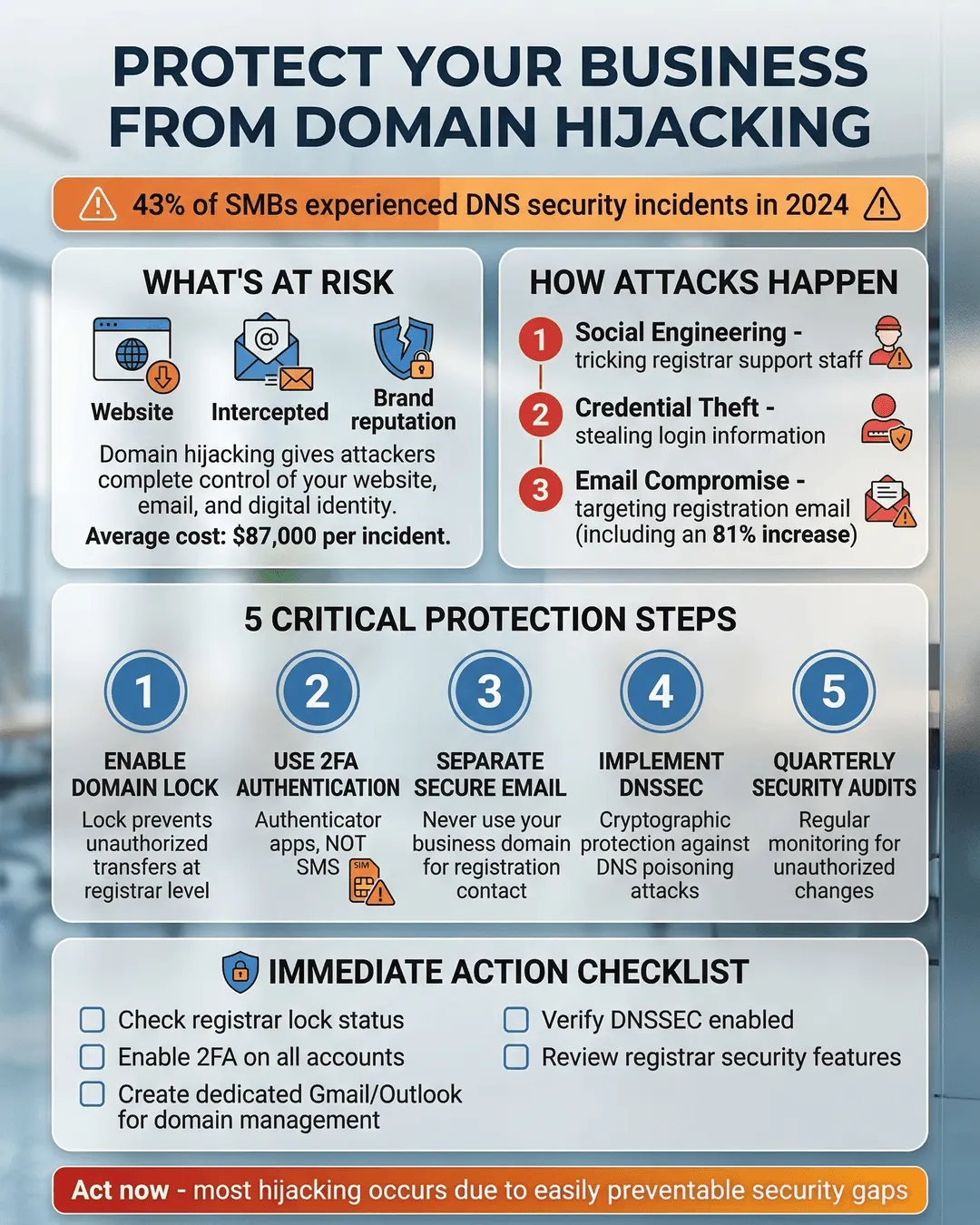
You’ve built your business from the ground up. Your website is humming along. Customers are clicking. Emails are flowing. Everything feels secure.
Then one morning, your domain stops working. Your website is gone. Your email bounces back. Customers are confused. Your brand, the one you’ve spent years building, is suddenly in someone else’s hands.
This isn’t a hypothetical nightmare. Domain hijacking happens to thousands of businesses every year, and most owners don’t realize how vulnerable they are until it’s too late.
The good news? You can protect your business with straightforward steps that don’t require a computer science degree. This guide walks you through exactly how to secure your domain and keep control of your most valuable digital asset.
Key Takeaways
- Domain hijacking gives attackers control over your website, email, and brand identity, often through weak registrar passwords or social engineering.
- Enable two-factor authentication and registrar locks on all domains immediately to prevent unauthorized transfers.
- Choose a reputable domain registrar with strong security features and avoid auto-renewal failures that can expose your domain.
- Monitor your domain’s WHOIS records and DNS settings regularly to catch unauthorized changes before they escalate.
- Implement DNSSEC and use separate credentials for your domain registrar to add critical layers of protection.
What Domain Hijacking Actually Means for Your Business
Domain hijacking happens when someone gains unauthorized control of your domain name. Once they have it, they can redirect your website to their servers, intercept your business emails, or hold your domain hostage for ransom.
Your domain is the foundation of your online presence. It’s how customers find you, how partners email you, and how your brand exists in the digital world. Losing control means losing all of that at once.
The financial impact can be devastating. Beyond the immediate loss of revenue from a down website, you face potential brand damage, customer trust issues, and the cost of recovery. Some businesses never fully recover from a successful domain hijack¹.
Attackers target businesses of all sizes. Small companies often make easier targets because they assume they’re too small to attract attention. That assumption is exactly what makes them vulnerable.
How Attackers Gain Control of Your Domain
Understanding how domain hijacking works helps you defend against it. Attackers use several methods, and most don’t require sophisticated hacking skills.
Weak registrar account security is the most common entry point. If your domain registrar account uses a simple password or lacks two-factor authentication, an attacker can break in through brute force or credential stuffing. Once inside, they initiate a domain transfer to a registrar they control.
Social engineering targets your registrar’s customer service team. An attacker poses as you, armed with publicly available information from WHOIS records or social media. They convince support staff to reset your password or unlock your domain for transfer. This method works disturbingly often.
Expired domain registration creates an opening. If your domain lapses because your credit card expired or you missed a renewal notice, it enters a grace period before becoming available to the public. Attackers monitor expiring domains and snap them up the moment they become available.
DNS hijacking is a related attack where criminals don’t steal your domain but alter your DNS records to redirect traffic. They gain access to your DNS management panel and point your domain to servers they control. Your domain registration stays in your name, but your website and email go somewhere else.
Compromised email accounts linked to your registrar can also lead to domain theft. If an attacker gains access to the email address associated with your domain account, they can request password resets and take over.
The scary part? Many business owners don’t notice until customers start complaining or revenue drops. By then, the damage is already underway.
Practical Steps to Protect Your Business Domain From Theft
Domain hijacking protection doesn’t require a massive security overhaul. These practical measures significantly reduce your risk.
Enable two-factor authentication (2FA) everywhere. Set up 2FA on your domain registrar account immediately. This adds a second verification step beyond your password, making unauthorized access much harder. Use an authenticator app rather than SMS codes when possible, since text messages can be intercepted².
Use a registrar lock. Most registrars offer a domain lock feature that prevents transfers without your explicit approval. Enable this lock on all your domains. It’s a simple toggle in your registrar settings that creates a significant barrier for attackers.
Choose a reputable domain registrar with strong security. Not all registrars prioritize security equally. Research registrars that offer robust security features like mandatory 2FA, registrar locks, and 24/7 security monitoring. Read reviews from other business owners about their security practices and customer support responsiveness.
Keep your contact information current. Your registrar needs to reach you if something suspicious happens. Ensure your email address, phone number, and mailing address are up to date. Set up notifications for any account changes or domain modifications.
Use a dedicated email address for domain management. Don’t use your primary business email for your registrar account. Create a separate email specifically for domain management and secure it with a unique password and 2FA. This limits the damage if your main email gets compromised.
Set strong, unique passwords. Your registrar account password should be long, complex, and different from every other password you use. A password manager helps you create and store these credentials securely. Change your registrar password regularly, especially if you suspect any security issues.
Enable auto-renewal carefully. Expired domains are easy targets. Enable auto-renewal for critical domains, but monitor your payment methods. Update credit card information before it expires. Set calendar reminders well before renewal dates as a backup.
Review account activity regularly. Check your registrar account monthly for any unauthorized changes. Look at login history, DNS modifications, and contact information updates. Catching suspicious activity early can prevent a full hijacking.
Implement DNSSEC. DNS Security Extensions (DNSSEC) add cryptographic signatures to your DNS records, making it harder for attackers to redirect your traffic through DNS hijacking. Many registrars now offer DNSSEC. Turn it on.
Restrict access to domain management. Limit how many people have access to your registrar account. The more people with login credentials, the higher your risk. If team members need access, use role-based permissions when available and remove access immediately when someone leaves your company.
DNS Security for Small Business: Additional Layers of Protection
Beyond securing your registrar account, DNS security for small business involves protecting the infrastructure that directs traffic to your website.
Use a separate DNS provider. Consider using a third-party DNS service instead of relying solely on your registrar’s DNS. Services like Cloudflare, Amazon Route 53, or Google Cloud DNS offer enhanced security features and better uptime. This separation means an attacker would need to compromise multiple accounts to fully hijack your domain.
Monitor your WHOIS records. WHOIS databases contain public information about domain ownership. Set up alerts to notify you of any changes to your WHOIS data. Services exist that monitor these records and alert you to modifications.
Implement domain monitoring services. Third-party monitoring tools track your domain’s DNS records, SSL certificates, and nameservers. They alert you immediately if anything changes unexpectedly. This early warning system can help you respond before customers notice problems.
Backup your DNS configuration. Keep a current backup of all your DNS records. If an attacker does modify your DNS, you can quickly restore the correct configuration once you regain control. Review and update this backup quarterly.
Use HTTPS and monitor SSL certificates. Secure your website with an SSL certificate and monitor its status. If an attacker hijacks your domain, they might install their own certificate. Certificate transparency logs help you spot unauthorized certificates issued for your domain³.
Consider domain privacy carefully. Domain privacy services hide your personal information from WHOIS databases, which reduces social engineering risks. However, ensure this privacy service is from your registrar or a trusted provider. Some privacy services add a layer between you and your domain that could complicate recovery efforts.
Create an incident response plan. Document exactly what to do if you suspect domain hijacking. Include contact information for your registrar’s security team, your DNS provider, and your IT support. Assign roles so everyone knows their responsibilities during a crisis. Test this plan annually.
Educate your team. Make sure everyone with access to domain management understands the risks. Train them on recognizing phishing attempts, using strong passwords, and spotting suspicious activity. Your people are both your greatest asset and your biggest vulnerability.
What to Do If Your Domain Gets Hijacked
Despite your best efforts, domain hijacking can still happen. Quick action minimizes the damage.
Contact your registrar immediately. Most registrars have dedicated security teams for hijacking incidents. Reach out through every channel available: phone, email, and support tickets. Explain the situation clearly and provide any evidence of unauthorized access.
Document everything. Take screenshots of any suspicious emails, login notifications, or DNS changes. Gather proof of ownership like past invoices, account creation dates, and historical WHOIS records. This documentation supports your claim that you’re the legitimate owner.
File a complaint with ICANN. The Internet Corporation for Assigned Names and Numbers (ICANN) oversees domain registrars. If your registrar isn’t responsive or helpful, file a formal complaint through ICANN’s website. This can pressure registrars to act faster.
Notify law enforcement. Domain hijacking is a crime. File a report with your local police and the FBI’s Internet Crime Complaint Center. While they may not recover your domain directly, a police report creates an official record that can help with legal proceedings.
Alert your customers and partners. Transparency matters. If your domain is redirecting to malicious content or your email is compromised, warn your customers through alternative channels like social media or a temporary website. This protects their security and your reputation.
Work with a domain recovery specialist. For high-value domains or complex hijacking cases, consider hiring a specialist who focuses on domain recovery. They navigate the technical and legal processes more efficiently than most business owners can on their own.
Change all related credentials. Once you regain control, change every password associated with your domain, DNS, hosting, and email. Assume that if one system was compromised, others might be too.
Review and strengthen your security. After recovery, analyze how the hijacking happened and close that gap. Implement the protection measures you may have skipped before. A hijacking is a wake-up call to take security