A business continuity plan that ignores cybersecurity is like a fire escape that doesn't account for locked doors. Here's how to connect the two.
I remember sitting in a small conference room last year with a client who’d just survived a ransomware attack. They had a business continuity plan. It was thorough, detailed, and totally useless when their systems went down because it didn’t account for cyber threats. Their backup systems? Encrypted along with everything else. Their communication protocols? All email-based, which was inaccessible. Their emergency contacts? Stored in a cloud system they couldn’t reach.
That conversation changed how I think about business continuity planning. A BCP that doesn’t integrate cybersecurity isn’t just incomplete. It’s dangerous.
If you’re running a small or mid-sized business, you probably already know you need both a business continuity plan and cybersecurity measures. But most SMBs treat them as separate initiatives. Your IT team handles security. Your operations team handles continuity. And when disaster strikes, you discover the gap between them the hard way.
Here’s how to bridge that gap and build a cybersecurity business continuity plan that actually works.
Key Takeaways
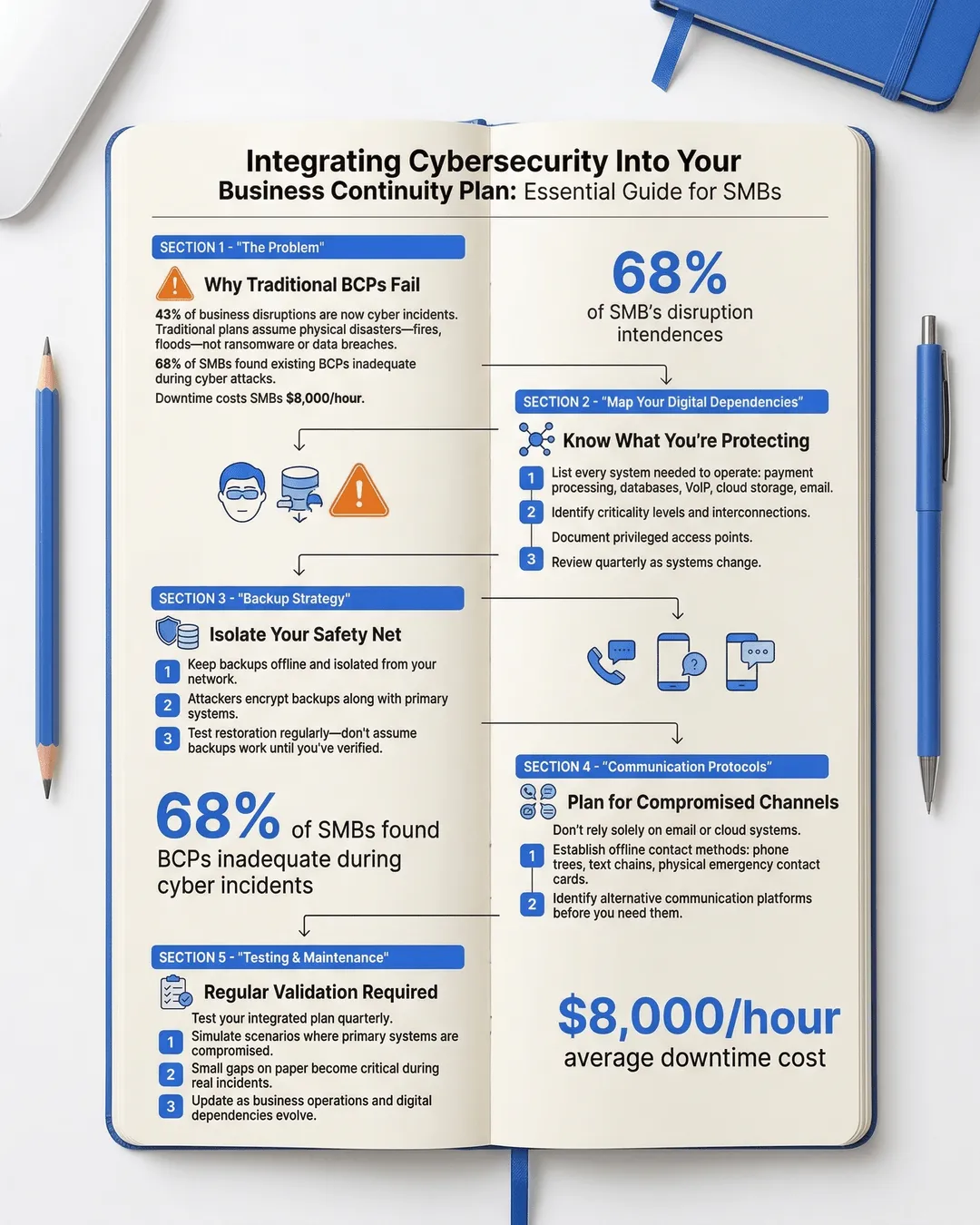
- Cyber incidents now account for 43% of all business disruptions, making cybersecurity integration essential for any business continuity plan¹.
- Traditional BCPs often fail during cyberattacks because they assume physical access to systems and don’t account for compromised backups or communication channels.
- A strong cybersecurity BCP integration requires identifying digital dependencies, isolating backup systems, and establishing offline communication protocols.
- Regular testing of your integrated plan reveals gaps that look minor on paper but become critical during actual incidents.
- SMBs face the same cyber threats as large enterprises but often lack dedicated resources, making efficient integration of security and continuity planning more important.
Why Traditional BCPs Fail During Cyber Incidents
Traditional business continuity plans were built for fires, floods, and power outages. Physical disasters where you evacuate, relocate, and restore operations from backups. The assumptions were simple. Your data is safe. Your communication systems work. You can access your backup site.
Cyber incidents break all those assumptions.
When ransomware hits, you can’t just restore from backups if the attackers encrypted those too. When a data breach occurs, you can’t communicate with customers using the same compromised email system. When your network goes down from a DDoS attack, your cloud-based emergency procedures become unreachable.
According to recent data, 68% of SMBs that experienced a cyber incident found their existing BCP inadequate for the response². The plans existed. They just didn’t work for the actual disaster they faced.
The problem isn’t that these plans are bad. It’s that they’re incomplete. They address where your people go and how they communicate, but not what happens when the how itself is compromised.
And this gap is expensive. The average cost of downtime for SMBs is $8,000 per hour³. For a business running on thin margins, even a day of downtime can be devastating. Add in recovery costs, potential regulatory fines, and customer loss, and you’re looking at an existential threat.
Understanding Your Digital Dependencies
Before you can integrate cybersecurity into your BCP, you need to map what you’re actually protecting and what you depend on.
Most SMBs I work with underestimate their digital dependencies. They think about their website and email. They forget about the payment processing system, the customer database, the inventory management software, the VoIP phone system, and the cloud storage where half their critical documents live.
Start with a digital dependency assessment. List every system your business needs to operate. Not just on normal days, but on your worst day. What do you need to process payroll? To fulfill customer orders? To communicate with your team? To access your financial records?
Then identify the criticality level. What can be down for an hour without major impact? What can’t be down for even five minutes? One manufacturing client discovered their entire production line depended on a single cloud-based scheduling system with no offline backup. That’s a single point of failure waiting to become a disaster.
Next, map the interconnections. Most systems don’t operate in isolation. Your CRM connects to your email. Your payment system feeds into your accounting software. Your backup solution syncs with your production environment. Understanding these connections reveals how one compromised system can cascade into total shutdown.
Document who has access to what. Privileged access is often the entry point for attacks. If your bookkeeper’s laptop gets compromised and they have admin access to your financial systems, you have a problem. Role-based access isn’t just good security practice. It’s risk containment for your continuity plan.
Finally, understand your data flows. Where does sensitive information live? How does it move through your organization? What happens if that flow gets interrupted or intercepted? A law firm I advised kept client files on a server that wasn’t part of their backup protocol. They assumed their managed IT provider was backing it up. Their provider assumed the law firm was handling it internally. Neither was wrong. Both were right. The data was at risk.
This assessment isn’t a one-time project. Your digital dependencies change as you adopt new tools, scale operations, or shift business models. Review it quarterly at minimum.
Building the Integration: Practical Steps
Integration sounds complicated, but it’s really about asking one question throughout your BCP. What if this gets compromised?
Start with your backup strategy. Traditional BCP wisdom says keep backups offsite. Cybersecurity adds another layer. Keep backups offline or air-gapped. If your backups are continuously synced to the cloud and ransomware encrypts your production systems, it will encrypt your backups too. You need backups that can’t be accessed through your network.
The 3-2-1 rule still applies, but with a cyber twist. Three copies of your data, on two different media types, with one completely offline and disconnected. That offline copy is your insurance policy against ransomware.
Next, establish alternative communication channels. If email is compromised, how does your team communicate? I recommend setting up a simple phone tree with actual phone numbers written down on paper. Not stored in your compromised phone system. Not in a cloud document you can’t access. Actual paper.
One retail client created a simple continuity card that every employee keeps in their wallet. It lists emergency contact numbers, the rally point address, and basic procedures. Nothing digital. No apps. No cloud dependencies. When their systems went down during a cyber incident, everyone knew exactly who to call and where to go.
Create isolation procedures for your systems. When you detect a potential breach, you need to contain it fast. Have a documented process for isolating compromised systems without shutting down everything. Know which systems can operate independently and which are interdependent.
Develop offline access to critical information. Your BCP probably lives in a shared drive somewhere. What happens when you can’t access that drive? Print key procedures and store physical copies in multiple locations. Keep a list of critical vendor contacts, account numbers, and access credentials in a secure but accessible offline format.
Build in verification steps. During a cyber incident, you can’t trust normal communication channels. Attackers often impersonate executives via email to authorize fraudulent transactions. Establish out-of-band verification for any unusual requests during an incident. If your CEO emails asking for an emergency wire transfer during a security event, pick up the phone and confirm.
And here’s something most SMBs miss: plan for the investigation. When you have a cyber incident, you’ll need to preserve evidence for insurance claims, regulatory compliance, and potential law enforcement involvement. Your BCP should include steps to isolate affected systems without destroying forensic evidence. Shutting everything down might stop the attack but can make it impossible to determine what happened.
Testing Your Integrated Plan
A plan that’s never been tested is just a document. And testing a cybersecurity business continuity plan requires different scenarios than traditional BCP tests.
Most SMBs test their BCP by simulating a power outage or office evacuation. That’s useful, but it doesn’t test cyber resilience. You need to simulate cyber scenarios specific to your risk profile.
Try a tabletop exercise where ransomware encrypts your primary systems. Walk through your response step by step. Can you actually access your offline backups? Do the key people know where they are and how to restore them? How long would it realistically take?
Run a communications drill. Simulate a scenario where your email and internal messaging are compromised. Can your team actually execute the alternative communication plan? Do they remember where the continuity cards are? Do those phone numbers still work?
Test your backup restoration process. Not just whether the backups exist, but whether you can actually restore from them under pressure. How long does it take? What if the person who usually handles it is unavailable? According to industry data, 47% of SMBs that tested their backups found they couldn’t fully restore their systems⁴.
One of my favorite tests is the “locked out” scenario. Simulate an attack where you’ve lost all administrative access to your systems. Can you still communicate with your team, access critical vendor information, and begin basic operations? This reveals gaps in your offline preparedness.
Document everything you learn from these tests. Every failure point. Every confusion. Every step that took longer than expected. Then update your plan. Testing isn’t about proving your plan works. It’s about finding where it doesn’t.
And involve your whole team. Your BCP isn’t just for leadership or IT. Everyone needs to understand their role during a cyber incident. The receptionist who first notices unusual activity. The manager who needs to decide whether to shut down operations. The team member who knows how to access the offline backups.
Maintaining and Updating Your Plan
Business continuity planning isn’t a project. It’s a process. And when cybersecurity is involved, the process needs to move faster because the threat landscape changes constantly.
New vulnerabilities emerge. New attack methods develop. Your business adopts new technologies. Each of these changes can make your integrated plan obsolete.
Schedule quarterly reviews of your cybersecurity BCP integration. Look at what’s changed in your technology stack. Have you adopted new cloud services? Changed vendors? Upgraded systems? Each change needs to be reflected in your continuity plan.
Stay informed about emerging threats relevant to your industry. Healthcare SMBs face different cyber risks than retail businesses or professional services firms. Understanding your specific threat landscape helps you prioritize where to focus your continuity planning.
Update your contact lists religiously. Nothing derails an emergency response faster than calling disconnected numbers or emailing people who left the company months ago. Make someone responsible for keeping this information current.
Review your insurance coverage annually. Cyber insurance policies evolve rapidly. Make sure your coverage aligns with your actual risks and that your continuity plan meets any requirements for coverage. Some policies require specific security measures or backup protocols.
And train new employees on the plan as part of onboarding. Your carefully designed procedures don’t help if half your team doesn’t know they exist. Make BCP awareness part of your culture, not a once-a-year drill.
Conclusion
Integrating cybersecurity into your business continuity plan isn’t optional anymore. It’s fundamental to survival in an environment where cyber incidents cause nearly half of all business disruptions.
The good news is that for SMBs, this integration doesn’t require massive budgets or dedicated teams. It requires thinking differently about the continuity planning you’re probably already doing. Instead of asking “what if we lose access to our building,” ask “what if we lose access to our systems.” Instead of planning for physical disasters, plan for digital ones.
The goal isn’t to create a perfect plan. It’s to create a plan that works when your assumptions fail. Because in a cyber incident, they will fail. Your backups might be compromised. Your communication systems might be down. Your trusted vendors might be unreachable.
But if you’ve mapped your dependencies, isolated your critical backups, established offline protocols, tested your procedures, and kept everything current, you’ll have options. You’ll know who to call, where your data is, and how to start recovery.
And that makes all the difference between a manageable incident and a business-ending disaster.
Start small. Pick one area of integration to improve this quarter. Maybe it’s setting up truly offline backups. Maybe it’s creating those continuity cards. Maybe it’s running your first cyber-focused tabletop exercise. Forward progress matters more than perfection.
Because the only thing worse than discovering gaps in your business continuity plan is discovering them during an actual cyber incident.
Citations
- IBM Security, “Cost of a Data Breach Report,” 2024.
- Verizon, “Data Breach Investigations Report,” 2024.
- Gartner, “Cost of Downtime Analysis,” 2024.
- Veeam, “Data Protection Trends Report,” 2024.