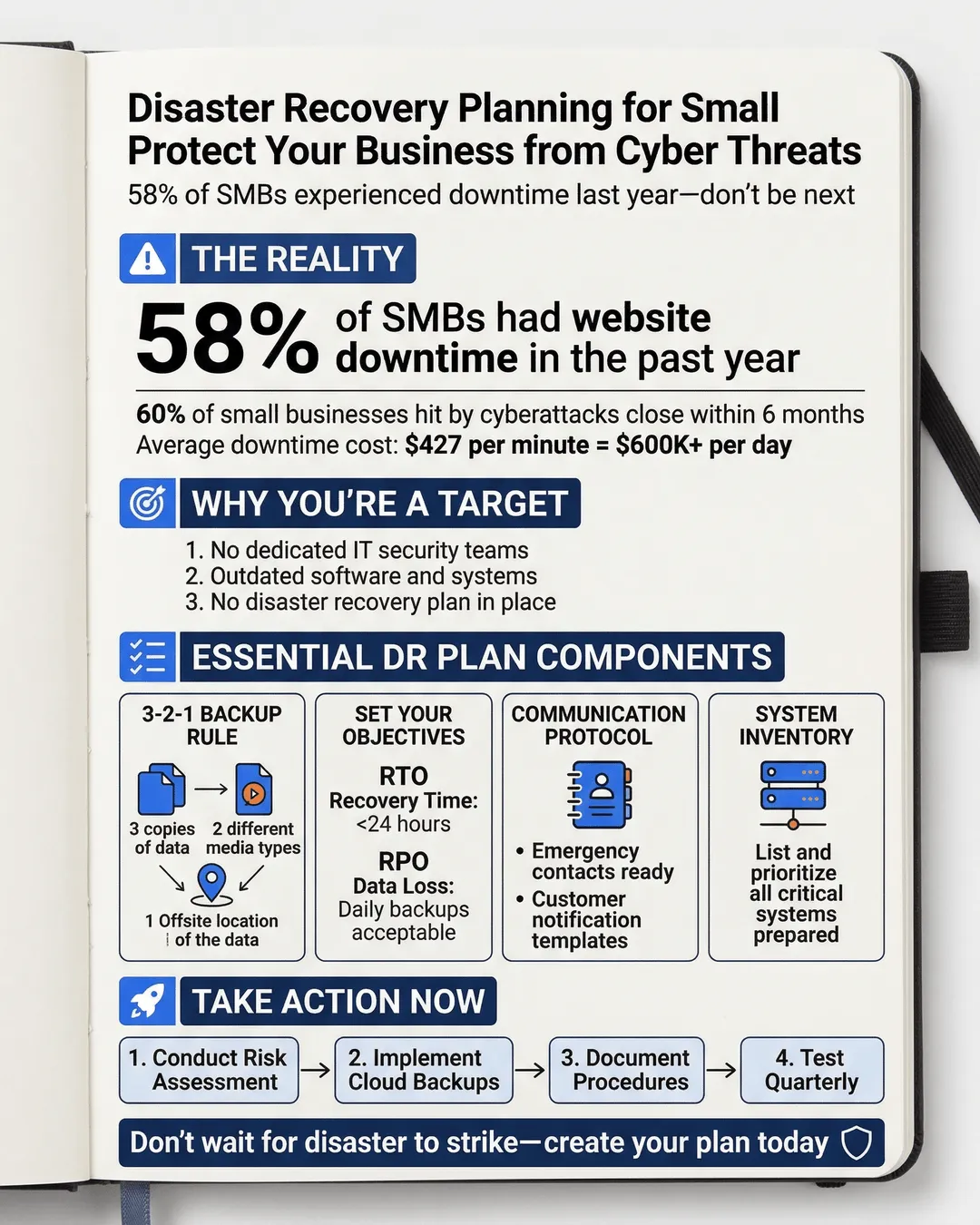
58% of SMBs experienced website downtime last year. Without a tested disaster recovery plan, a cyber incident could keep you offline for days, or permanently.
I’ll be honest with you. I used to think disaster recovery planning was something only Fortune 500 companies needed to worry about. You know, the kind of thing that involves underground bunkers and backup data centers in three different countries.
Then I watched a friend’s company go dark for 11 days after a ransomware attack. No website. No email. No customer data. Just chaos, scrambling, and a whole lot of regret about not having a plan.
Here’s the thing: 58% of small and medium businesses experienced website downtime in the last year¹. And for 60% of small businesses that suffer a cyberattack, the damage is so severe they close their doors within six months².
If that doesn’t make you want to create a disaster recovery plan right now, I don’t know what will.
Key Takeaways
- A disaster recovery plan is your playbook for getting back online after a cyber incident, natural disaster, or system failure.
- Small businesses are increasingly targeted by cybercriminals because they often lack proper backup and recovery systems.
- Your DR plan must include data backups, communication protocols, recovery time objectives, and regular testing.
- Cloud-based backup solutions make disaster recovery accessible and affordable for SMBs.
- Testing your plan quarterly is just as important as creating it in the first place.
Why Small Businesses Need Disaster Recovery Planning (More Than Ever)
Let me paint you a picture. It’s Monday morning. You arrive at the office with your coffee, ready to tackle the week. You boot up your computer and… nothing works. Your files are encrypted. There’s a ransom note on your screen demanding $50,000 in Bitcoin.
This isn’t a Hollywood movie. This is happening to small businesses every single day.
Cybercriminals love small businesses because we’re often running lean. We don’t have dedicated IT security teams. We’re using outdated software. We’re clicking on phishing emails because we’re busy and distracted. And most importantly, we don’t have disaster recovery plans.
The average cost of downtime for small businesses is $427 per minute³. Let that sink in. If you’re offline for just one day, that’s over $600,000 in losses. For most small businesses, that’s not survivable.
But here’s the good news: disaster recovery planning for small business doesn’t require a massive budget or a team of experts. It just requires intention, a bit of planning, and regular maintenance.
Think of your disaster recovery plan as insurance. You hope you never need it, but when disaster strikes, you’ll be incredibly grateful it exists.
The Core Components of a Cyber-Focused Disaster Recovery Plan
A solid disaster recovery plan cybersecurity strategy has a few essential building blocks. I’m going to walk you through each one, and I promise to keep the tech jargon to a minimum.
Data Backup Strategy
This is your first line of defense. You need to back up your critical business data regularly and store those backups somewhere safe. I’m talking about the 3-2-1 rule: three copies of your data, on two different types of media, with one copy stored offsite.
Cloud backup services have made this incredibly easy for small businesses. Tools like Backblaze, Carbonite, or even built-in solutions from Microsoft 365 or Google Workspace can automatically back up your files daily.
But don’t just back up and forget. You need to verify those backups actually work. I learned this the hard way when I discovered our backup system had been failing silently for three months. Test your backups at least quarterly.
Recovery Time Objective and Recovery Point Objective
These are fancy terms for two simple questions: How quickly do you need to be back online? And how much data can you afford to lose?
For most small businesses, being down for more than 24 hours is catastrophic. That’s your Recovery Time Objective (RTO). Your Recovery Point Objective (RPO) might be daily backups, meaning you could lose up to 24 hours of data in a worst-case scenario.
Knowing these numbers helps you choose the right backup and recovery solutions. If you’re an e-commerce business processing hundreds of orders daily, you might need real-time replication and a much tighter RPO.
Communication Protocols
When disaster strikes, chaos follows. Who do you call first? How do you notify your team? What about your customers?
Your disaster recovery plan needs a clear communication tree. This includes contact information for your IT support, cybersecurity insurance provider, legal counsel, and key team members. Keep this list in multiple places, including a printed copy that’s stored offsite.
You also need template messages ready to go. If your website goes down, you should have pre-written social media posts and email templates explaining the situation to customers. Transparency builds trust, even in a crisis.
Critical System Inventory
You can’t protect what you don’t know you have. Make a list of every system, application, and service your business depends on. This includes your website, email, customer database, payment processing, accounting software, and any industry-specific tools.
Rank these by priority. What absolutely must be restored first? What can wait a few days? This prioritization will guide your recovery efforts when you’re under pressure.
Building Your DR Plan: Cyber Disaster Recovery Steps That Actually Work
Now that you understand the components, let me walk you through the actual DR planning SMB process. I’m going to break this down into manageable steps so you don’t get overwhelmed.
Step One: Conduct a Risk Assessment
Start by identifying your biggest threats. For most small businesses, that’s ransomware, phishing attacks, hardware failure, and human error. But depending on your location, you might also need to plan for natural disasters like floods or hurricanes.
Be honest about your vulnerabilities. Do you have employees using personal devices for work? Are you running outdated software? Do you have admin passwords written on sticky notes? (Please say no.)
Step Two: Define Your Recovery Strategy
Based on your risk assessment and your RTO/RPO numbers, decide how you’ll recover each critical system. This might mean:
- Subscribing to a cloud backup service for all company data
- Setting up redundant internet connections so you’re not dependent on a single provider
- Maintaining offline backups of critical systems
- Establishing relationships with IT vendors who can respond quickly in an emergency
For small businesses with limited budgets, cloud-based solutions are your best friend. Services like AWS, Microsoft Azure, and Google Cloud offer disaster recovery options that scale with your needs.
Step Three: Document Everything
This is where most people drop the ball. Your disaster recovery plan needs to be a detailed, written document that anyone on your team can follow. I’m talking step-by-step instructions that assume the person reading them is stressed, scared, and possibly not very tech-savvy.
Include screenshots. Include login credentials (stored securely, of course). Include phone numbers and account numbers. Make it impossible to mess up.
Store this document in multiple places. Cloud storage, a USB drive in a safe deposit box, and printed copies in at least two physical locations.
Step Four: Test, Test, Test
Here’s a sobering statistic: 77% of organizations that tested their disaster recovery plan found gaps or failures⁴. Testing isn’t optional. It’s the difference between a plan that works and a very expensive piece of documentation.
Run tabletop exercises where you walk through different disaster scenarios with your team. Conduct actual recovery drills where you restore data from backups. Time how long it takes and look for bottlenecks.
I recommend testing at least quarterly, and whenever you make significant changes to your systems.
Step Five: Train Your Team
Your disaster recovery plan is only as good as the people executing it. Make sure everyone knows their role in a disaster scenario. Who contacts customers? Who works with the IT team? Who handles media inquiries if it’s a major incident?
Run regular training sessions. Make them engaging. Turn them into team-building exercises. The goal is to make disaster response feel routine, not panic-inducing.
Common Mistakes in Business Disaster Recovery Guide Planning (And How to Avoid Them)
I’ve seen a lot of disaster recovery plans over the years. Some are excellent. Many are… not. Here are the mistakes I see most often.
Mistake One: Assuming It Won’t Happen to You
Small business owners love to think they’re too small to be targeted. But 43% of cyberattacks target small businesses⁵. Cybercriminals use automated tools that don’t care about your company size. They’re looking for easy targets.
Mistake Two: Backing Up Without Testing
I mentioned this earlier, but it’s worth repeating. A backup that hasn’t been tested is just wishful thinking. Schedule regular restoration tests and document the results.
Mistake Three: Forgetting About Mobile and Remote Workers
If your team works remotely or uses mobile devices, those need to be part of your DR plan. How do you recover data from a lost laptop? What happens if someone’s phone gets compromised?
Mobile device management (MDM) solutions can help, but at minimum, ensure remote workers are using company-approved cloud storage and have their devices encrypted.
Mistake Four: Neglecting Cybersecurity Insurance
Cyber insurance won’t prevent a disaster, but it can help you recover from one. Policies typically cover costs like forensic investigations, legal fees, customer notification, and even ransom payments.
Many insurers now require you to have a documented disaster recovery plan to qualify for coverage. That’s how important this stuff is.
Mistake Five: Creating a Plan and Never Updating It
Your business changes. Your systems change. Your team changes. Your disaster recovery plan needs to change with them.
Set a calendar reminder to review your plan every six months. Update it whenever you add new systems, change vendors, or experience staff turnover.
Conclusion
Look, I get it. Disaster recovery planning for small business isn’t glamorous. It’s not going to help you land new clients or launch exciting products. It’s the business equivalent of eating your vegetables.
But here’s what it will do: It will give you peace of mind. It will protect the business you’ve worked so hard to build. And if disaster does strike, it will be the difference between a temporary setback and a permanent shutdown.
Start small if you need to. Get your data backups in place this week. Document your critical systems next week. Build from there.
The best disaster recovery plan is the one you create before you need it. Because once disaster strikes, it’s too late to prepare. You can only execute what you’ve already planned.
So take that first step today. Your future self (and your customers, employees, and stakeholders) will thank you for it.