The first day on the job sets the tone. If cybersecurity is part of onboarding, employees treat it as core to their role from the start.
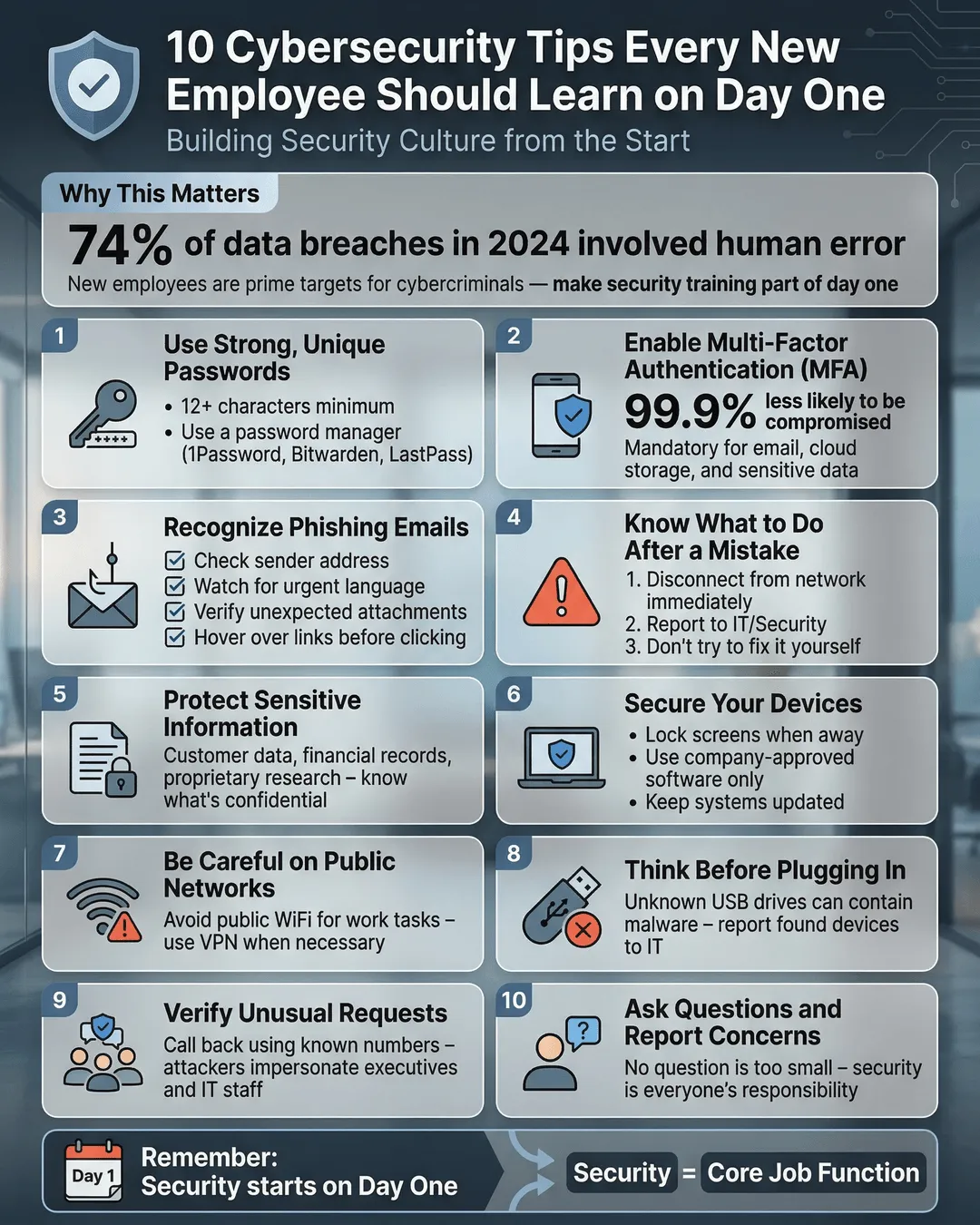
The first day on the job sets the tone. If cybersecurity is part of onboarding, employees treat it as core to their role from the start.
You know the drill. New employee shows up, gets the grand tour, fills out paperwork, meets the team, and by lunch they’re drowning in passwords they scribbled on a sticky note. By the end of the week, that sticky note is lost, and they’re clicking on a phishing email because they’re too overwhelmed to think straight.
Sound familiar?
Here’s the reality: 88% of data breaches are caused by human error¹. Your newest team member could be your biggest vulnerability or your strongest defense. The difference comes down to what you teach them on day one.
When you treat cybersecurity as an afterthought, employees do too. But when you build it into onboarding from the start, you send a clear message that security matters as much as any other part of the job. This approach turns compliance training into actual behavior change.
This guide gives you 10 practical cybersecurity onboarding tips that make sense for real businesses with real constraints. No corporate jargon, no massive IT budgets required. Just straightforward advice that protects your business starting on day one.
Key Takeaways
- Integrate cybersecurity into day-one onboarding to establish it as a core job responsibility, not an afterthought.
- Provide new hires with a simple cybersecurity checklist covering passwords, device security, phishing awareness, and incident reporting.
- Use password managers and multi-factor authentication to reduce password-related risks immediately.
- Train employees to recognize phishing attempts through real examples and simulated tests.
- Create a culture where reporting security concerns is encouraged and easy, not punished.
Why Day One Matters for Cybersecurity
Your new hire’s first week is a critical window. They’re paying attention, following directions, and forming habits that will stick for months or years. Miss this opportunity, and you’ll spend the next six months trying to undo bad practices.
The numbers back this up. Organizations with comprehensive security awareness training reduce their risk of a data breach by 70%². But most companies wait weeks or months before addressing security with new employees. By then, they’ve already saved dozens of passwords in their browser, connected personal devices to your network, and clicked on who-knows-what.
Day-one security training works because it’s proactive. You’re not correcting behavior. You’re shaping it from the beginning. Plus, new employees expect training on their first day. Adding cybersecurity to the mix feels natural, not like extra homework.
Think of it this way: you wouldn’t wait three months to explain how your CRM works or where the bathroom is located. Security deserves the same urgency.
The 10 Cybersecurity Tips for New Employee Onboarding
1. Start with a Password Manager
Before your new hire creates their first account, set them up with a password manager. This single step eliminates the sticky note problem, the password reuse problem, and the “I forgot my password again” problem.
Show them how it works during orientation. Walk through creating their first secure password. Make it part of the standard setup, like email and Slack. When password security is built into the workflow, people actually use it.
Most password managers cost less than $5 per user per month. That’s cheaper than the productivity loss from constant password resets, and infinitely cheaper than a data breach.
2. Enforce Multi-Factor Authentication Everywhere
Multi-factor authentication blocks 99.9% of automated attacks³. Set it up on day one for every account your employee will use. Email, project management tools, file storage, everything.
Yes, employees find it annoying at first. But if you introduce it as standard practice from day one, they accept it as part of the job. Waiting until after they’ve been using systems for months makes it feel like a punishment.
Walk them through the setup process. Show them how to use an authenticator app. Answer their questions. Make it easy and normal.
3. Explain Your Acceptable Use Policy in Plain English
You have an acceptable use policy, right? Good. Now translate it from legal speak into language humans actually understand.
On day one, spend 10 minutes explaining what employees can and cannot do with company devices and accounts. Can they check personal email on their work laptop? Download software without approval? Use public Wi-Fi without a VPN? Give them clear answers.
Confusion leads to bad decisions. Clarity leads to compliance. Make the rules obvious and the reasons behind them make sense.
4. Teach Phishing Recognition with Real Examples
Phishing attacks account for 90% of data breaches⁴. Your new employee needs to know what they look like, and generic training videos won’t cut it.
Show them actual phishing emails your company has received. Point out the red flags: suspicious sender addresses, urgent language, unexpected attachments, requests for credentials. Make it tangible.
Then, send them a simulated phishing email within their first week. When they click it (and they probably will), use it as a teaching moment, not a gotcha. Explain what they missed and why it matters.
5. Set Up Secure Device Practices from the Start
If your employee uses a company device, configure it correctly before you hand it over. Full disk encryption, automatic updates enabled, firewall turned on, and a strong password or biometric lock.
If they use their own device, provide clear requirements and help them meet those standards. Don’t assume they know how to secure their laptop or phone. Show them.
This also means explaining what happens if a device is lost or stolen. Who do they call? How do you remotely wipe it? What’s the backup plan? Cover this before it becomes an emergency.
6. Clarify Data Handling and Storage Rules
Where should your new employee save files? What goes in the cloud? What stays on local drives? What absolutely cannot be emailed outside the company?
These questions sound basic, but employees make wrong assumptions all the time. On day one, show them your approved tools and explain why you use them. Demonstrate how to share documents securely. Point out what not to do.
Data leaks happen because someone thought Dropbox and Google Drive were the same level of security, or because they emailed a spreadsheet full of customer data to their personal account to work from home. Prevent this by being explicit about the rules.
7. Make Incident Reporting Simple and Safe
Your employee clicked on something they shouldn’t have. Do they know who to tell? And more importantly, will they actually tell someone, or will they stay quiet and hope nothing bad happens?
On day one, explain your incident reporting process. Give them a specific person to contact. Make it a one-step process: see something wrong, send a message to this person or this email address. Done.
Just as important, make it clear that reporting a mistake is the right thing to do and won’t result in punishment. People hide problems when they’re afraid of consequences. You want a culture where admitting “I think I messed up” is rewarded, not punished.
8. Cover Remote Work Security Basics
If your employee works remotely, even part-time, they need remote security training on day one. That means VPN usage, home network security, video call privacy, and public Wi-Fi rules.
Explain when and how to use your VPN. Show them how to check if their home Wi-Fi is secured. Remind them that coffee shop Wi-Fi is not secure, no matter how good the lattes are.
Remote work is permanent for many businesses. Your security training needs to reflect that reality from the beginning.
9. Introduce Your Security Team (or Point Person)
Security feels abstract until employees know who’s responsible for it. Introduce your new hire to your IT or security team on day one, even if it’s just a quick video call or a name and email address.
When employees have a face and a name attached to security, they’re more likely to ask questions and report concerns. It transforms security from a set of rules into a relationship with real people who are there to help.
If you’re a small business without a dedicated security team, assign one person as the go-to contact for security questions. Make sure new employees know who that is.
10. Give Them a Physical or Digital Security Checklist
People forget things, especially when they’re overwhelmed with new information. Give your new employee a simple checklist they can reference after orientation.
Include the essentials: password manager set up, MFA enabled on all accounts, VPN installed, incident reporting contact saved, acceptable use policy reviewed. Make it a one-page document they can check off as they complete each step.
This checklist also serves as a record that training happened. If you need to demonstrate compliance later, you have documentation that your new hire received and completed their security orientation.
How to Build This Into Your Onboarding Process
You don’t need to overhaul your entire onboarding program to include these 10 tips. Start small and build from there.
Begin with a 30-minute security orientation session on day one or within the first week. Cover the basics: password manager, MFA, phishing awareness, and incident reporting. That’s enough to make a real difference.
Then, layer in the rest over the first month. Send simulated phishing tests. Review your acceptable use policy during the second week. Check in to make sure device security settings are correct. Spread it out so it’s manageable, not overwhelming.
Document everything. Create a standard script or slide deck for your security orientation. Build templates for your security checklist and incident reporting instructions. Make it repeatable so every new hire gets the same quality of training, whether you’re onboarding one person or ten.
And make it two-way. Ask new employees what confused them or what questions they still have. Their feedback will help you improve the process for the next hire.
This approach works because it’s practical. You’re not asking employees to become security experts. You’re giving them the tools and knowledge to protect themselves and your business as part of their daily routine.
Conclusion
The first day on the job is your best opportunity to build a security-conscious culture. When you treat cybersecurity as a core part of onboarding, employees understand that security is part of their job, not something IT worries about.
These 10 cybersecurity onboarding tips give you a practical roadmap to protect your business from day one. Set up password managers and MFA, teach phishing recognition, clarify data handling rules, and make incident reporting simple and safe. These steps are straightforward, cost-effective, and create lasting behavior change.
Your newest employee could be your biggest vulnerability or your strongest defense. The choice is yours, and it starts on day one.
Citations
- IBM Security, “Cost of a Data Breach Report,” 2024.
- Proofpoint, “State of the Phish Report,” 2024.
- Microsoft, “Security Signals Report,” 2024.
- Verizon, “Data Breach Investigations Report,” 2024.