Consumer antivirus is not designed for business use. Choosing the wrong product leaves gaps that attackers know how to exploit.
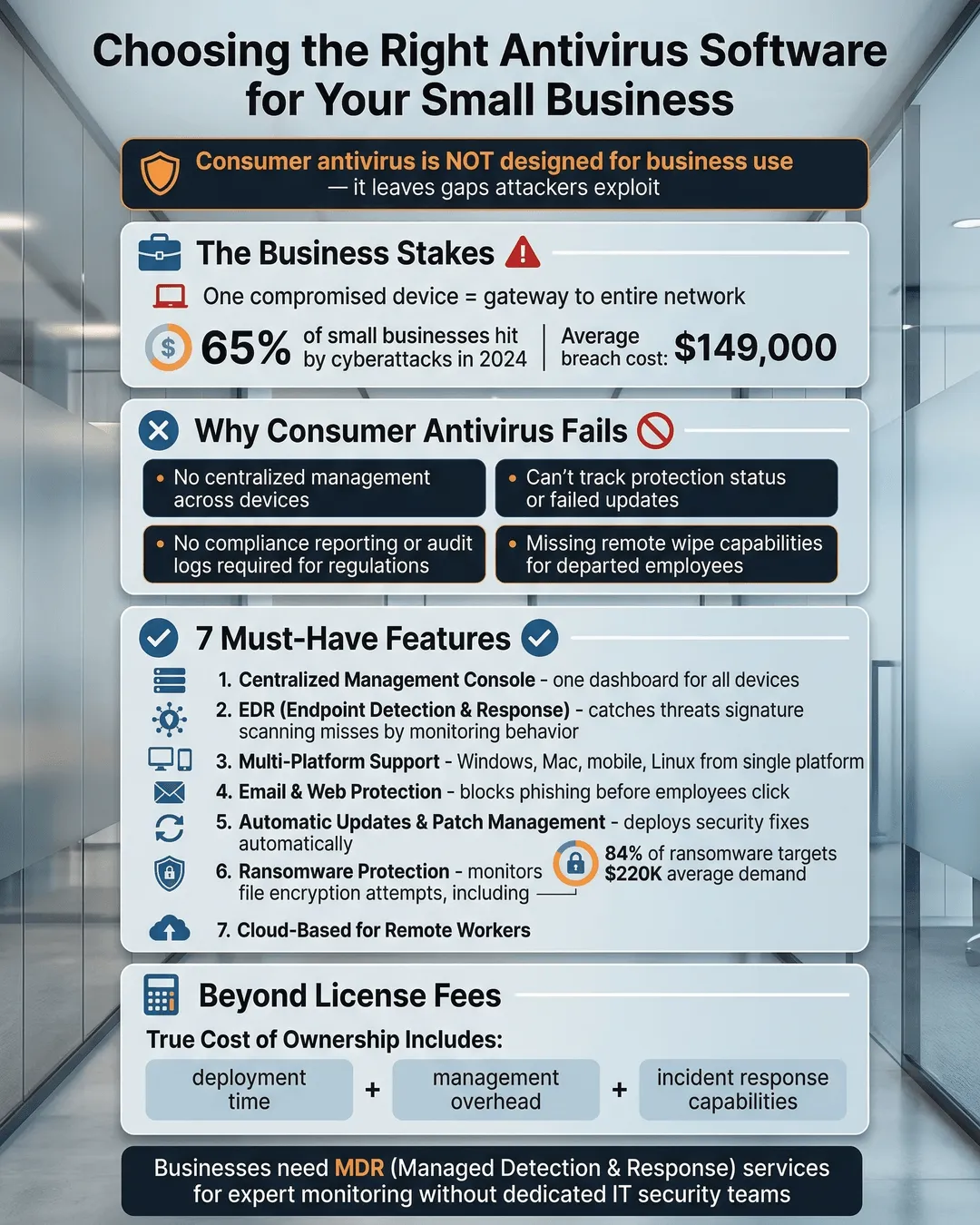
You probably started your business with the same antivirus you use at home. Maybe you grabbed a few licenses of whatever was on sale at Best Buy. Or you stuck with the free version you have been using for years.
Here’s the problem: consumer antivirus products are built for individual users browsing the web and checking email. They are not designed to protect multiple devices, manage user permissions, or defend against the sophisticated attacks that target businesses.
Cybercriminals know this. They count on small businesses using consumer-grade tools because those tools leave predictable gaps. No centralized management means one infected laptop can spread malware across your network before anyone notices. No reporting means you have no idea when an attack attempt happened or what data might be at risk.
According to the 2024 Verizon Data Breach Investigations Report, 46% of all cyber breaches now impact small businesses¹. The average cost of a data breach for small businesses reached $2.98 million in 2024². Those numbers should get your attention.
The good news is that choosing the right antivirus software for your small business does not require a degree in cybersecurity. You just need to know what to look for and what questions to ask. This guide walks you through the process step by step.
Key Takeaways
- Consumer antivirus lacks centralized management, compliance reporting, and multi-device protection that businesses need.
- Look for endpoint protection that includes real-time threat detection, centralized dashboards, and automated updates across all devices.
- Evaluate vendors based on detection rates, ease of management, scalability, and quality of support rather than price alone.
- Business antivirus should integrate with your existing tools and support all operating systems your team uses.
- Plan for implementation that includes employee training, staged rollout, and regular testing of protection measures.
Why Consumer Antivirus Falls Short for Business
Consumer antivirus products are designed for a single user managing their own device. That works fine when you are protecting your personal laptop. It breaks down completely when you need to protect ten, twenty, or fifty devices across your organization.
The first gap is visibility. With consumer antivirus, each employee manages their own protection. You have no way to know if someone disabled their antivirus to install a program, forgot to update their definitions, or clicked through a security warning without reading it. By the time you discover a problem, the damage is done.
The second gap is control. You cannot enforce security policies across consumer products. You cannot require employees to run scans at specific intervals. You cannot block them from visiting high-risk websites or downloading unauthorized software. You are trusting everyone to make perfect security decisions every single time.
The third gap is response time. When a threat appears, consumer antivirus alerts the individual user. That user might be in a meeting, on vacation, or simply unsure how to respond. Business antivirus alerts your IT team or managed service provider immediately so trained professionals can contain the threat before it spreads.
Small businesses face the same threats as large enterprises. Ransomware does not check your company size before encrypting your files³. Phishing emails do not skip your inbox because you only have fifteen employees. You need business-grade protection because you face business-grade threats.
Essential Features to Look For in Business Antivirus
Not all business antivirus solutions are created equal. Some are rebranded consumer products with a higher price tag. Others are enterprise platforms that are too complex and expensive for small business needs. You need something in the middle: robust protection without unnecessary complexity.
Centralized Management Console
Your antivirus should give you a single dashboard where you can see the status of every protected device. You should be able to view which devices are online, when they last updated, and whether any threats were detected. This visibility is non-negotiable for business use.
The console should let you push updates, run scans, and adjust settings across all devices from one location. You should not need to touch each individual computer to make changes.
Real-Time Threat Detection
Basic signature-based detection is not enough anymore. Attackers release new malware variants faster than traditional definitions can keep up. Your business antivirus needs behavioral analysis and machine learning to catch threats that have never been seen before⁴.
Look for products that monitor what programs do, not just what they look like. If a legitimate-looking program suddenly tries to encrypt your files or send data to an unknown server, your antivirus should block it immediately.
Multi-Platform Support
Your team probably uses a mix of Windows PCs, Macs, and mobile devices. Your antivirus needs to protect all of them under a single management platform. Buying separate solutions for different operating systems creates more gaps and more complexity.
Verify that the vendor supports all your current devices plus any you might add in the future. Support for Linux is worth considering even if you do not use it now, especially if you run web servers or development environments.
Automated Updates and Patch Management
Security threats evolve constantly. Your protection needs to keep pace without requiring constant manual intervention. Business antivirus should update threat definitions automatically and can help manage security patches for your operating systems and critical applications.
Some platforms include vulnerability scanning that identifies unpatched software and helps you prioritize which updates to install first. This feature becomes more valuable as your business grows and you manage more devices.
Email and Web Protection
Most attacks start with a phishing email or a malicious website. Your antivirus should scan email attachments before they reach inboxes and block access to known dangerous sites. Some solutions include email filtering and spam protection as part of the package.
Web filtering lets you block entire categories of sites like gambling, adult content, or newly registered domains that often host phishing pages. This reduces risk and can improve productivity at the same time.
Reporting and Compliance
You need records of security events for compliance requirements, insurance claims, and incident investigation. Business antivirus should generate reports showing what threats were detected, when they appeared, and how they were handled.
If your industry has specific compliance requirements like HIPAA, PCI DSS, or SOC 2, verify that your antivirus vendor can provide the documentation and controls you need. Some vendors offer compliance-specific packages that include the reporting and features required for different regulations.
How to Evaluate and Compare Antivirus Vendors
Once you know what features you need, the next step is comparing specific products. This process can feel overwhelming because vendors love to list hundreds of features without explaining what actually matters for businesses like yours.
Start with Independent Test Results
Organizations like AV-TEST and AV-Comparatives publish regular evaluations of business antivirus products⁵. These tests measure detection rates, false positive rates, and system performance impact. Look for products that consistently score above 95% detection in business environment tests.
Pay attention to false positive rates as well. An antivirus that blocks legitimate business software creates more problems than it solves. The best products catch real threats without flagging normal business activities.
Consider Ease of Management
The most powerful antivirus in the world is useless if it is too complicated to manage properly. Request demos from your top candidates and evaluate the management console yourself. Can you find the information you need quickly? Are common tasks straightforward or buried in menus?
Ask vendors how long initial setup typically takes and what level of technical expertise is required. Some products can be deployed in hours with minimal IT knowledge. Others require professional services and days of configuration.
Evaluate Scalability and Pricing Models
Your business will grow. Your antivirus should grow with you without requiring a complete replacement. Check whether the vendor offers plans that accommodate more devices as you need them. Understand the pricing structure: per device, per user, or tiered packages.
Watch for hidden costs. Some vendors charge separately for mobile device protection, email security, or advanced reporting. Others bundle everything together. Calculate the total cost for your current needs plus 25% growth to compare accurately.
Assess Vendor Support Quality
When ransomware hits at 3 AM, you need support that actually answers the phone. Research what support is included with your plan. Is technical support available 24/7 or only during business hours? Do you get a dedicated account manager or join a general queue?
Read customer reviews focusing on support experiences. Check how quickly the vendor releases updates when new threats emerge. A vendor with a strong security research team will push critical updates within hours of a new threat appearing.
Test Integration Capabilities
Your antivirus needs to work alongside your other business tools, not fight with them. Check compatibility with your email platform, cloud storage services, and any industry-specific software you use. Ask about APIs if you use security information and event management (SIEM) systems or other security tools.
Some antivirus vendors partner with managed service providers and IT consultants. If you work with an MSP, ask which platforms they recommend and support. Their experience managing the product for multiple clients provides valuable insight.
Implementation Best Practices
You picked the right product. Now you need to deploy it effectively. A rushed rollout can disrupt business operations and leave gaps in protection.
Start with a Pilot Group
Deploy your new antivirus to a small group of users first. This lets you identify compatibility issues, adjust settings, and refine your deployment process before rolling out company-wide. Choose pilot users from different departments who use different types of software.
Run the pilot for at least two weeks. Monitor