Your Cyber Insurance Application Is Lying About Your Company (And You Don't Even Know It)
We need to talk about something uncomfortable: that cyber insurance application you just submitted? It’s probably lying.
Not intentionally. Not maliciously. But it’s painting a picture of your security posture that exists only in policy documents and leadership meetings, not in the daily reality of how your employees actually work.
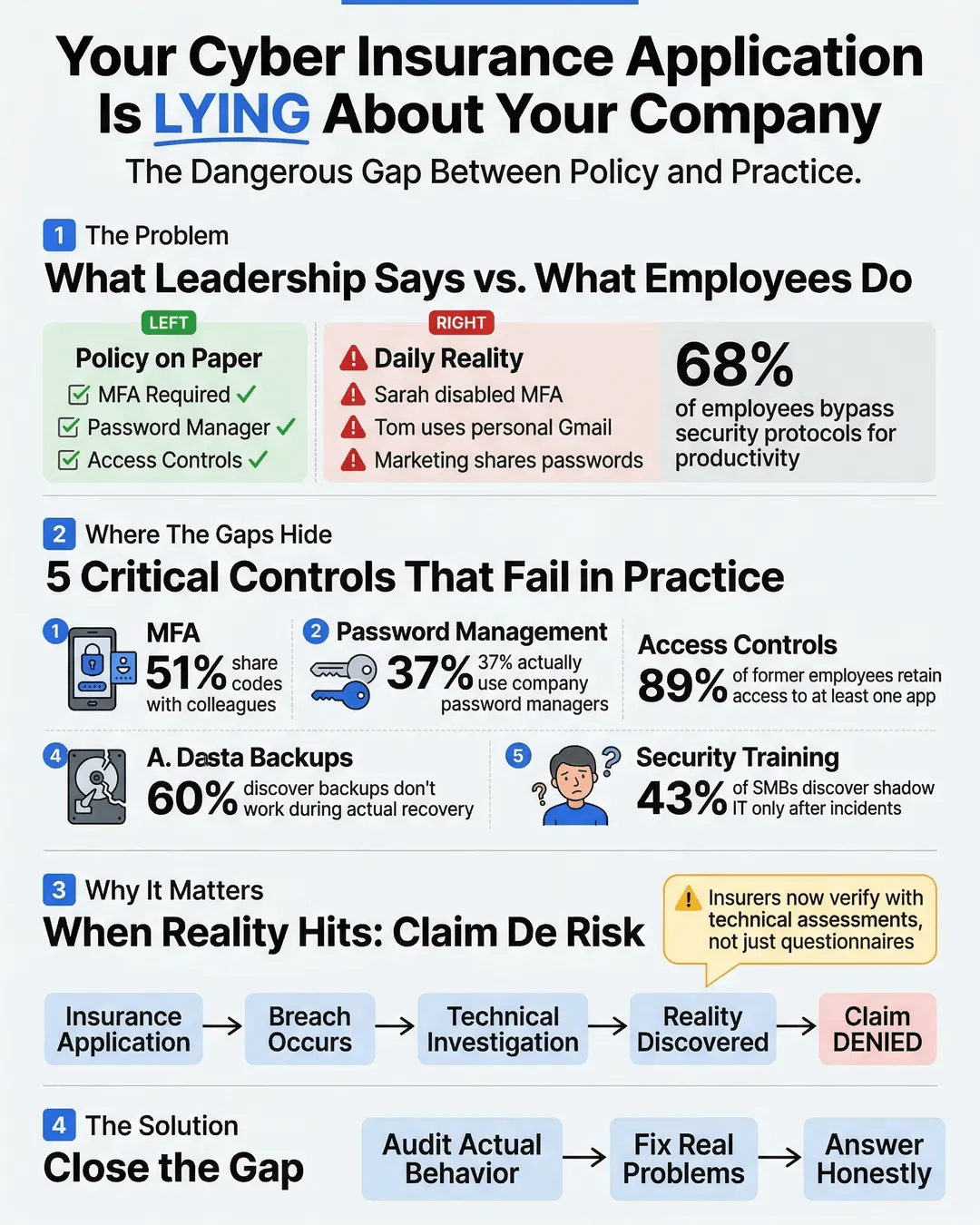
Here’s what happens. Your IT director checks “yes” next to “Multi-factor authentication required for all accounts.” Technically true. You have the policy. It’s in the employee handbook. But walk through your office right now and you’ll find Sarah from accounting who disabled MFA because it was “annoying,” Tom in sales who uses his personal Gmail for client communications, and your entire marketing team sharing login credentials for your social media management tool.
The disconnect between what leadership reports on insurance applications and what actually happens on employee devices creates a massive gap. And when a breach occurs, that gap becomes the reason your claim gets denied.
Key Takeaways
- Leadership often answers cyber insurance questionnaires based on written policies rather than actual employee behavior.
- Critical insurance controls like MFA, password management, and data access restrictions exist on paper but fail in daily practice.
- The gap between stated security practices and real-world implementation can invalidate claims when breaches occur.
- Regular security audits focusing on actual employee behavior rather than policy compliance help close this dangerous gap.
- SMB cyber insurance underwriters increasingly verify controls through technical assessments rather than just questionnaire responses.
The Policy vs. Reality Problem
When you fill out an SMB cyber insurance application, you’re answering questions about security controls. Do you require strong passwords? Check. Do you encrypt sensitive data? Check. Do you restrict administrative access? Check.
These answers come from a genuine place. You implemented these policies. You paid consultants to write comprehensive security frameworks. You made employees sit through training sessions.
But here’s what the insurance questionnaire doesn’t ask: “Does anyone actually follow these policies when they’re trying to close a deal on Friday afternoon?”
A 2024 study found that 68% of employees admit to bypassing security protocols when they interfere with productivity¹. Another report showed that 43% of SMBs discovered unapproved shadow IT applications only after a security incident occurred².
The problem isn’t that business leaders are dishonest. The problem is that they’re answering based on intent while insurers pay claims based on implementation.
Where the Gaps Hide
Let’s walk through the most common insurance-critical controls and where the reality diverges from the application.
Multi-Factor Authentication: Your policy says MFA is required. Your application says it’s enabled. But MFA fatigue is real. Employees who get prompted multiple times daily start looking for workarounds. They save passwords in browsers. They choose “trust this device for 30 days.” They call IT asking for exceptions because a client is waiting on a call.
Research indicates that 51% of employees have shared MFA codes with colleagues to expedite workflows³. That’s not malicious. That’s humans trying to get work done within systems that feel obstructive.
Password Management: You mandated a password manager last year. Everyone was supposed to install it. The IT team even sent three reminder emails. Your insurance application reflects this requirement. But a recent internal audit at a mid-sized professional services firm revealed that only 37% of employees actually used the company password manager, while the rest continued using browser-saved passwords or variations of the same password across multiple accounts⁴.
Access Controls: Your application states that terminated employees lose system access within 24 hours. Your offboarding checklist includes it. But when your star salesperson quit suddenly last month, did anyone remember to revoke access to the CRM, the shared Google Drive, the Slack workspace, and that third-party analytics tool he set up himself? A 2025 report found that 89% of former employees retain access to at least one corporate application after departure⁵.
Data Backup and Recovery: You confidently checked “yes” on backup protocols. Your IT person runs weekly backups. But are those backups tested? When’s the last time you actually attempted a restore? Studies show that 60% of SMBs discover their backup systems don’t work properly only when they attempt recovery after an incident⁶.
Security Awareness Training: You completed annual training. Everyone clicked through the modules. Certificates were generated. But can your receptionist identify a phishing email today, six months after that training? Can your finance team spot a business email compromise attempt when they’re processing urgent payment requests?
Why This Matters for Your Coverage
Insurance companies are getting smarter about verification. The days of accepting questionnaire responses at face value are ending.
Many cyber insurance providers now require technical assessments before binding coverage. They’re scanning your external attack surface. They’re requesting proof of MFA implementation through screenshots or system logs. They’re asking for documentation of security testing results.
When a claim happens, the investigation gets even more thorough. Insurers examine actual configurations, review access logs, and interview employees about real practices. They’re specifically looking for material misrepresentations on the application.
Here’s a real scenario: A professional services firm experienced a ransomware attack. Their insurance application stated they had endpoint detection and response (EDR) tools deployed on all devices. Technically true, the software was installed. But the investigation revealed that the EDR agent had been disabled on 40% of devices because it slowed system performance. The insurer denied the claim, arguing material misrepresentation. The firm lost both their data and their coverage payout.
The legal term is “duty of disclosure.” You’re required to provide accurate information. But accuracy isn’t just about what policies exist. It’s about what controls are actually functioning.
How to Close the Gap
The solution isn’t more policies or stricter rules. It’s aligning your operational reality with your stated security posture.
Audit actual behavior, not just policy compliance: Don’t ask IT if MFA is enabled. Sample 20 random employees and verify it’s working on their devices. Don’t check if password managers are required. Look at whether people are actually using them.
Make security controls easier than workarounds: If employees are bypassing security measures, the measures are too friction-heavy for your operational tempo. Find solutions that balance security with usability. Single sign-on implementations. Passwordless authentication. Context-aware access controls that adjust requirements based on risk signals.
Create feedback loops between IT and operations: Your security team sees attempted policy violations. Your operations team knows when security controls prevent work from happening. These groups need regular conversations to identify where stated policies and practical reality have diverged.
Document actual state before filing insurance applications: Before renewing your SMB cyber insurance, conduct a realistic assessment. What percentage of devices actually have EDR running? What’s the real adoption rate of your password manager? How many privileged accounts exist? Use these numbers to either remediate gaps or accurately represent your current state to insurers.
Test your controls under real conditions: Schedule a surprise backup restore drill. Send simulated phishing emails to see actual click rates. Attempt to access systems using a recently terminated employee’s credentials. These tests reveal where your stated controls aren’t holding up.
One SMB we work with implemented monthly “reality checks” where IT randomly audits five employees to verify actual security practice compliance. They found their real MFA coverage was 73%, not the 100% they’d reported. They spent three months fixing the gap before their insurance renewal, avoiding potential coverage issues down the road.
Conclusion
Your cyber insurance application isn’t lying because you’re dishonest. It’s lying because there’s an invisible gap between leadership’s understanding of security controls and the daily behavioral reality of how work gets done.
Closing that gap isn’t just about better insurance coverage. It’s about actually reducing your risk. The same vulnerabilities that invalidate insurance claims are the ones attackers exploit.
Start by asking better questions. Not “do we have this policy” but “is this policy actually working.” Not “did we implement this control” but “is this control functioning today, on actual employee devices, under real work conditions.”
Your insurance application should reflect reality. More importantly, your reality should match your risk tolerance. If your application says you require MFA and you actually do, consistently and effectively, you’re both better protected and better covered.
The uncomfortable truth is that most SMBs operate with security programs that look great in documentation and mediocre in practice. The good news? Once you acknowledge the gap, you can actually fix it.
And that makes you not just insurable, but actually more secure.
Citations
- Tessian, “Psychology of Human Error Report,” 2024.
- McAfee Enterprise, “Shadow IT in Small and Medium Businesses,” 2024.
- Yubico, “State of Authentication Report,” 2024.
- Keeper Security, “Password Management Adoption Study,” 2024.
- Sailpoint, “Identity Security Outlook,” 2025.
- Veeam, “Data Protection Trends Report,” 2024.