Your employees are already using AI tools‚ whether you know it or not. Without guidelines, they may be feeding sensitive data into systems you do not control
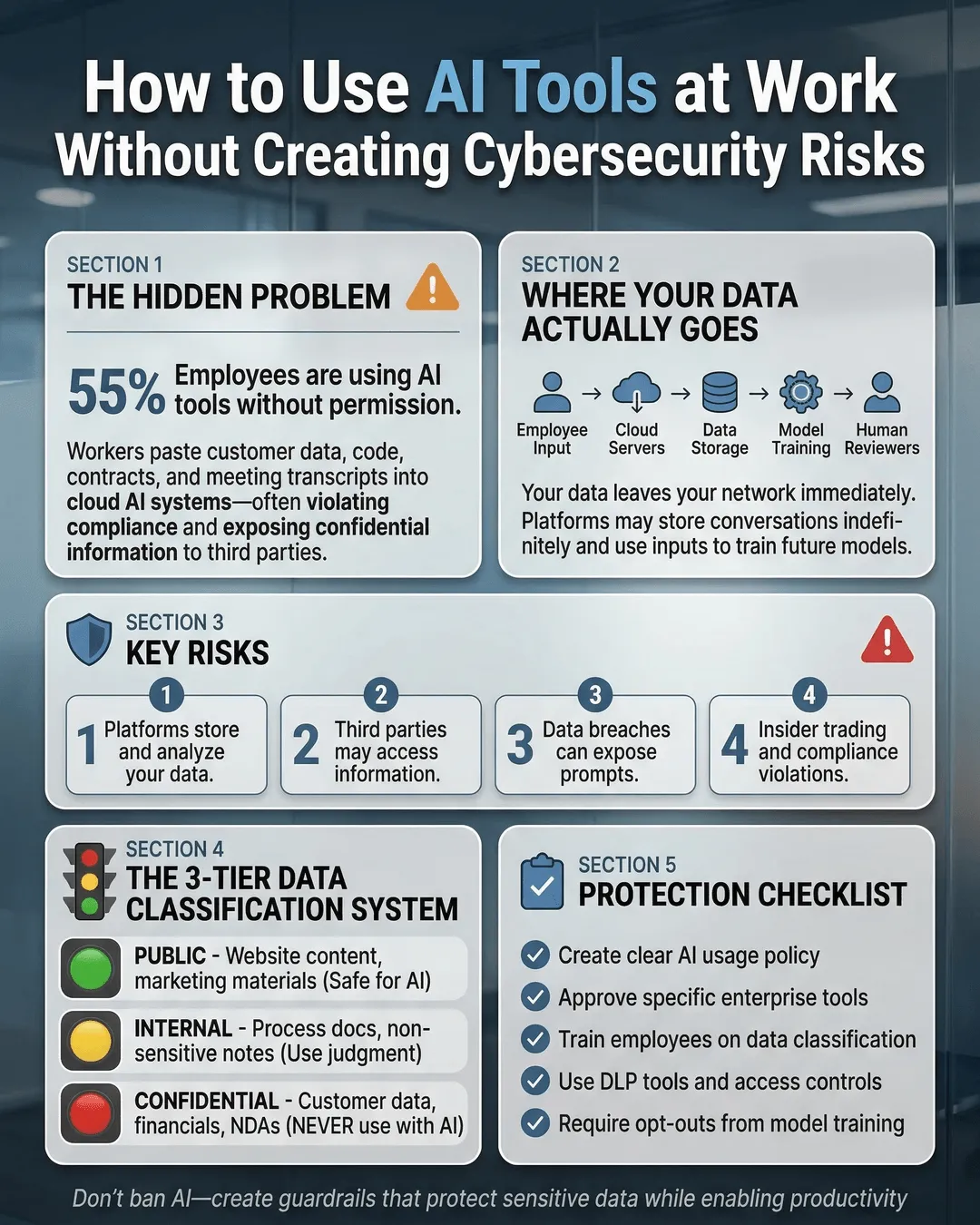
Your employees are already using AI tools, whether you know it or not. Without guidelines, they may be feeding sensitive data into systems you do not control.
That’s not a hypothetical scenario. It’s happening right now in companies of every size. Someone on your team copied a client contract into ChatGPT to draft an email. Your marketing manager pasted proprietary product specs into an image generator. Your finance lead uploaded salary data to an AI spreadsheet assistant.
They didn’t do it maliciously. They did it because AI tools make their jobs easier, faster, and more efficient. But here’s the problem: most of these tools weren’t designed with enterprise-grade security in mind. And when your team uses them without oversight, your company’s sensitive information can end up stored on servers you have zero control over.
The good news? You don’t have to ban AI to stay secure. You just need a plan.
Why AI Tools Pose Real Cybersecurity Risks
AI tools create cybersecurity vulnerabilities in ways traditional software doesn’t. Understanding these risks is the first step to managing them.
When employees use public AI platforms, they often input data that the AI provider stores, analyzes, and potentially uses to train future models. That client proposal you asked ChatGPT to rewrite? It might now be part of OpenAI’s training data. The sales forecast you uploaded to an AI analytics tool? It could be sitting on a third-party server in another country.
Data leakage is the most common risk. According to Cybersecurity Ventures, data breaches cost businesses an average of $4.45 million in 2023¹. Many of these breaches stem from uncontrolled data sharing with third-party applications.
Another risk comes from inadequate access controls. Many AI tools don’t offer the same permission structures your company uses internally. An employee might share an AI-generated document link without realizing it grants editing access to anyone with the URL.
Then there’s the issue of compliance. If your business handles regulated data (healthcare records, financial information, personal data under GDPR or CCPA), using non-compliant AI tools can put you in legal jeopardy. Most free AI platforms explicitly state in their terms of service that they are not HIPAA or SOC 2 compliant.
Finally, AI tools can introduce malware or phishing risks. As AI becomes more sophisticated, so do the scams. Attackers use AI to create convincing phishing emails, deepfake voice messages, and fake login pages that trick employees into revealing credentials.
How to Use AI Tools Safely at Work
The solution isn’t to block AI entirely. That’s neither realistic nor strategic. Instead, you need to create a framework that allows innovation while protecting your data.
Start with an AI usage policy. Your employees need clear guidelines on what’s acceptable and what’s not. Your policy should specify which AI tools are approved for work use, what types of data can and cannot be entered into AI systems, and what consequences exist for violations.
Make the policy practical, not punitive. Frame it as protection for both the company and employees. After all, if an employee accidentally leaks client data, they face consequences too.
Vet AI tools before approving them. Not all AI platforms handle data the same way. Before adding a tool to your approved list, review its privacy policy, data retention practices, and security certifications. Look for tools that offer enterprise plans with stronger privacy protections.
Ask these questions: Where is data stored? Is it encrypted? Does the vendor use your data to train their models? Can you request data deletion? Does the tool comply with relevant regulations?
Tools like Microsoft Copilot for Microsoft 365, Google Workspace with Gemini, or dedicated enterprise AI platforms often provide better security controls than free consumer versions.
Implement data classification. Not all information is equally sensitive. Create a simple classification system so employees know what they can safely use with AI tools.
For example, public information (already on your website, published reports) might be safe to use. Internal information (meeting notes, project plans) could be acceptable with approved tools. Confidential information (client contracts, financial data, employee records) should never be entered into unapproved AI systems.
Train your team to recognize the difference. Make it easy for them to check before they paste.
Use enterprise versions of popular AI tools. Many AI platforms offer business or enterprise tiers with enhanced security features. ChatGPT Enterprise, for instance, doesn’t use customer data to train models and offers admin controls, SSO, and data encryption². Claude for Work and other enterprise AI solutions provide similar protections.
These versions cost more, but they dramatically reduce your risk exposure. Think of it as insurance, not an expense.
Monitor AI tool usage without becoming Big Brother. You need visibility into what tools your team uses, but you don’t need to read every prompt they write. Use software asset management tools to identify which AI applications are active on company devices.
Have regular conversations with department leads about their AI needs. If people are using unapproved tools, find out why. They might have a legitimate need you haven’t addressed.
Train employees on safe AI practices. Your team can’t follow rules they don’t understand. Conduct regular training sessions that cover AI security risks, explain your policy, and provide practical examples.
Show them what safe AI use looks like. Demonstrate how to anonymize data before using AI tools (removing names, specific dates, proprietary details). Teach them to spot AI-generated phishing attempts. Make security training engaging, not tedious.
According to IBM, companies with regular security training programs experience 54% fewer data breaches than those without³.
Building an AI Security Culture
Technology alone won’t protect you. You need a culture where people think about security before they click “send.”
Start at the top. When leadership openly discusses AI security and follows the same rules as everyone else, it sets the tone. If your C-suite uses unapproved AI tools, your employees will too.
Make reporting easy and blame-free. If someone accidentally shares sensitive data with an AI tool, they should feel comfortable reporting it immediately so you can contain the damage. If they fear punishment, they’ll hide the mistake until it becomes a crisis.
Celebrate good security practices. Recognize employees who ask questions before using new AI tools or who identify security risks. Make it clear that speaking up is valued.
Create an AI review committee or designate someone as your AI security point person. This gives employees a clear path when they want to try a new tool or aren’t sure if something is allowed.
Keep your policy living and flexible. AI technology changes fast. What’s secure today might not be secure tomorrow. Review your policy quarterly and update it as needed. Solicit feedback from employees about what’s working and what’s creating friction.
What to Do When Things Go Wrong
Despite your best efforts, someone will eventually make a mistake. How you respond matters.
Create an incident response plan. Before a data leak happens, document the steps you’ll take. Who needs to be notified? How will you assess the damage? What’s your communication plan for affected clients or partners?
Having a plan means you can act quickly instead of scrambling. According to Ponemon Institute, organizations with an incident response team and tested plan save an average of $2.66 million per data breach⁴.
Conduct a post-incident review. When something goes wrong, investigate without blame. What happened? Why did it happen? What gaps in your policy, training, or tools allowed it to occur? What will you change to prevent it from happening again?
Share lessons learned (appropriately) across the organization. Every incident is a chance to improve.
Stay informed about AI security threats. The AI security landscape evolves constantly. Subscribe to cybersecurity newsletters, follow industry experts, and participate in relevant forums or associations. The more you know about emerging threats, the better you can protect your organization.
Conclusion
AI tools aren’t going away. They’re too useful, too efficient, and too embedded in how work gets done. Your employees will use them regardless of what you say.
Your job isn’t to stop AI adoption. It’s to make AI use safe, intentional, and aligned with your security standards.
That means creating clear policies, vetting tools before use, training your team, and building a culture where security and innovation coexist. It means treating AI tools like any other business technology: with appropriate controls, oversight, and risk management.
The companies that thrive in the AI era won’t be the ones that blocked access or ignored the risks. They’ll be the ones that embraced AI strategically while protecting what matters most: their data, their clients, and their reputation.
You can’t control whether your employees use AI. But you can control how they use it.
Key Takeaways
- Employees are already using AI tools at work, often without oversight, creating data security risks.
- Free AI platforms may store, analyze, or use your business data to train future models.
- Create a clear AI usage policy that specifies approved tools and defines what data can be shared.
- Enterprise versions of AI tools offer better security controls than free consumer versions.
- Data classification helps employees understand what information is safe to use with AI.
- Regular security training reduces data breach incidents by 54% according to IBM research.
- Build a blame-free reporting culture so employees disclose mistakes before they become crises.
- Have an incident response plan ready before a data leak occurs to minimize damage and costs.
Citations
- Cybersecurity Ventures, “Official Annual Cybercrime Report,” 2023.
- OpenAI, “ChatGPT Enterprise Privacy and Security Features,” 2024.
- IBM, “Cost of a Data Breach Report,” 2024.
- Ponemon Institute, “Cost of a Data Breach Study,” 2023.