Not all data deserves the same level of protection. Knowing what is critical and what is routine helps you spend your security budget wisely.
You probably have terabytes of data sitting on your servers right now. Customer records, old meeting notes, marketing PDFs, financial statements, employee records, that spreadsheet from 2018 nobody remembers creating.
Here’s the uncomfortable truth: you can’t protect everything equally. Your security budget isn’t infinite. Your team’s attention span definitely isn’t. And trying to treat every single file like it contains nuclear launch codes is a recipe for burnout, wasted money, and paradoxically, worse security.
Business data classification is how you figure out what actually matters. It’s the process of sorting your information into categories based on sensitivity, value, and impact if it gets leaked, corrupted, or deleted. Think of it like organizing your home. You don’t store your passport, cash, and family photos the same way you store junk mail and old magazines.
When you know what’s critical and what’s routine, you can spend your security budget wisely. You can focus your best protections on the stuff that would hurt if it disappeared. And you can finally answer the question that keeps you up at night: “If we got breached tomorrow, what would actually destroy us?”
Key Takeaways
- Business data classification helps you prioritize security spending by identifying which information needs the most protection.
- Most organizations use a three or four-tier system (public, internal, confidential, restricted) to categorize data based on sensitivity and business impact.
- Start small by classifying your most obvious sensitive data first, then expand gradually rather than trying to tag everything at once.
- Your classification policy should include clear labeling requirements, access controls, and handling procedures for each data category.
- Regular reviews and employee training ensure your classification system stays relevant as your business evolves.
Why Most Businesses Get Data Protection Backwards
Most companies approach data security like they’re protecting a castle. They build walls around everything, spend a fortune on fancy tools, and hope for the best. The problem is they’re guarding the moat and the throne room with equal intensity.
This approach fails for three reasons. First, it’s expensive. Enterprise-grade encryption, multi-factor authentication, and 24/7 monitoring costs real money. When you apply it to everything, you burn through budget protecting things that don’t matter. Second, it’s exhausting for your team. When every document requires three approval steps and two password confirmations, people find workarounds. They email files to personal accounts. They screenshot instead of download. They defeat your security by sheer annoyance. Third, it doesn’t actually work. When everything is critical, nothing is. Your team can’t tell the difference between a must-protect customer database and a cafeteria menu.
Data classification flips this model. Instead of protecting everything poorly, you protect important things well. You create tiers. You assign resources based on actual risk. You make security proportional to value.
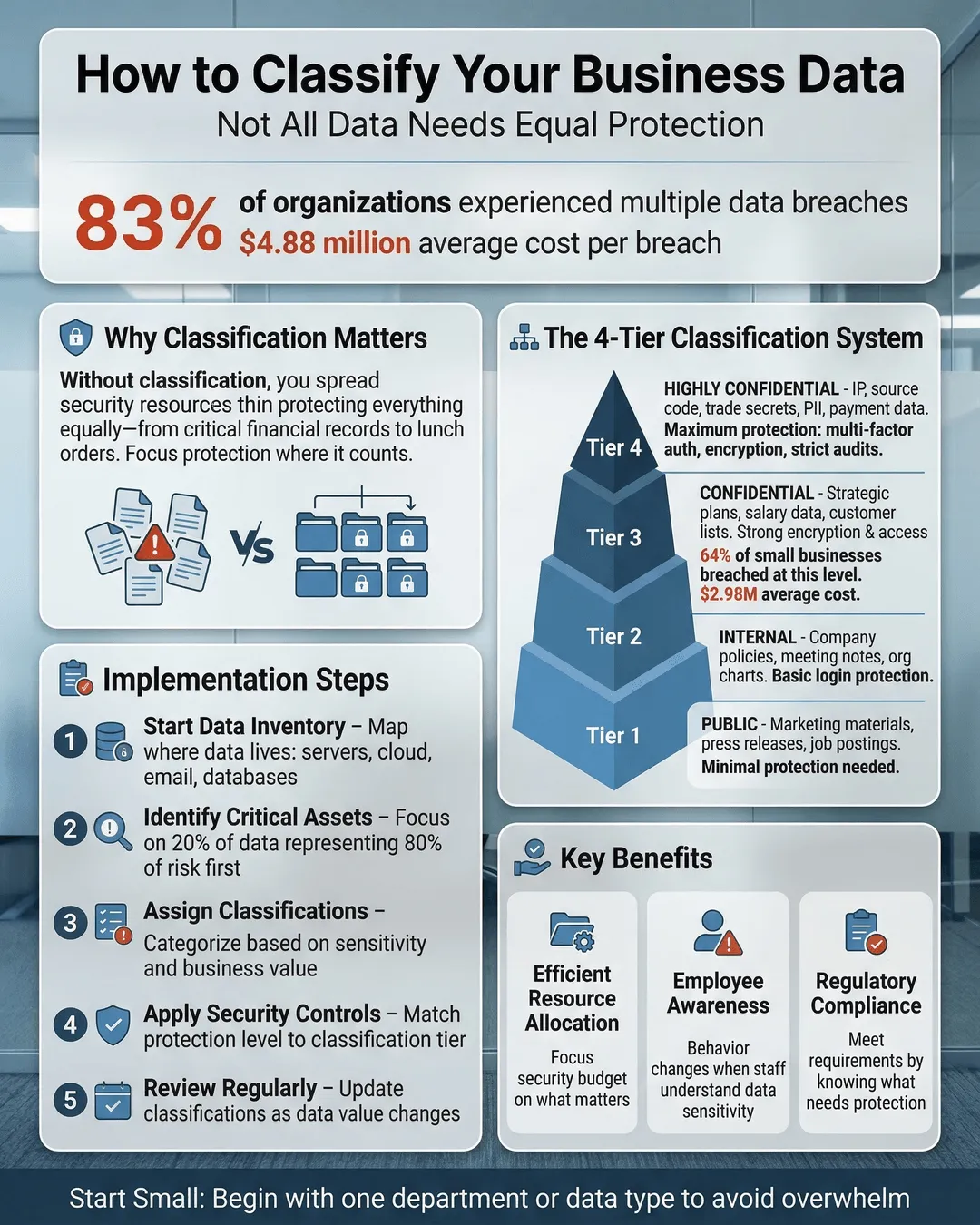
How to Classify Sensitive Data: The Four-Tier System
Most organizations land on a three or four-tier classification system. You can adjust the labels to fit your culture, but the concept stays the same.
Public data is information that could be posted on a billboard without consequence. Marketing materials, published reports, job postings, press releases. If it’s already on your website or intended for public consumption, it’s public. This category needs minimal protection. You still want basic backups in case of accidental deletion, but you’re not encrypting it or limiting access.
Internal data is everyday business information that’s not meant for outsiders but won’t cause disaster if it leaks. Internal memos, project plans, meeting notes, most email correspondence. This is the bulk of what your company generates. It requires standard protections like password-protected systems and basic access controls, but it’s not the crown jewels.
Confidential data is where things get serious. This is information that would damage your business if competitors got it or if it became public. Customer lists, financial records, strategic plans, contracts, employee salary information, proprietary research. This data deserves strong encryption, restricted access, audit trails, and clear handling procedures. Not everyone in the company should see it.
Restricted data (sometimes called highly confidential or top secret) is your most sensitive information. Leak this and you face lawsuits, regulatory penalties, or existential business threats. Think credit card numbers, social security numbers, health records, trade secrets, M&A plans, security credentials. This category gets your best protections: encryption at rest and in transit, strict access controls, comprehensive monitoring, and often legal agreements before anyone can view it.
Some businesses add a fifth category for regulatory data that falls under specific compliance requirements like HIPAA, PCI-DSS, or GDPR. Others keep it simpler with just three tiers. Choose what makes sense for your organization, but make sure the categories are clearly different from each other.
Building Your Data Classification Policy for Small Business
A policy sounds bureaucratic, but it’s just a document that answers basic questions: What are our categories? Who decides what goes where? How do we label things? What protections apply to each tier? Who can access what?
Start by identifying your most obvious sensitive data. You don’t need to classify every file on day one. Begin with the no-brainers. Customer payment information? Restricted. Employee social security numbers? Restricted. Last quarter’s sales figures? Confidential. Company newsletter? Public. Marketing photos? Public.
Create simple labeling requirements. In emails, this might be a tag in the subject line or a footer notation. In file systems, it could be folder naming conventions or metadata tags. In documents, you might use headers or footers that say “CONFIDENTIAL” or “INTERNAL USE ONLY.” The method matters less than consistency.
Define access controls for each category. Public data gets minimal restrictions. Internal data requires employee authentication. Confidential data goes to specific teams or roles. Restricted data needs explicit approval and often additional authentication steps. Document who has authority to grant access at each level.
Spell out handling procedures. Can confidential data be emailed? Printed? Stored on personal devices? Shared with contractors? Your policy should make these decisions clear so employees don’t have to guess. Include retention and disposal requirements too. Some data needs to be kept for seven years. Some should be deleted after 90 days.
Assign someone to own this. Data classification doesn’t manage itself. Someone needs authority to make classification decisions, handle exceptions, and update the policy as the business changes. In small businesses, this might be your IT manager, operations director, or even you. Just make sure it’s explicit.
Making Data Categorization Actually Work in Practice
The best policy in the world fails if nobody follows it. Implementation is where most data classification efforts die.
Train your team on the basics. Everyone needs to understand the categories, why they exist, and how to apply them. This doesn’t require a formal certification program. A 30-minute lunch session covering the tiers, some real examples from your business, and how to label things correctly will get you 80% of the way there.
Automate where possible. Many document management systems can auto-classify based on content, source, or metadata. Email systems can tag messages based on sender or recipient. Cloud storage platforms can enforce access controls based on folder location. Use technology to reduce the burden on humans.
Start with new data. Don’t attempt to classify your entire historical archive in week one. That’s overwhelming and often unnecessary. Focus on properly classifying everything created going forward. Then tackle historical data in priority order: restricted first, then confidential, then internal if you have time.
Build classification into workflows. When someone creates a customer record, the system should prompt for classification. When you draft a contract, the template should include a confidentiality designation. Make it part of how work gets done, not an extra step people skip.
Review regularly. Your business changes. Products launch. Regulations update. What was confidential last year might be public now. What seemed internal might have become confidential. Schedule quarterly or annual reviews of your classification scheme and key data categories.
Handle exceptions gracefully. Sometimes data doesn’t fit neatly into your boxes. A document might be public in six months but confidential today. A report might be internal for most staff but confidential for contractors. Your policy needs a clear process for handling edge cases without requiring a committee meeting.
Which Business Data is Most Valuable: A Priority Framework
Not sure where to start? Here’s a simple framework for identifying which data deserves protection first.
Financial impact: What would cost the most to lose or recreate? Customer databases that took years to build, proprietary algorithms, unique research data. If recreating it would cost six figures or more, it’s high priority.
Regulatory consequences: What data, if breached, would trigger fines or legal action? Healthcare records, payment card information, personal data covered by privacy laws. Regulatory penalties can exceed millions of dollars¹.
Competitive advantage: What information gives you an edge competitors would love to have? Pricing strategies, product roadmaps, customer insights, operational processes. If your competitor would pay for it, protect it.
Reputation damage: What data, if leaked, would embarrass you or harm customer trust? Internal communications about customers, security vulnerabilities, incidents you handled poorly. Reputation damage is hard to quantify but easy to experience.
Operational continuity: What data do you need to keep operating? Vendor contracts, system credentials, operational procedures, contact lists. If losing it would stop business for more than a day, it matters.
Run your key data categories through these filters. Anything that scores high on multiple dimensions belongs in your restricted category. Moderate scores suggest confidential. Low across the board probably means internal or public.
Conclusion
Data classification isn’t about creating bureaucracy. It’s about being honest with yourself about what actually matters. You can’t protect everything equally, so you need to choose. The good news is most of your data isn’t that sensitive. The better news is once you identify what truly needs protection, you can actually protect it well instead of protecting everything poorly.
Start simple. Pick three or four categories. Classify your obvious sensitive data first. Build it into how your team works. Review and adjust as you learn. You don’t need perfection on day one. You need a system that’s better than what you have now, which for most businesses is no system at all.
Your security budget is finite. Your attention is finite. Your team’s patience with security procedures is definitely finite. Data classification helps you spend all three on things that actually matter. And that’s worth far more than another piece of security software that tries to protect everything and ends up protecting nothing.
Citations
- IBM Security, “Cost of a Data Breach Report,” 2024.