Giving employees access to only what they need sounds simple, but most businesses give everyone access to everything by default.
Giving employees access to only what they need sounds simple, but most businesses give everyone access to everything by default.
It starts innocently enough. A new employee joins your team. You need to get them up and running quickly, so you grant them the same access level as their manager. After all, it’s easier than figuring out exactly which folders, systems, and databases they actually need. Fast forward six months, and that temporary contractor still has admin privileges. Your marketing intern can view payroll records. Half your team can access customer financial data they never use.
This approach creates a massive security vulnerability. When everyone can see everything, you have no control over who accesses sensitive information. A single compromised account becomes a gateway to your entire business. One disgruntled employee can walk away with proprietary data. An innocent mistake can expose customer records.
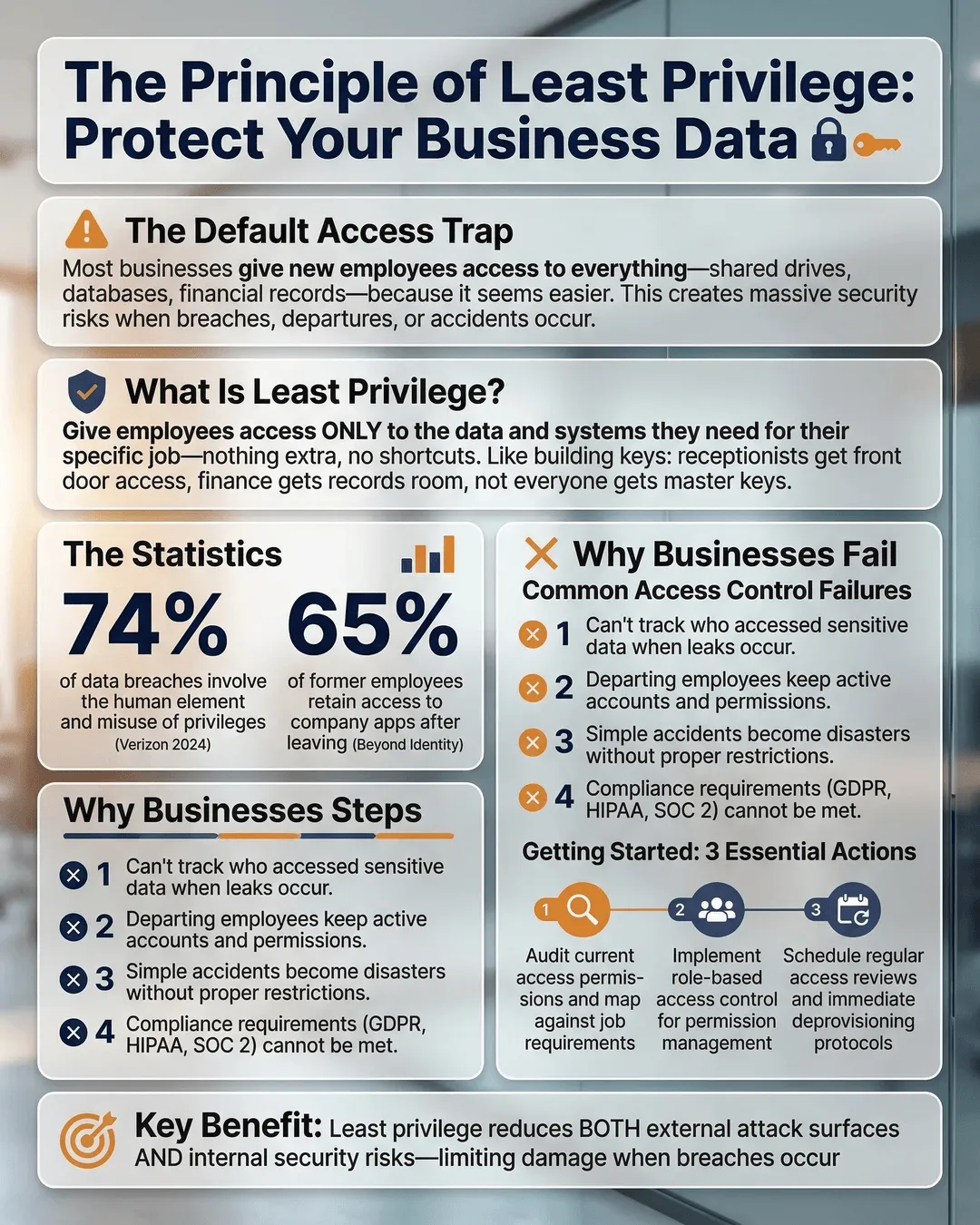
The solution is the principle of least privilege, a security concept that limits each person’s access to only the data and systems they need to do their job. Nothing more, nothing less.
What Is the Principle of Least Privilege?
The principle of least privilege is exactly what it sounds like. You give each employee, contractor, and system the minimum level of access required to perform their specific role. If someone doesn’t need access to financial records, they don’t get it. If a team member only needs to read certain files, they can’t edit or delete them.
This approach reduces your attack surface. When fewer people have access to sensitive data, there are fewer opportunities for breaches, whether from external hackers or internal mistakes.
Think of it like key management in a physical building. Your receptionist needs a key to the front door and their office. They don’t need keys to the server room, the executive suite, or the supply closet. You wouldn’t hand them a master key that opens every door in the building. Yet that’s exactly what many businesses do with digital access.
Least privilege access explained: you’re creating digital boundaries that match job responsibilities. Your sales team accesses customer relationship management tools and prospect lists. Your finance team sees accounting software and bank records. Your IT team manages infrastructure. The overlap is minimal and intentional.
Why Most Businesses Get Access Control Wrong
Default permissions are usually too broad. When you add someone to your email system, project management tool, or file storage, the default setting often grants more access than necessary. Many business owners never adjust these settings because they don’t realize the risk or don’t have time to configure granular permissions.
Convenience trumps security. It’s faster to give everyone admin access than to set up role-based permissions. It’s easier to share entire folders than to determine which specific files someone needs. You avoid the hassle of fielding access requests when employees genuinely need something they can’t reach.
But convenience costs you. According to the 2024 Verizon Data Breach Investigations Report, 68% of breaches involved a human element, including misuse of privileges or social engineering¹. When you hand out access freely, you’re betting that nobody will ever click a phishing link, fall for a scam, or act maliciously.
Your team grows and nobody reviews access. Employees change roles. Contractors finish projects. People leave the company. If you’re not regularly auditing who has access to what, you’re accumulating risk. That contractor who helped with your website relaunch three years ago might still have backend access. The employee who moved from finance to marketing probably still sees payroll data.
You underestimate insider threats. Most business owners trust their teams, and that trust is usually well-placed. But 34% of data breaches in 2024 involved internal actors². You don’t need a malicious employee to have a problem. Accidental deletion, careless sharing, or a compromised personal device can all lead to data exposure.
How to Implement Least Privilege in Your Small Business
Start with an access audit. Before you can limit access, you need to know what access currently exists. List every system your business uses, including email, file storage, customer databases, financial software, and any industry-specific tools. Then document who has access to each system and at what permission level.
This exercise usually reveals surprises. You’ll find former employees still in your systems, contractors with admin rights, and employees who can access data completely unrelated to their work.
Map access to roles, not individuals. Create standard permission sets based on job functions. What does every salesperson need? What about every accountant? Define these templates once, then apply them consistently as you hire.
For example, your customer service role template might include:
- Read access to customer records and order history.
- Write access to support ticket system.
- Read-only access to product documentation.
- No access to financial data, employee records, or system administration.
When you hire a new customer service representative, you apply this template instead of figuring out permissions from scratch.
Use the minimum viable access approach. When someone requests access to a system or folder, ask: “What specific task are you trying to accomplish?” Then grant only the access needed for that task. If they need to review a report, give read-only access. If they need to update a spreadsheet, share just that file, not the entire folder.
This feels restrictive at first, but it protects both your business and your employees. When people can only access what they need, they can’t accidentally damage or expose data outside their area.
Implement time-based access for temporary needs. Sometimes people need elevated permissions for a specific project or time period. Instead of granting permanent access, set an expiration date. After the project ends, their permissions automatically revert to baseline.
Most modern business software includes this functionality. Your file storage system can grant access for 30 days. Your project management tool can add someone to a workspace temporarily. Use these features.
Require approval for elevated access. Admin privileges should require a formal request and approval process. When someone needs admin access, they should explain why, get approval from a manager or IT lead, and understand that the access will be reviewed regularly.
This creates a paper trail and forces people to think twice before requesting unnecessary permissions.
Review access quarterly. Set a recurring calendar reminder to audit permissions every three months. Remove access for departed employees, revoke unused permissions, and verify that current access levels still match job responsibilities.
This regular maintenance prevents access creep, where permissions accumulate over time without anyone noticing.
Data Access Control Best Practices for Long-Term Security
Document your access control policy. Write down your approach to granting, reviewing, and revoking access. Include who can approve access requests, how long temporary access lasts, and how often you conduct audits.
This documentation creates consistency. When everyone understands the process, you avoid ad-hoc decisions that undermine security.
Train your team on why access limits matter. Employees sometimes view restricted access as a lack of trust. Explain that least privilege protects everyone. It reduces their liability if something goes wrong. It prevents accidental mistakes. It makes your business less attractive to attackers.
When people understand the reasoning, they’re less likely to share passwords or request unnecessary access.
Use multi-factor authentication everywhere. Even with limited access, a compromised password can lead to data exposure. Multi-factor authentication adds a second verification step, dramatically reducing the risk of unauthorized access.
According to Microsoft, multi-factor authentication blocks 99.9% of automated attacks³. This single step eliminates most common threats.
Separate personal and business accounts. Employees who use the same password for work and personal accounts create vulnerability. If their personal email gets hacked, attackers gain a foothold into your business systems.
Require separate business accounts for all work-related tools and prohibit password reuse.
Monitor access logs for unusual activity. Most business software tracks who accesses what and when. Review these logs periodically for red flags, such as access from unusual locations, login attempts outside business hours, or bulk data downloads.
Unusual patterns often indicate compromised accounts or malicious activity. Early detection limits damage.
Plan for emergencies. You need a process for granting emergency access when something breaks and the person who normally handles it is unavailable. Define who can approve emergency access, how quickly it can be granted, and how long it lasts.
This prevents security shortcuts during crises while ensuring business continuity.
Key Takeaways
- The principle of least privilege means giving employees access only to the data and systems they need to do their jobs, nothing more.
- Most businesses default to overly broad permissions because it’s easier than configuring granular access controls.
- Start with an access audit to understand who currently has access to what across all your business systems.
- Create role-based permission templates that map access to job functions, not individuals.
- Review access quarterly to remove unused permissions and revoke access for departed employees.
- Combine least privilege with multi-factor authentication and access monitoring for comprehensive security.
- Document your access control policy so everyone understands the process for requesting and approving access.
Conclusion
You don’t need to give everyone the keys to the kingdom. Implementing the principle of least privilege protects your business data without making work harder for your team.
Start small. Pick one system and audit access this week. Create a simple role-based template for your most common position. Set a quarterly reminder to review permissions. These incremental steps add up to significant risk reduction.
The alternative is hoping nothing goes wrong while everyone has access to everything. That strategy works until it doesn’t, and by then the damage is done. Taking control of data access now prevents problems you don’t want to deal with later.
Your business data is valuable. Treat access to it like the privilege it is.
Citations
- Verizon, “2024 Data Breach Investigations Report,” 2024.
- IBM Security, “Cost of a Data Breach Report 2024,” 2024.
- Microsoft, “Multi-factor Authentication Effectiveness Study,” 2024.