Having backups means nothing if you have never tested whether they actually restore. Most business owners skip this step until it is too late.
You’ve got backups. Great. You check that little green light on your backup software dashboard every week. The system says “Success.” You feel secure.
But here’s the uncomfortable truth: having backups means absolutely nothing if you’ve never actually tested whether they restore. Most business owners skip this critical step until disaster strikes, and by then, it’s way too late.
Think about it. You wouldn’t buy a fire extinguisher, mount it on the wall, and never check if it works, would you? Yet that’s exactly what happens with business backups every single day. The backup runs, the status shows green, and everyone assumes everything is fine. Until the day you need that data, and you discover your backups are corrupt, incomplete, or completely useless.
Let’s fix that problem today. Testing your backups isn’t complicated, but it does require a plan and some dedicated time. Here’s how to make sure your safety net actually catches you when you fall.
Why Most Backup Tests Never Happen
Before we get into the how, let’s talk about the why. Why do smart business leaders skip backup testing?
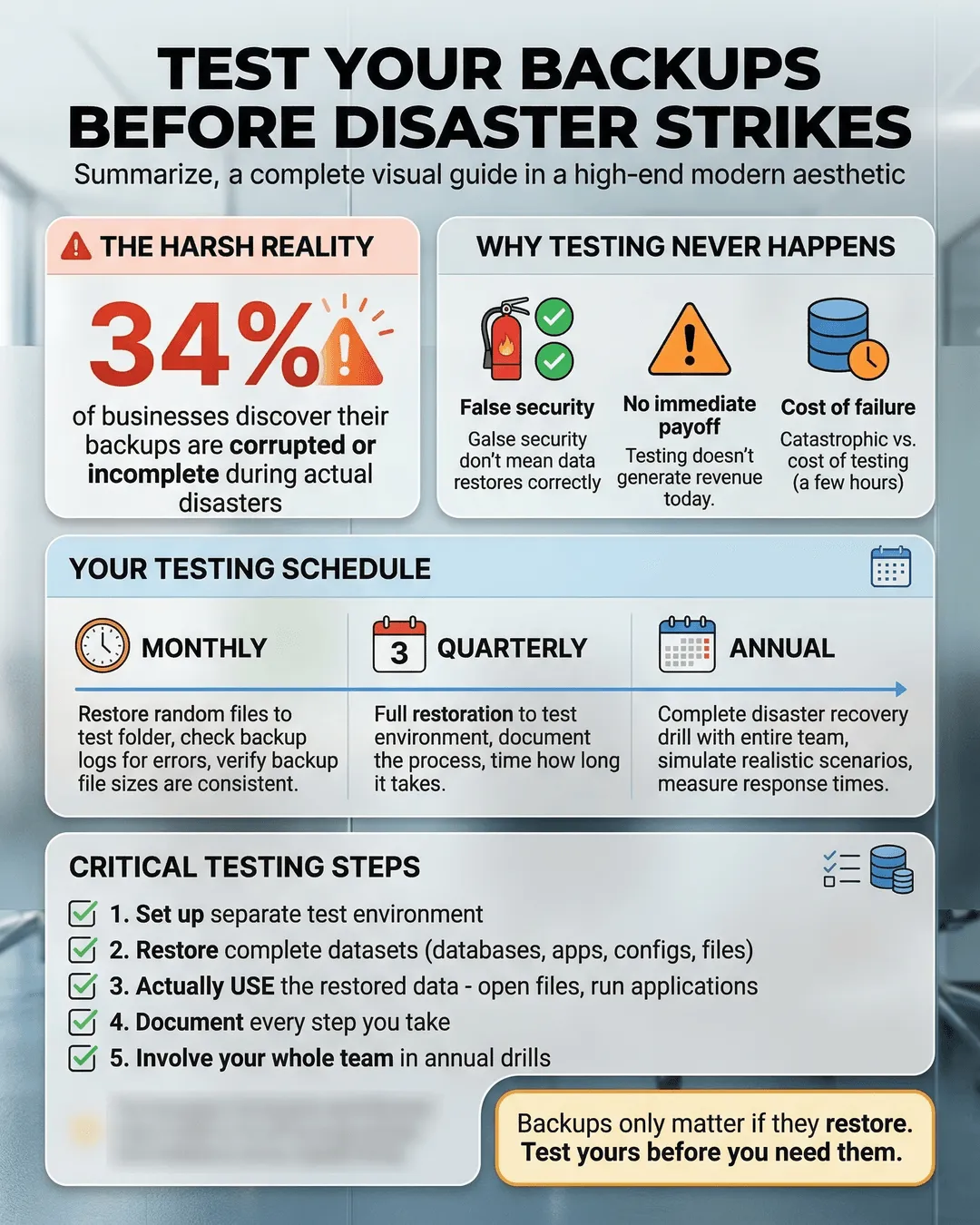
The answer is simple: it feels like extra work with no immediate payoff. You’re busy running a business. Backup testing doesn’t generate revenue. It doesn’t close deals. It doesn’t make customers happy today. So it gets pushed to next quarter, then the quarter after that, and eventually it never happens at all.
There’s also a false sense of security. Your backup software sends you reports. Those reports say everything is working. But those reports only confirm that data was copied somewhere. They don’t confirm that the data can be restored, that it’s complete, or that it’s actually usable.
According to a 2024 survey, 34% of businesses that experienced data loss discovered their backups were incomplete or corrupted when they tried to restore them¹. That’s more than one in three. Those aren’t great odds when your entire business is on the line.
The cost of discovering a backup failure during an actual disaster is catastrophic. You lose time, money, customer trust, and potentially your entire business. The cost of testing your backups before disaster strikes is a few hours of planned work. The math isn’t complicated.
The Essential Backup Testing Checklist
Let’s build your backup testing process. This checklist gives you a systematic approach to verify backup integrity without disrupting your daily operations.
Monthly Quick Tests
Start with lightweight monthly tests. These don’t require a full restoration but verify your backups are functioning at a basic level.
Pick a few random files from your backup and restore them to a test folder. Open them. Make sure they’re not corrupted. This takes maybe 15 minutes and confirms your backup system is at least capturing and storing data correctly.
Check your backup logs for errors or warnings. Many businesses set up backups and never look at the logs again. You’re looking for failed file transfers, timeout errors, or consistency warnings. These red flags tell you something needs attention before it becomes a crisis.
Verify that backup file sizes are consistent with expectations. If your daily backup is normally 50GB and suddenly it’s 5GB, something went wrong. If it jumps to 500GB overnight, you might have a problem too. Significant size changes without explanation deserve investigation.
Quarterly Full Restoration Tests
Once per quarter, perform a complete restoration test. This is the real deal. You’re going to restore a full dataset and verify it works exactly as it should.
Set up a test environment separate from your production systems. This could be a spare computer, a virtual machine, or a cloud instance. The point is to restore somewhere that won’t interfere with your live business operations.
Restore a complete dataset from your backup. Don’t cherry-pick the easy stuff. Restore everything: databases, applications, configuration files, user data. Then actually use it. Log into applications. Open files. Run queries against databases. Make sure everything functions exactly as it did before backup.
Document the restoration process as you go. How long did it take? What steps did you follow? Did you encounter any problems? This documentation becomes your disaster recovery playbook when you actually need it.
Time the entire process. Knowing how long a full restoration takes is critical information. If your business can only afford two hours of downtime, but restoration takes eight hours, you’ve got a problem you need to solve before disaster strikes.
Annual Disaster Recovery Drills
Once per year, run a full disaster recovery drill. This goes beyond testing backups to test your entire recovery process, including your team’s ability to execute under pressure.
Simulate a realistic disaster scenario. Maybe your primary server dies. Maybe ransomware encrypts your data. Maybe your office floods. Pick a scenario and work through your recovery process from start to finish.
Involve your entire team. Who makes the call that you’re in disaster recovery mode? Who performs the actual restoration? Who communicates with customers and employees? Who decides when you’re back online? Everyone should know their role.
Measure everything. How long until you identified the problem? How long until you started restoration? How long until you were operational again? What worked well? What broke down? Every drill makes your next response better.
These drills often reveal gaps in your disaster recovery plan that no amount of technical testing would catch. Maybe the person who knows your backup password is on vacation. Maybe your backup drives are stored in the same building that just flooded. Maybe your documentation is stored only on the server that died. Real drills find real problems.
Common Backup Testing Mistakes to Avoid
Even when businesses test backups, they often make critical mistakes that give them false confidence. Here are the traps to avoid.
Testing Only What’s Easy
It’s tempting to test the simple stuff. A few documents here. Some spreadsheets there. Everything restores fine, and you call it a success. But what about your email server? Your customer database? Your custom application configurations? The hard-to-restore stuff is exactly what you need to test most.
Your backup testing should focus on your most critical systems first. What data would hurt most to lose? Test that. What systems are most complex to restore? Test those. Easy stuff can wait.
Never Testing Full Restorations
Restoring individual files is useful, but it’s not the same as restoring an entire system. A full restoration might reveal problems with database dependencies, application configurations, or system settings that partial restorations would never catch.
At least quarterly, you need to restore everything and verify the whole system works together. Anything less leaves you vulnerable.
Skipping the “Actually Use It” Step
Restoring files and confirming they exist is not the same as confirming they work. You need to open those files. Run those applications. Query those databases. Access those systems exactly as users would. Only then do you know your restoration was successful.
This step catches corruption that wouldn’t be obvious from just looking at file listings. A corrupted database might restore to the correct file size but be completely unusable. You only discover this when you try to use it.
Testing in Production Environments
Restoring backups directly into your production environment is risky. If something goes wrong, you could damage your live systems. Always test restorations in an isolated environment first.
This also gives you freedom to experiment. You can try different restoration methods, test partial restorations, or verify specific scenarios without any risk to your business operations.
Ignoring Offsite and Cloud Backups
Many businesses maintain multiple backup locations: local backups, offsite backups, and cloud backups. Great. But if you only test your local backups, you have no idea if those other copies actually work.
Test every backup location you maintain. A natural disaster could destroy your office and your local backups simultaneously. Your offsite backups become your only option. You better know if they work before that happens.
Building a Sustainable Testing Schedule
The biggest barrier to backup testing isn’t technical difficulty. It’s consistency. You test once, everything works, and then six months pass without another test. Here’s how to make backup testing a reliable habit.
Put It on the Calendar
Schedule backup tests like any other critical business activity. Set recurring calendar events. Assign responsibility to specific people. Make it part of someone’s job, not something that happens when people remember.
Monthly quick tests should take 15-30 minutes. Schedule them for the same day each month. First Monday, last Friday, whatever works for your business. Make it automatic.
Quarterly full restorations take more time, typically 2-4 hours depending on your data volume. Schedule these in advance. Block the time. Treat it like an important meeting, because it is.
Annual disaster recovery drills might take half a day or more. Plan these well in advance. You’ll need to coordinate multiple team members and potentially arrange for backup systems or environments.
Document Everything
Create a simple template for recording test results. Date, what was tested, how long it took, whether it succeeded, and any problems encountered. This log becomes invaluable over time.
You can spot trends. Maybe restorations are taking progressively longer, signaling you need to optimize your backup strategy. Maybe certain file types consistently cause problems. Maybe restoration times vary significantly between different backup locations.
Documentation also protects you during staff transitions. If the person who knows how to restore your backups leaves the company, your documentation ensures that knowledge doesn’t leave with them.
Start Small and Build
If you’ve never tested your backups, don’t try to implement this entire schedule immediately. Start with a single monthly quick test. Get comfortable with that. Then add quarterly full restorations. Eventually build up to annual disaster recovery drills.
The perfect testing schedule that you never follow is worthless. A simple testing schedule that you actually execute is valuable. Start where you are and improve over time.
Automate What You Can
Some backup testing can be partially automated. Many backup solutions include verification features that check file integrity automatically. Use them. They’re not a replacement for manual testing, but they add another layer of confidence.
Automated tests can run more frequently than manual tests. Set them to run weekly or even daily. They catch problems faster, giving you more time to fix issues before you need those backups.
Just remember that automated tests have limits. They confirm data integrity but not usability. They verify that bits were copied correctly but not that those bits represent working systems. Automated tests supplement manual testing, they don’t replace it.
What to Do When Tests Fail
Here’s the good news: finding problems during testing is a massive success. You just discovered an issue before it could destroy your business. Now you get to fix it.
First, don’t panic. You’re testing specifically to find problems. Finding them means the system is working exactly as designed.
Second, diagnose the root cause. Is it a configuration issue? A software bug? Insufficient storage? Network problems? Hardware failure? User error? Understanding why the test failed tells you how to fix it.
Third, fix the underlying problem, not just the symptom. If a backup failed because your storage was full, don’t just delete some files and call it fixed. Implement a proper storage management strategy so it doesn’t happen again.
Fourth, test again after implementing fixes. Confirm that your solution actually works. Then keep testing on your regular schedule. One successful test after a fix doesn’t mean the problem is permanently solved.
Finally, update your documentation. What failed? Why? How did you fix it? This knowledge protects you in the future and helps your team handle similar issues.
Some businesses discover during testing that their entire backup strategy is flawed. Maybe backups are too slow to meet recovery time requirements. Maybe backup storage costs are unsustainable. Maybe backup complexity makes reliable restoration nearly impossible. These discoveries hurt, but they’re infinitely better than discovering these problems during an actual disaster.
Treat major backup strategy failures as opportunities. You get to redesign your approach before it matters. Research better solutions. Maybe you need different backup software. Maybe you need to restructure your data. Maybe you need professional help designing a proper disaster recovery plan. Whatever you need, you’ve got time to get it right.
Conclusion
Testing your backups isn’t sexy. It doesn’t generate immediate value. It’s easy to postpone indefinitely. But it’s also the difference between a recoverable disaster and a business-ending catastrophe.
You don’t need perfect. You need consistent. Monthly quick tests catch obvious problems. Quarterly full restorations verify complete recoverability. Annual disaster recovery drills prepare your team for real emergencies. Together, they transform your backups from theoretical insurance into practical protection.
Start this week. Pick a few files and restore them. Check your backup logs. Verify file sizes are reasonable. Spend 30 minutes confirming your safety net is actually there. Then schedule your next test before you forget.
The time to discover your backups don’t work is right now, during a planned test, when you can fix problems calmly. Not six months from now, when your server dies, your data is gone, and your business hangs in the balance.
Your backups are only as good as your last successful restoration test. When was yours?
Key Takeaways
- One in three businesses discover their backups are incomplete or corrupted during actual disasters, making regular testing essential.
- Monthly quick tests verify basic functionality, quarterly full restorations confirm complete recoverability, and annual disaster recovery drills prepare your team for real emergencies.
- Always test restorations in isolated environments separate from production systems to avoid risking your live business operations.
- Testing must include actually using restored data and systems, not just confirming files were copied correctly.
- Document every test including date, duration, results, and problems encountered to build institutional knowledge and spot trends over time.
- Test all backup locations including local, offsite, and cloud backups, not just whichever is most convenient to access.
- Automated verification tools supplement manual testing but cannot replace hands-on restoration tests that confirm data usability.
- Finding problems during testing is success, not failure, because you discovered issues before they could destroy your business.
Citations
- Veeam, “Data Protection Trends Report,” 2024.