Improper access controls are the #1 cause of compliance failures during audits—because when everyone has access to everything, you can't prove who did what or protect sensitive data. This fundamental control underpins nearly every compliance framework.
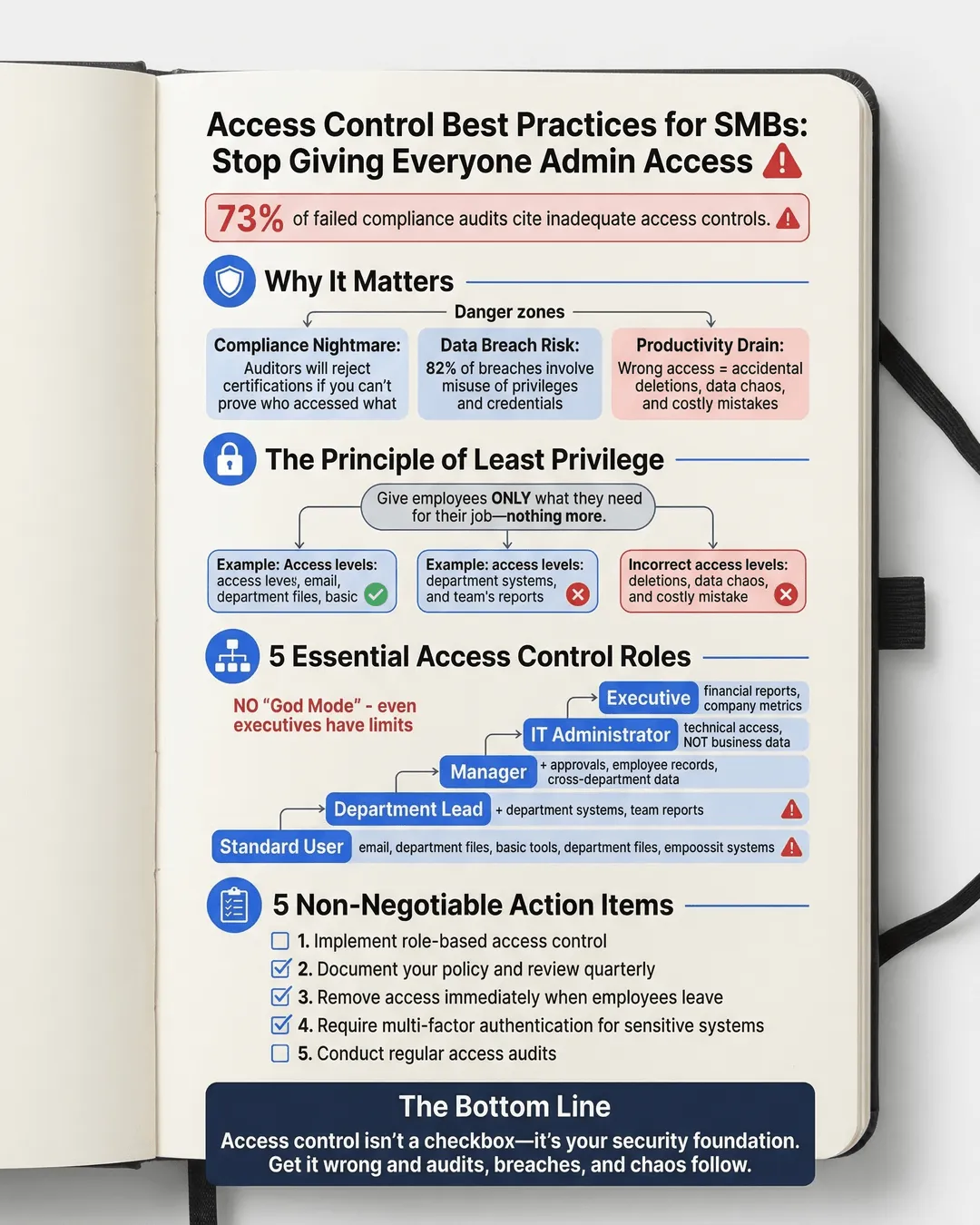
Improper access controls are the number one cause of compliance failures during audits. We’ve seen it time and time again: when everyone has access to everything, you can’t prove who did what or protect sensitive data. This fundamental control underpins nearly every compliance framework, yet most small and medium-sized businesses treat it as an afterthought.
We get it. You’re busy running a business. When a new employee starts, it’s faster to copy someone else’s permissions than to think through what they actually need. When someone leaves, you’re already juggling five other priorities. And that shared admin password for the accounting software? Well, everyone needs access sometimes, right?
Wrong. Dead wrong. And we’re going to show you why access control best practices aren’t just compliance checkbox items but the foundation of your entire security posture.
Key Takeaways
- Implement role-based access control to ensure employees only access what they need for their specific job functions.
- Document your access control policy clearly and review permissions quarterly to catch access creep.
- Remove access immediately when employees leave or change roles to prevent unauthorized data exposure.
- Multi-factor authentication should be mandatory for all systems containing sensitive business or customer data.
- Regular access audits protect you during compliance reviews and help identify security gaps before they become breaches.
Why Access Control Matters More Than You Think
Let’s talk about what actually happens when your access controls are a mess. We’re not talking theoretical risks here. We’re talking about real consequences that hurt real businesses.
First, there’s the compliance nightmare. Whether you’re dealing with SOC 2, ISO 27001, HIPAA, or PCI DSS, auditors will scrutinize your access controls. In fact, 73% of organizations that failed their initial compliance audit cited inadequate access controls as a primary factor¹. When the auditor asks “who had access to customer payment data in March 2024” and your answer is “uh, probably half the company,” you’re not getting that certification.
Second, there’s the data breach risk. The 2024 Verizon Data Breach Investigations Report found that 82% of breaches involved the human element, including misuse of privileges and credentials². When your former intern still has admin access six months after leaving, or when your marketing coordinator can view payroll data, you’re sitting on a ticking time bomb.
Third, there’s the productivity drain. Yes, we said productivity. When people have access to everything, they waste time navigating systems they don’t need, accidentally modifying data they shouldn’t touch, and creating chaos that someone else has to clean up.
We’ve worked with SMBs who discovered that their sales team had been accidentally deleting inventory records for months because they had edit access to the entire ERP system. The financial impact? Tens of thousands in lost sales and inventory discrepancies.
Building Your Access Control Policy for Small Business Success
Here’s where we roll up our sleeves and get practical. Your access control policy doesn’t need to be a 50-page legal document. It needs to be clear, actionable, and something your team will actually follow.
Start with the principle of least privilege. Sounds fancy, but it’s simple: people get the minimum access they need to do their jobs. Not what might be convenient. Not what their manager has. Just what they need.
For example, your customer service team needs to view customer records and update support tickets. They don’t need to delete customer accounts, access financial data, or modify product pricing. Create roles that reflect these boundaries.
Role-based access control implementation is your best friend here. Instead of managing permissions person by person (a nightmare waiting to happen), you create roles like “Customer Service Representative,” “Accounting Manager,” or “Sales Associate.” Each role has specific permissions attached. When someone joins the team, you assign them the appropriate role. Done.
We recommend SMBs start with these core roles as a baseline:
Standard User: Can access email, shared drives for their department, and basic productivity tools.
Department Lead: Everything a standard user has, plus access to department-specific systems and the ability to run reports for their team.
Manager: Department lead permissions, plus ability to approve purchases, access employee records for their direct reports, and view cross-department data relevant to their function.
IT Administrator: Technical system access for maintenance and troubleshooting, but not necessarily business data access.
Executive: Strategic access to financial reports, company-wide metrics, and high-level business intelligence.
Notice what’s missing? There’s no “God Mode” where someone has every possible permission. Even executives shouldn’t have technical admin access to systems they don’t manage. Separation of duties isn’t just for Fortune 500 companies.
Your policy should also specify the approval process. Who authorizes access requests? How quickly should they be processed? What documentation is required? We’ve found that a simple ticketing system where requests are logged, approved by a manager, and implemented by IT works well for most SMBs.
User Access Management for SMBs: The Practical Stuff Nobody Tells You
Theory is great. Implementation is where most businesses stumble. Let’s talk about the real-world mechanics of user access management for SMBs.
Onboarding: Create a checklist for each role. When Sarah joins as a marketing coordinator, you pull up the “Marketing Coordinator” checklist and systematically grant each required access. This takes 30 minutes upfront to create the template but saves hours per employee and eliminates the “oh, I forgot to give them access to X” messages that clog up your first week.
Access requests: Employees will need additional access sometimes. That’s normal. What’s not normal is granting it via Slack message or hallway conversation. Implement a simple request form where employees specify what access they need, why they need it, and for how long. Their manager approves. IT implements. Everything is documented.
We learned this the hard way. A client once had an employee request “temporary” access to financial systems for a one-time project. The access was granted via email. Three years later, that employee (now in a completely different role) still had that access. Nobody remembered granting it. The auditor found it.
Offboarding: This is where companies bleed risk. An employee leaves, and everyone focuses on collecting the laptop and deactivating their email. Meanwhile, they still have access to your CRM, accounting software, project management tools, and cloud storage.
Create an offboarding checklist that’s just as detailed as onboarding. Better yet, tie it to your HR system so that when someone’s termination date is entered, it triggers the access removal workflow. According to a 2024 study by Beyond Identity, 56% of organizations have experienced a security incident related to former employees retaining access to systems³.
We recommend the “disable first, delete later” approach. On the employee’s last day, disable all their accounts immediately. This prevents access while preserving their data and activity logs for potential review. After 90 days (or whatever your retention policy requires), then delete the accounts permanently.
Access reviews: Set a recurring calendar reminder for quarterly access reviews. Pull a report of who has access to what in your critical systems. Send it to department managers. Ask them to confirm that each person still needs that access. You’ll be amazed what you find. People who changed roles six months ago. Contractors whose projects ended. That shared account three people use that nobody can explain.
Access Control Compliance Requirements: What Auditors Actually Check
Let’s demystify what happens during an audit. We’ve sat through enough of them to know exactly what auditors look for regarding access controls.
First, they want to see your written policy. It doesn’t need to be Shakespeare, but it needs to exist and be current. The policy should define roles, approval processes, review frequency, and consequences for violations. If you can’t produce this document, you’re starting the audit on the wrong foot.
Second, they’ll test your policy against reality. They’ll pick random employees and trace their access grants. Can you show the approval for each system they access? Is their access appropriate for their role? We’ve seen auditors pick the CEO specifically to see if even executives follow the process.
Third, they’ll look for segregation of duties. Can one person initiate a payment and also approve it? Can someone create a vendor record and then cut a check to that vendor? These combinations create fraud risk. Compliance frameworks require you to separate these functions.
Fourth, they’ll examine your access reviews. Do you actually review permissions regularly, or is this policy fiction? They’ll want to see documentation proving reviews happened, issues were identified, and corrections were made.
Fifth, they’ll check your offboarding process. They’ll select termed employees and verify their access was removed promptly. A 2024 report from Osterman Research revealed that 89% of former employees admitted they still had access to corporate applications after leaving⁴.
The good news? If you’ve implemented the practices we’ve discussed, you’ll sail through these checks. The better news? You’ll have dramatically reduced your actual security risk in the process, not just checked compliance boxes.
Multi-factor authentication deserves special mention. Nearly every modern compliance framework requires MFA for remote access and privileged accounts. Some require it for all access to systems containing sensitive data. Implementing MFA is no longer optional. The statistics back this up: Microsoft reported that MFA blocks 99.9% of automated attacks⁵.
Making Access Control Sustainable Without Burning Out Your IT Team
We need to address the elephant in the room. Everything we’ve described sounds like a lot of work. And if you’re an SMB with a small IT team (or an IT team of one), you’re wondering how you’ll add this to an already full plate.
The secret is automation and choosing the right tools. You don’t need enterprise-grade identity management platforms that cost six figures. But you do need to move beyond spreadsheets and manual processes.
Start with centralized identity management. Tools like Okta, Microsoft Entra ID (formerly Azure AD), or JumpCloud provide single sign-on and centralized user management for SMBs at reasonable price points. When you provision a user once in your identity platform and it automatically creates their accounts across all integrated apps, you’ve just saved hours per employee.
Look for tools with built-in access review workflows. Instead of manually compiling spreadsheets every quarter, these platforms can automatically send review requests to managers and track responses. What used to take days now takes hours.
Implement automated offboarding. Connect your HR system to your identity management platform. When someone’s termination date arrives, their accounts automatically disable. No ticket required. No missed systems.
Use groups and roles religiously. Managing permissions individually is madness. Managing them through group membership is manageable. When someone moves from sales to marketing, you remove them from the “Sales” group and add them to “Marketing.” All their permissions update automatically.
Start small. Pick your three most critical systems and get access control right for those first. Usually that’s your email, financial system, and customer data repository. Once you’ve nailed the process for those, expand to other systems.
We’ve watched SMBs transform their access control from chaos to clarity in six months using this incremental approach. You don’t need to fix everything on day one. You need to start moving in the right direction.
Conclusion
Access control best practices aren’t sexy. They won’t transform your business overnight or generate revenue directly. But they’re the unglamorous foundation that protects everything else you’ve built.
We’ve laid out the roadmap: implement role-based access control, document your access control policy, execute disciplined user access management, meet compliance requirements proactively, and use automation to make it sustainable.
The businesses that get this right sleep better at night. They pass audits without panic. They avoid breaches caused by excessive permissions. They know exactly who has access to what and why.
The businesses that ignore access controls? They’re the cautionary tales we reference in articles like this one. Don’t be a cautionary tale.
Start today. Pick one thing from this article and implement it this week. Review who has admin access to your most critical system. Create a role definition for your most common job function. Set up MFA on your financial software. Just start.
Your future self, staring down an audit or investigating a security incident, will thank you.
Citations
- Ponemon Institute, “The Cost of Compliance Report,” 2024.
- Verizon, “2024 Data Breach Investigations Report,” 2024.
- Beyond Identity, “Former Employee Access Security Survey,” 2024.
- Osterman Research, “Identity and Access Management in SMBs,” 2024.
- Microsoft, “Azure Active Directory Security Effectiveness Report,” 2024.