Passwords may soon be a thing of the past. Passkeys promise faster, phishing-proof logins, but is your business ready to make the switch?
Remember when you had to memorize your best friend’s phone number? Now you probably can’t recall your own. That’s the kind of shift we’re facing with passwords. They’re becoming obsolete, replaced by something called passkeys.
If you run a small business, you’ve probably dealt with password headaches. Employees forget them. They write them on sticky notes. They use “Password123” for everything. And don’t get me started on password reset requests eating up your IT support time.
Passkeys offer a way out. They’re faster, more secure, and eliminate the password chaos. But before you jump ship, you need to understand what you’re getting into.
Key Takeaways
- Passkeys use device biometrics or PINs instead of traditional passwords, making them immune to phishing and password theft.
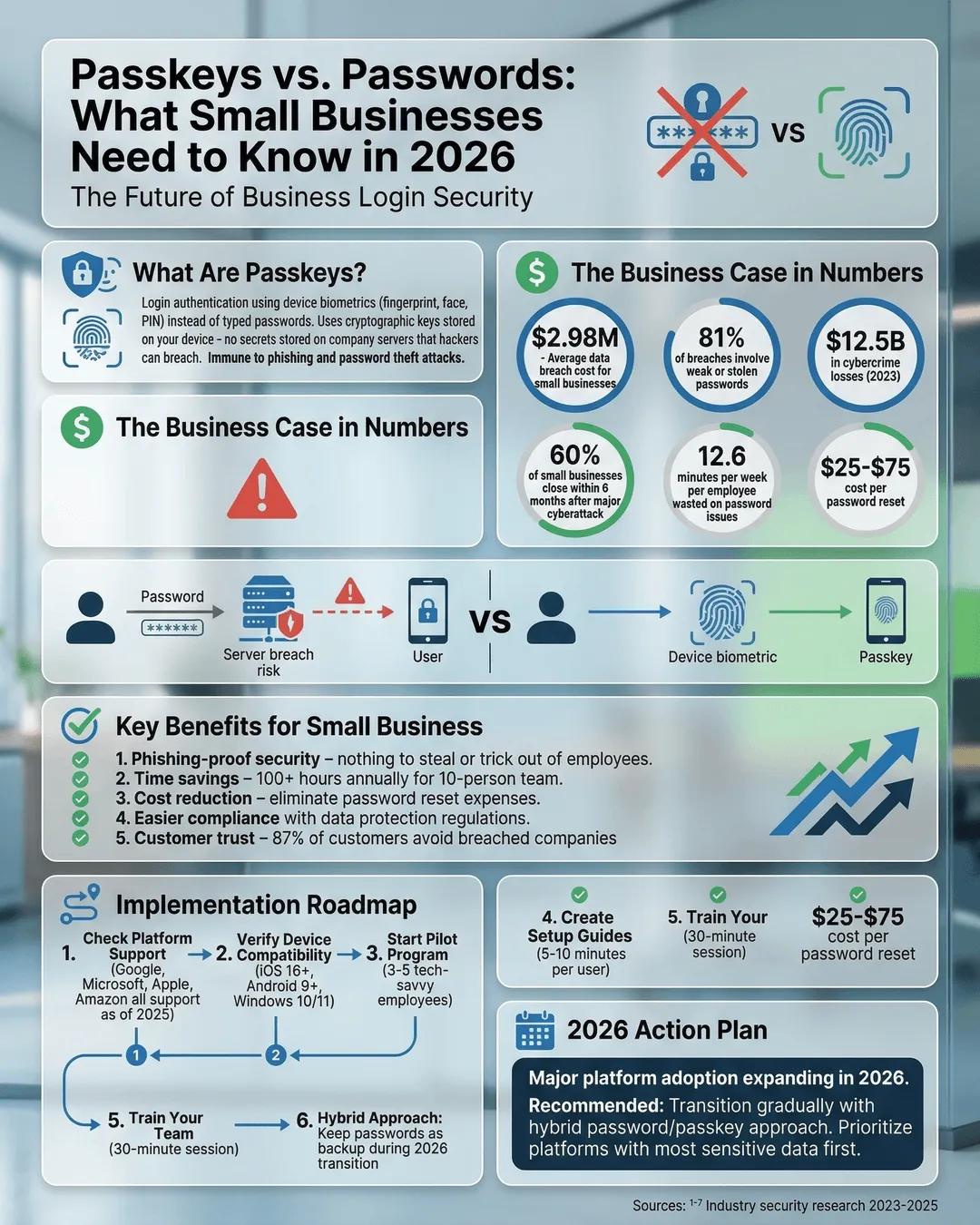
- The average data breach costs small businesses $2.98 million, and 81% of breaches involve weak or stolen passwords¹.
- Major platforms including Google, Microsoft, Apple, and Amazon support passkeys as of 2025, with broader adoption expected in 2026².
- Implementation requires compatible devices, supported platforms, and employee training, but setup typically takes 5-10 minutes per user.
- Consider a hybrid approach during 2026, keeping passwords as backup while transitioning to passkeys.
What Are Passkeys and Why Should You Care?
Passkeys are the new way to log in without typing a password. Instead of entering “Fluffy2023!” you use your fingerprint, face, or device PIN. The technology relies on cryptographic key pairs stored on your device and uses biometric authentication you already use to unlock your phone.
Think of it like this. Your password is like carrying cash. Anyone who sees it can use it. A passkey is like your fingerprint. It’s unique to you and can’t be copied or stolen.
Here’s what makes passkeys different from passwords. When you create a password, it gets stored on a company’s server. If hackers breach that server, they get your password. With passkeys, no secret information lives on the server. Your device proves you’re you without sharing anything that could be stolen.
For your business, this means real security improvements. Phishing scams, which trick employees into giving up passwords, don’t work against passkeys. There’s nothing to trick them out of. Password stuffing attacks, where hackers try stolen passwords across multiple sites, become useless.
The numbers tell the story. Cybercriminals caused $12.5 billion in losses to businesses in 2023³. Password-related breaches accounted for the majority of these incidents. Passkeys eliminate that entire category of risk.
The Real-World Impact for Small Businesses
You’re not Google or Microsoft. You don’t have a massive IT department. So what does this actually mean for your business?
Time savings add up fast. Your employees waste an average of 12.6 minutes per week dealing with password issues⁴. Multiply that by your staff count. A ten-person team loses over 100 hours annually to password problems. That’s time they could spend on actual work.
Password resets cost money too. Each help desk password reset costs between $25 and $75 in labor⁵. If your team needs help five times a month, you’re spending up to $4,500 per year just fixing forgotten passwords.
Security risks hit harder when you’re small. Large enterprises can absorb a data breach. You probably can’t. Small businesses close within six months of a major cyberattack 60% of the time⁶. Passkeys dramatically reduce your attack surface by removing the weakest link in security.
Compliance gets easier. If you handle customer data, you know about compliance requirements. Regulations increasingly expect strong authentication. Passkeys meet and exceed most security standards without the complexity of managing password policies, rotation schedules, and complexity requirements.
Customer trust matters more than ever. When you protect customer accounts with passkeys, you signal that security matters to you. In 2025, 87% of consumers said they would stop doing business with a company that experienced a data breach⁷.
How to Actually Implement Passkeys in Your Business
Let’s get practical. You don’t need a computer science degree to set this up, but you do need a clear plan.
Step 1: Check what you’re already using. Look at your business tools. Gmail, Microsoft 365, Dropbox, Salesforce, Slack. Most major platforms added passkey support in 2024 and 2025. Make a list of which tools support passkeys and which don’t. Focus first on the platforms that hold your most sensitive data or that employees access most frequently.
Step 2: Verify device compatibility. Passkeys work on modern devices. iPhones running iOS 16 or later, Android phones with Android 9 or higher, Windows 10 and 11, and macOS Ventura or newer all support passkeys. Check your company devices. If some are too old, factor upgrade costs into your decision.
Step 3: Start small with a pilot group. Don’t roll passkeys out company-wide on day one. Pick three to five tech-comfortable employees. Have them set up passkeys for one or two key platforms. Collect feedback. Identify problems. Adjust your approach based on what you learn.
Step 4: Create simple setup guides. Your employees need clear instructions. Write a one-page guide with screenshots. Cover these points: which platforms support passkeys, how to enable them, what to do if their device is lost, and who to contact for help. Use simple language. Skip the technical jargon.
Step 5: Train your team. Schedule a 30-minute training session. Show employees how passkeys work. Walk them through setup on at least one platform. Answer questions. Make it clear that passkeys make their lives easier, not harder.
Step 6: Keep passwords as backup. Don’t delete passwords immediately. Run passkeys and passwords in parallel for at least three months. This gives everyone time to adjust and provides a safety net if something goes wrong.
Practical setup takes about 5-10 minutes per platform per user. For most small businesses, full implementation happens over two to three months. Budget 2-4 hours of IT or administrative time for planning and creating guides, plus 30-60 minutes per employee for training and initial setup.
Common Concerns and Real Solutions
You probably have questions. These are the ones every small business owner asks.
“What if someone loses their phone?” Valid concern. Most passkey systems sync across devices through your Apple ID, Google account, or password manager. If someone loses their phone, they can access passkeys from their laptop or tablet. As backup, keep traditional recovery methods available during your transition period.
“Will this confuse my less tech-savvy employees?” Passkeys are actually simpler than passwords once people try them. No memorization. No typing. Just a fingerprint or face scan. Your employees already use this to unlock their phones dozens of times daily. The concept translates easily. Older employees who struggle with complex password requirements often find passkeys easier.
“What’s the cost?” For most small businesses, passkey implementation costs nothing beyond staff time. The technology is built into devices and platforms you already use. If you use a password manager, check whether it supports passkeys (most major ones added support in 2024-2025). If you need to upgrade some older devices, factor that cost in, but you probably planned those upgrades anyway.
“Can we really trust new technology?” Passkeys aren’t experimental. The technology, called WebAuthn, was developed by the FIDO Alliance and became a web standard in 2019⁸. Apple, Google, and Microsoft spent years testing and refining passkey implementations before public release. By 2026, passkeys represent mature, proven technology. More importantly, the alternative (passwords) demonstrably doesn’t work.
“What if a platform doesn’t support passkeys yet?” Keep using passwords there for now. Adoption accelerated rapidly through 2024 and 2025, and most business-critical platforms now offer passkey options. For platforms that don’t, use a password manager with strong master password protection and two-factor authentication. Transition those accounts to passkeys as support becomes available.
“How do we handle employee turnover?” When someone leaves, you revoke their access to your systems as usual. With passkeys, there’s no password to change afterward because the passkey lives on their device, not in a shared system. This actually makes offboarding cleaner. Just remove their account access and you’re done.
Making the Right Decision for Your Business in 2026
Should you switch to passkeys right now? For most small businesses, the answer is yes, but with a measured approach.
Start your transition if you meet these criteria: your core business platforms support passkeys, your employee devices are modern enough (made within the last 4-5 years), you’re tired of password-related security risks and support costs, and you have 2-4 hours to invest in planning and setup.
Wait a bit longer if you use specialized industry software that hasn’t added passkey support yet, you’re planning major device upgrades in the next six months and would rather implement passkeys after those upgrades, or your team is currently overwhelmed with other technology changes and can’t absorb another shift right now.
Either way, start preparing. Create your platform inventory. Check device compatibility. Read up on how your specific business tools implement passkeys. When you’re ready to move, you’ll have a head start.
The password era is ending. Not because of some tech trend, but because passwords never worked well in the first place. We just didn’t have a better option until now.
You don’t have to switch everything overnight. But if you’re still relying entirely on passwords in 2026, you’re accepting unnecessary risk and cost. Your competitors who make the switch will have more secure systems, happier employees, and lower IT overhead.
The question isn’t whether passkeys are coming to small business. They’re already here. The question is whether you’ll be early enough to gain the advantages or late enough to fall behind.
Conclusion
Passkeys represent the biggest shift in authentication since passwords were invented. For small business owners, this shift offers a rare opportunity. You can improve security, reduce costs, and simplify operations all at once.
The transition doesn’t require massive investment or technical expertise. It requires a clear plan, some time, and a willingness to leave behind a system that never worked that well anyway.
Your passwords have been a liability disguised as a security measure. Passkeys are the solution. The businesses that recognize this in 2026 will operate with less risk, less hassle, and more confidence.
Start small. Test with a few employees and platforms. Learn what works for your specific business. Then expand from there. By the end of 2026, you could have a fully passwordless operation. Or you could still be resetting “Fluffy2023!” for the hundredth time.
The choice is yours.
Citations
- IBM Security, “Cost of a Data Breach Report,” 2024.
- FIDO Alliance, “Passkey Adoption Report,” 2025.
- FBI Internet Crime Complaint Center, “Internet Crime Report,” 2023.
- Forrester Research, “The State of Password Management in the Enterprise,” 2024.
- Gartner, “IT Service Desk Cost Analysis,” 2024.
- National Cyber Security Alliance, “Small Business Cyber Impact Study,” 2024.
- PwC, “Global Consumer Insights Survey,” 2025.
- World Wide Web Consortium (W3C), “Web Authentication: An API for accessing Public Key Credentials,” 2019.