SMBs directed more budget to software subscriptions and bonuses than cybersecurity last year. Here's how to allocate spending where it actually reduces risk.
I’ll be honest with you. Last year, I watched too many small business owners triple their Slack subscriptions and hand out year-end bonuses while leaving their digital front door wide open. I’m not judging the bonuses. Your team deserves recognition. But when a single ransomware attack can cost you six figures in recovery costs alone, prioritizing another SaaS tool over basic security infrastructure isn’t just risky. It’s expensive.
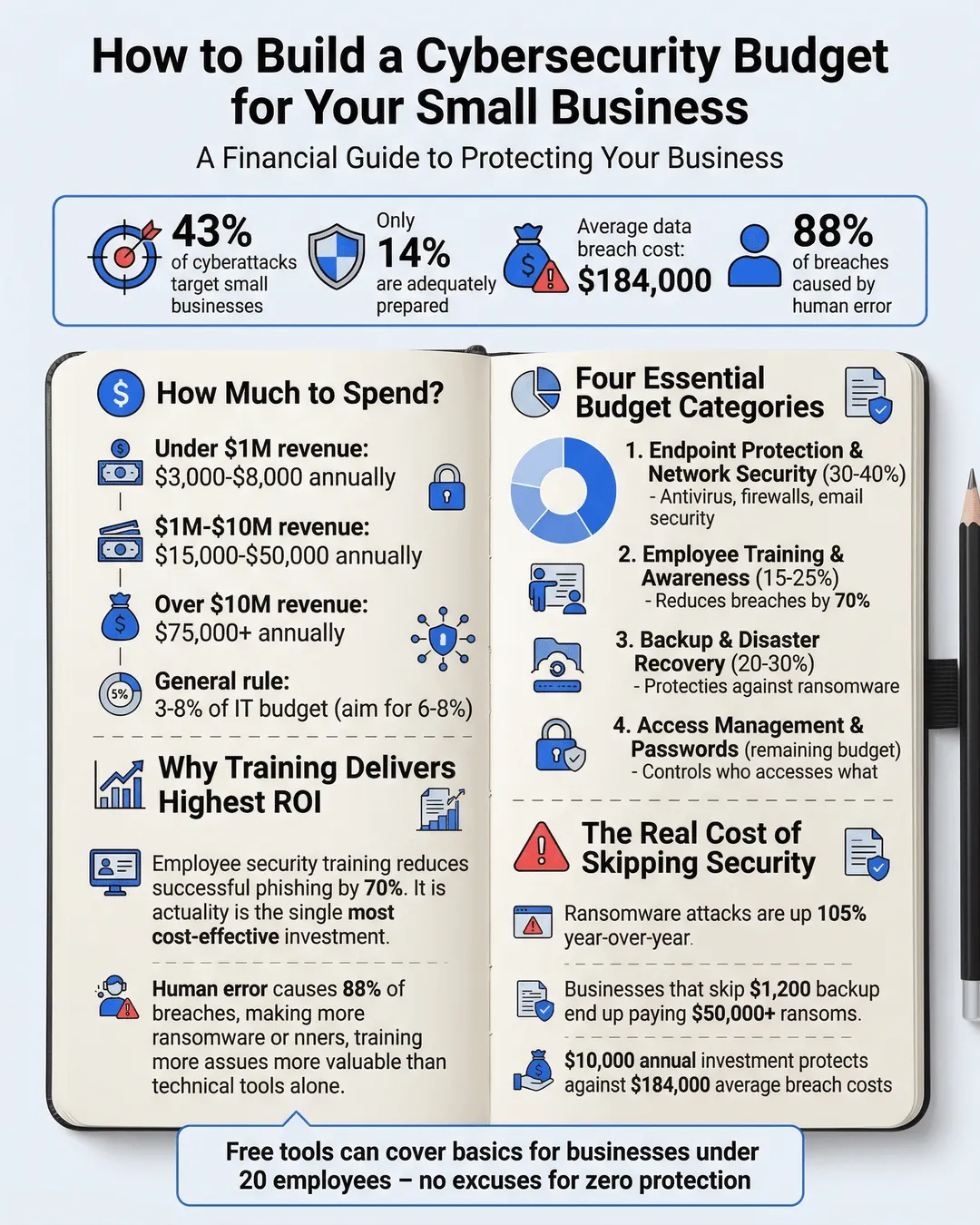
According to recent data, 43% of cyberattacks target small businesses, yet only 14% are adequately prepared to defend themselves¹. The gap between threat and readiness isn’t because small business owners don’t care. It’s because cybersecurity budgeting feels overwhelming, technical, and frankly, easier to postpone.
I’m writing this guide to change that. You don’t need a CISO or a Fortune 500 budget to protect your business. You need a clear framework for allocating resources where they actually reduce risk.
Key Takeaways
- Small businesses should allocate 3-8% of their IT budget to cybersecurity, with higher percentages for businesses handling sensitive customer data.
- The four essential budget categories are endpoint protection, employee training, backup and recovery, and access management.
- Free and low-cost tools can cover foundational security needs for businesses under 20 employees.
- Annual cybersecurity reviews should align spending with your actual risk profile, not generic industry benchmarks.
- Employee security awareness training delivers the highest ROI of any cybersecurity investment, reducing breach likelihood by up to 70%.
Understanding Your Baseline: How Much Should You Actually Spend?
The standard recommendation floats around 3-8% of your total IT budget². But that range is uselessly broad when you’re trying to decide between a $50 monthly antivirus subscription and a $5,000 annual security audit.
Here’s a better framework. Start with your revenue and risk profile.
For businesses under $1 million in annual revenue, aim for $3,000-$8,000 annually on cybersecurity essentials. This covers basic endpoint protection, cloud backup, password management, and minimal training. It’s not comprehensive, but it addresses the most common attack vectors.
Between $1-10 million in revenue, you’re looking at $15,000-$50,000 annually. At this stage, you should add regular security assessments, more sophisticated backup solutions, and dedicated security awareness training programs.
Above $10 million, or if you handle healthcare, financial, or similarly regulated data, plan for $75,000 and up. You’ll need compliance support, potentially a part-time security professional, and more advanced monitoring tools.
These numbers assume cybersecurity represents roughly 6-8% of your IT spending. If you’re spending less than 3%, you’re likely underinvested. If you’re above 12% without a specific compliance requirement, you might be over-engineering your security stack.
The real question isn’t whether you can afford cybersecurity spending. It’s whether you can afford not to. The average cost of a small business data breach reached $184,000 in 2024³. A $10,000 annual investment suddenly looks reasonable.
The Four Budget Categories That Actually Matter
I’ve reviewed dozens of small business cybersecurity budgets. The ones that work break spending into four core categories. Everything else is either optional or can wait until you’ve covered these foundations.
Endpoint Protection and Network Security
This category includes antivirus software, firewalls, email security, and device management. For most small businesses, this represents 30-40% of your cybersecurity budget.
Don’t overcomplicate this. A business-grade antivirus suite runs $40-80 per user annually. A hardware firewall for a 10-person office costs $300-800 upfront, plus occasional updates. Email filtering and spam protection might add another $3-8 per user monthly.
You can cover endpoint protection for a 15-person team with roughly $2,500-4,000 annually. The specific tools matter less than ensuring every device accessing company data has active protection.
Employee Training and Awareness
This is where I see the biggest disconnect. Businesses will spend thousands on technical tools while skipping the $400 annual subscription to a security awareness training platform.
Here’s the reality. Human error causes 88% of data breaches⁴. Your team clicking on phishing emails, using weak passwords, or leaving sensitive documents in shared folders creates more vulnerability than outdated antivirus software.
Allocate 15-25% of your cybersecurity budget here. For a $10,000 annual budget, that’s $1,500-2,500. It covers quarterly phishing simulations, monthly security tips, and annual comprehensive training for every employee.
The ROI is measurable. Companies with regular security training experience 70% fewer successful phishing attempts⁵. That’s not marginal improvement. That’s transformative risk reduction.
Backup and Disaster Recovery
Ransomware attacks increased 105% year-over-year among small businesses in 2024⁶. The only reliable defense is having clean, isolated backups you can restore quickly.
Budget 20-30% of your cybersecurity spending for backup solutions. This includes automated cloud backup services, offline backup storage, and testing your recovery procedures at least quarterly.
A solid backup strategy for a small business runs $500-2,000 annually depending on data volume. Yes, you can find cheaper consumer-grade backup tools. But business-grade solutions include version history, immutable backups that ransomware can’t encrypt, and actual customer support when you need emergency recovery.
I’ve watched businesses pay $50,000 ransoms because they skipped the $1,200 annual backup service. Don’t be that business.
Access Management and Authentication
Password reuse and weak credentials remain laughably common. I still meet business owners whose entire team shares the same admin password.
Spend 10-15% of your budget on password managers and multi-factor authentication tools. For a typical small business, this means $300-1,000 annually.
A business password manager costs $3-7 per user monthly. Multi-factor authentication for your critical systems might be free or included in your existing software subscriptions. If it’s not, budget $2-5 per user monthly.
This category has the best cost-to-protection ratio. Adding MFA to your email, financial systems, and cloud storage reduces account compromise risk by over 99%⁷.
Building Your Budget Template: A Practical Walkthrough
Let me walk you through creating an actual cybersecurity budget for a hypothetical 12-person marketing agency with $2 million annual revenue.
Start with the 6% IT budget benchmark. If they’re spending $60,000 annually on IT (roughly 3% of revenue, which is typical), their cybersecurity allocation should be approximately $3,600.
Break it down by category.
Endpoint protection gets $1,300. That covers business antivirus for 12 users at $70 each ($840), a hardware firewall ($300 upfront, prorated to $100 annually over three years), and email security ($360 annually at $2.50 per user monthly).
Employee training receives $800. They choose an automated security awareness platform at $600 annually and budget $200 for occasional workshops or specialized training.
Backup and recovery gets $1,000. This includes cloud backup with version history ($720 annually for their data volume) and quarterly testing time ($280 in staff hours).
Access management takes $500. Password manager for 12 users runs $420 annually, and they implement free MFA options for most systems, budgeting $80 for any paid upgrades needed.
Total: $3,600 allocated across the four essential categories.
Notice what’s not in this budget. No penetration testing. No security operations center. No dedicated security staff. Those might come later as revenue grows, but they’re not foundational requirements.
You can download templates and adjust these percentages based on your specific risk profile. Retailers handling credit cards need more. Professional services firms with minimal customer data might need less. But this framework scales reliably from five employees to fifty.
What You Can Skip (And What You Absolutely Cannot)
Not every cybersecurity expense delivers equal value. I want to save you from both under-spending on essentials and over-spending on impressive-sounding services you don’t actually need yet.
You cannot skip endpoint protection. Every device needs antivirus, every network needs a firewall, and every email system needs spam filtering. These aren’t negotiable. They’re table stakes.
You cannot skip employee training. I don’t care how tech-savvy your team is. Phishing attacks have become sophisticated enough to fool security professionals. Regular training isn’t optional.
You cannot skip backups. Not negotiable, not debatable, not “we’ll get to it next quarter.” Implement backup before you buy anything else.
You can skip penetration testing in year one. Yes, it’s valuable. Yes, you’ll eventually want external security assessments. But if you’re working with a $5,000 annual budget, cover the foundations first. Penetration testing typically starts around $3,000-5,000 for a small business. Add it when your budget grows.
You can skip dedicated security monitoring tools early on. Security information and event management systems are powerful, but they’re designed for larger operations. Most small businesses get more value from properly configured endpoint protection than from monitoring tools they don’t have expertise to interpret.
You can skip cyber insurance initially if premiums strain your budget. I know that’s controversial. Insurance is valuable, and premiums for small businesses run $1,000-3,000 annually. But insurance doesn’t prevent breaches. It mitigates financial impact after the fact. If you’re choosing between insurance and basic security controls, implement the controls first.
What about free tools? Use them strategically. Free antivirus for personal use isn’t adequate for business environments. But free MFA, free VPN options for remote workers, and free security awareness resources can legitimately fill gaps in tight budgets.
The goal isn’t perfection. It’s meaningful risk reduction within your financial constraints.
Annual Review: Adjusting Your Budget as Threats Evolve
Your cybersecurity budget isn’t static. What made sense in January might be inadequate by December.
I recommend formal reviews every 12 months, minimum. Quarterly is better if your budget allows and your risk profile is higher.
During each review, ask four questions.
First, what changed in your business? New software tools introduce new vulnerabilities. Remote work changes your security perimeter. Client contracts might impose new security requirements. Growth means more users, more devices, and more data to protect.
Second, what worked? Review your security incidents from the past year. Not just breaches, but close calls. Phishing emails that employees reported. Suspicious login attempts that MFA blocked. These successes validate your spending priorities.
Third, what didn’t work? Did you buy a tool nobody uses? Did training fail to change behavior? Cut what’s ineffective and reallocate that budget.
Fourth, what new threats emerged? Cybersecurity threats evolve constantly. The social engineering tactics from 2023 look different in 2025. Your budget should adapt to address current attack methods, not yesterday’s threats.
Expect your cybersecurity budget to grow 10-20% annually in the first few years as you mature your security posture. After you’ve covered foundations, growth rates should stabilize closer to your overall revenue growth.
Conclusion
Building a cybersecurity budget for your small business doesn’t require a technical degree or unlimited resources. It requires honest assessment of your risks and disciplined allocation across four essential categories.
Start with 6% of your IT budget as a baseline. Distribute that across endpoint protection, employee training, backup and recovery, and access management. Cover the foundations before adding sophisticated tools you’re not equipped to manage.
The businesses I’ve seen succeed with cybersecurity budgeting share one trait. They treat security spending as insurance, not expense. You’re not buying software. You’re buying the ability to operate when competitors are offline dealing with ransomware. You’re buying customer trust. You’re buying uninterrupted revenue.
SMBs might have directed more budget to software subscriptions and bonuses than cybersecurity last year, but you don’t have to repeat that pattern. Allocate spending where it actually reduces risk, review your effectiveness annually, and adjust as your business grows.
Your digital front door deserves better than whatever security came free with your internet service. Budget accordingly.
Citations
- Verizon, “Data Breach Investigations Report,” 2024.
- Gartner, “IT Spending Forecast,” 2024.
- IBM, “Cost of a Data Breach Report,” 2024.
- Stanford University, “Human Error in Cybersecurity Study,” 2024.
- Proofpoint, “State of the Phish Report,” 2024.
- Sophos, “State of Ransomware Report,” 2024.
- Microsoft, “Security Signals Report,” 2024.