The hybrid work model isn't going away, and neither are the security risks it creates. Here's how to assess and manage them.
I’ll be honest with you. When the pandemic forced us all to work from home, I thought cybersecurity would be a temporary headache. We’d muddle through, return to the office, and everything would go back to normal.
Turns out, I was completely wrong.
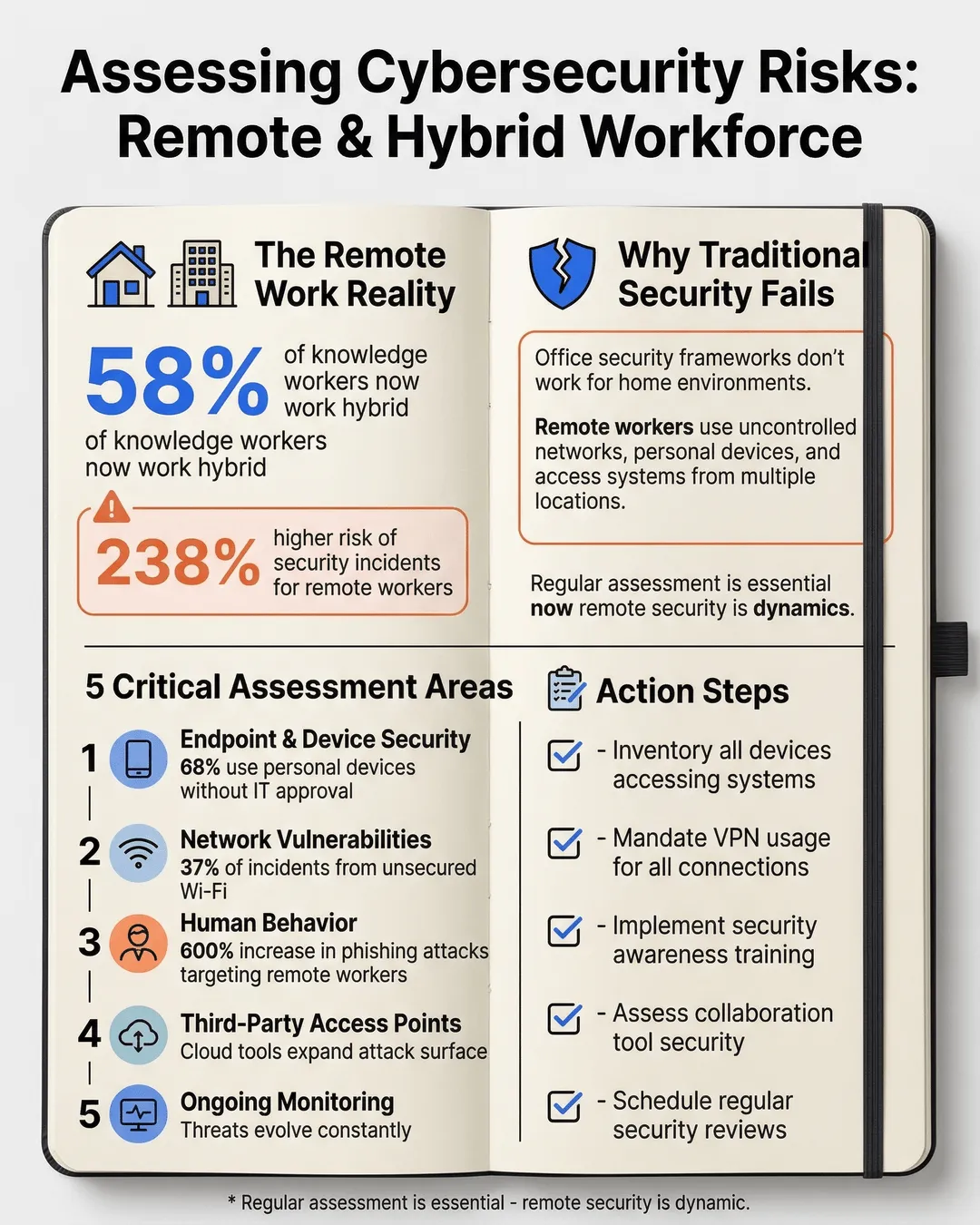
Here we are in 2025, and hybrid work is the new permanent reality. 58% of knowledge workers now split their time between home and office¹, and that number keeps climbing. But here’s the problem: while we’ve figured out Zoom calls and async communication, many organizations are still flying blind when it comes to the security risks that remote and hybrid work creates.
And those risks? They’re not hypothetical. Remote workers are 238% more likely to experience a security incident than their office-based counterparts². That statistic should keep you up at night.
But don’t panic. I’m going to walk you through exactly how to assess cybersecurity risks for your remote and hybrid workforce. No jargon, no corporate security theater, just practical steps you can actually implement.
Key Takeaways
- Remote and hybrid work models create unique security vulnerabilities that require dedicated assessment frameworks, not just traditional office security protocols extended to home environments.
- The human element remains your biggest security risk, with phishing attacks targeting remote workers increasing by 600% since 2020, making employee behavior assessment critical.
- Device security and network vulnerability assessments must account for personal devices, home networks, and public Wi-Fi usage patterns specific to your workforce.
- Third-party access points, including collaboration tools and cloud services, exponentially increase your attack surface and require systematic evaluation.
- Regular, ongoing assessment is essential because remote work security is dynamic, with new threats emerging as work patterns and technologies evolve.
Why Traditional Security Assessments Fall Short for Remote Work
Here’s where most companies get it wrong. They take their existing security framework, designed for a controlled office environment, and try to stretch it to cover remote workers. It’s like using a road map to navigate the ocean. Sure, there are similarities, but you’re fundamentally operating in a different environment.
In an office, you control the network. You control the physical access. You know who’s walking through your doors and what devices are connecting to your systems. Remote work throws all of that out the window.
Your employees are logging in from their kitchen tables, coffee shops, and sometimes their in-laws’ guest bedrooms. They’re using home routers that still have the default password. They’re mixing personal devices with work devices. And that contractor you hired last month? They might be accessing your systems from three different countries.
This is why a remote work cybersecurity assessment needs to be built from the ground up with these realities in mind. You’re not just checking boxes on a compliance form. You’re mapping out an entirely different threat landscape.
The Five Critical Areas You Need to Assess
Let me break down the framework I use when conducting a remote work security assessment. Think of these as the five pillars holding up your security posture. If any one of them is weak, the whole structure becomes vulnerable.
Endpoint and Device Security
Start here because this is where most breaches begin. Every laptop, phone, and tablet your team uses to access company resources is a potential entry point for attackers.
You need to answer these questions: What devices are people using to access work systems? Are they company-owned or personal? Do they have up-to-date antivirus software? Are operating systems patched regularly? Is disk encryption enabled?
Here’s the reality check: 68% of remote workers admit to using personal devices for work without informing IT³. You can’t secure what you don’t know exists. Your assessment needs to identify every endpoint touching your network, whether you issued it or not.
Create a comprehensive inventory. Use mobile device management software if you can. For personal devices accessing work resources, implement a clear bring-your-own-device policy with minimum security requirements. No negotiation on basics like encryption and security software.
Network and Connectivity Vulnerabilities
This is where things get messy because you’re dealing with networks you don’t control. Your employees’ home Wi-Fi setups vary wildly. Some people are security-conscious with WPA3 encryption and strong passwords. Others are using their ISP’s default router settings from 2018.
Your assessment needs to identify: How are employees connecting to company resources? Are they using VPNs consistently? What’s the security level of their home networks? Are they ever working from public Wi-Fi?
Remote workers using unsecured Wi-Fi networks account for 37% of all remote work-related security incidents⁴. That’s not a small problem.
Implement mandatory VPN usage for accessing company systems. Period. No exceptions. Then educate your team on home network security. Provide a work from home security checklist that covers router security, Wi-Fi encryption, and safe browsing practices. Make it simple enough that non-technical employees can follow it.
Human Behavior and Security Awareness
Here’s the uncomfortable truth: your employees are your biggest vulnerability. Not because they’re malicious, but because attackers know humans are easier to hack than systems.
Phishing attacks targeting remote workers increased by 600% between 2020 and 2024⁵. Attackers got sophisticated. They’re spoofing video conference invitations, fake IT support requests, and urgent messages from “the CEO” asking for wire transfers.
Your assessment needs to evaluate: What’s your team’s current security awareness level? Have they received recent training on remote work threats? Can they identify phishing attempts? Do they understand password hygiene? Are they reusing passwords across accounts?
Run simulated phishing tests. I know, everyone hates them, but they’re effective. Track your click-through rates and target additional training to those who need it. Make security training engaging and relevant to remote work scenarios they actually encounter.
And please, implement multi-factor authentication everywhere possible. It stops 99.9% of automated attacks⁶. This is low-hanging fruit you cannot afford to ignore.
Access Controls and Identity Management
When your team is distributed, identity becomes your new perimeter. You need absolute certainty that the person accessing your systems is who they claim to be, and that they only have access to what they need.
Assess your current access management: Who has access to what systems and data? Is access based on current job roles? Are permissions reviewed regularly? What happens when someone changes roles or leaves the company? How quickly can you revoke access?
The principle of least privilege isn’t just a buzzword. It’s your safety net. If an account gets compromised, you want to limit the damage. That means regular access audits, role-based permissions, and immediate offboarding protocols.
For hybrid teams especially, review your physical access controls too. Do former employees still have building access badges? Are conference room systems secured? Hybrid security means thinking about both digital and physical access points.
Third-Party and Cloud Service Risks
Your attack surface isn’t limited to your own systems anymore. Every cloud service, collaboration tool, and vendor platform your team uses is a potential entry point.
The average company now uses 130 cloud services⁷. Many of them were probably adopted by individual teams without IT approval. Shadow IT is real, and it’s dangerous.
Map out every third-party service your remote workers use. Assess each one: What data are they accessing? How is authentication handled? What’s their security posture? Are they compliant with relevant regulations? What happens if they get breached?
Implement an approved tools list and a clear process for vetting new services. Use single sign-on where possible to centralize authentication. Review vendor access regularly and remove services you no longer need.
Building Your Assessment Process
Now that you understand what to assess, let’s talk about how to actually do it without grinding your business to a halt.
Start with a baseline audit. Get a clear picture of your current state across all five areas. Use automated tools where you can. Network scanning tools, endpoint detection platforms, and access management systems can give you data quickly.
But don’t rely solely on technology. Talk to your people. Survey your remote workers about their setup, their challenges, and their security concerns. You’ll learn things no scanning tool will reveal.
Document everything in a risk register. For each vulnerability you identify, assess its likelihood and potential impact. Prioritize based on actual risk, not just what’s easy to fix. A critical vulnerability affecting 80% of your workforce trumps a minor issue impacting three people.
Create a remediation roadmap with realistic timelines. You can’t fix everything at once. Focus on high-risk issues first. Assign ownership for each action item. Security can’t be just the IT team’s problem when everyone is remote.
Then, and this is crucial, make assessment ongoing. Set up quarterly reviews at minimum. Security isn’t a project with an end date. Threats evolve, your workforce changes, and new tools get adopted. Your assessment process needs to be continuous.
Common Mistakes to Avoid
I’ve seen companies make the same mistakes repeatedly when assessing remote work security. Learn from their pain.
Don’t assume compliance equals security. Checking regulatory boxes doesn’t mean you’re actually protected. Many compliance frameworks weren’t designed for remote work realities.
Don’t ignore the small stuff. Yes, focus on high-risk areas first, but those seemingly minor issues add up. Weak password policies, outdated software on one person’s machine, an unsecured admin account somebody forgot about—these are how breaches happen.
Don’t conduct your assessment in a vacuum. Involve stakeholders from across the organization. HR needs to be part of discussions about employee behavior and training. Department heads can identify critical systems and data. Remote workers themselves have valuable insights into practical security challenges.
And please, don’t let perfect be the enemy of good. You will never achieve perfect security. That’s not the goal. The goal is to understand your risks and manage them appropriately for your organization’s size, industry, and risk tolerance.
Making Security Work for a Hybrid World
Here’s what I’ve learned after helping dozens of organizations navigate hybrid workforce cybersecurity risks: security doesn’t have to be the department of “no.” It can be an enabler that lets your team work flexibly without constant anxiety about breaches.
The companies that get this right treat security as a design feature, not an afterthought. They build assessment into their regular rhythm. They make security training relevant and engaging. They give people the tools and knowledge to protect themselves and the company.
Your remote and hybrid workforce isn’t going back to the office full-time. The flexibility is too valuable, for both employees and employers. But that flexibility comes with responsibility. You need to know your risks before you can manage them.
Start your assessment this week. Pick one of the five areas and dig into it. Talk to your team. Run some scans. Document what you find. Then move to the next area. Progress beats perfection every time.
Conclusion
The hybrid work model created a security landscape that looks nothing like what we dealt with five years ago. Your office perimeter dissolved. Your employees are everywhere. Your data lives in the cloud. Traditional security approaches built for a different era simply don’t cut it anymore.
But here’s the good news: assessing and managing these risks is completely achievable. You don’t need a massive budget or a huge security team. You need a clear framework, consistent effort, and a willingness to adapt as threats evolve.
Focus on the five critical areas: endpoints, networks, human behavior, access controls, and third-party services. Build a regular assessment process. Involve your entire organization. And remember that security is a journey, not a destination.
Your hybrid workforce is your competitive advantage. Proper security assessment ensures it stays that way instead of becoming your biggest liability. Now get out there and start mapping your risks. Your future self will thank you.
Citations
- Gartner, “Hybrid Work Employee Survey,” 2024.
- IBM Security, “Cost of a Data breach Report,” 2024.
- Forrester Research, “Remote Work Security Study,” 2024.
- Verizon, “Data Breach Investigations Report,” 2024.
- Check Point Research, “Cyber Attack Trends Report,” 2024.
- Microsoft, “Security Signals Report,” 2024.
- McAfee, “Cloud Adoption and Risk Report,” 2024.