You don't need 15 security tools. You need the right five. Here's the essential stack every SMB should have before investing in anything else.
I’ve watched too many small business owners fall into the same trap. They panic after reading about the latest ransomware attack, then go on a spending spree, buying every security tool a vendor pitches them. Six months later, they’re drowning in dashboards they never check, paying for features they don’t understand, and still vulnerable to basic threats.
The truth is simpler than the cybersecurity industry wants you to believe. You don’t need a Fortune 500 security budget to protect your business. You need five core tools, configured correctly, and actually used by your team.
Let me walk you through the essential cybersecurity stack for small businesses in 2026. No fluff, no unnecessary complexity, just what actually works.
Key Takeaways
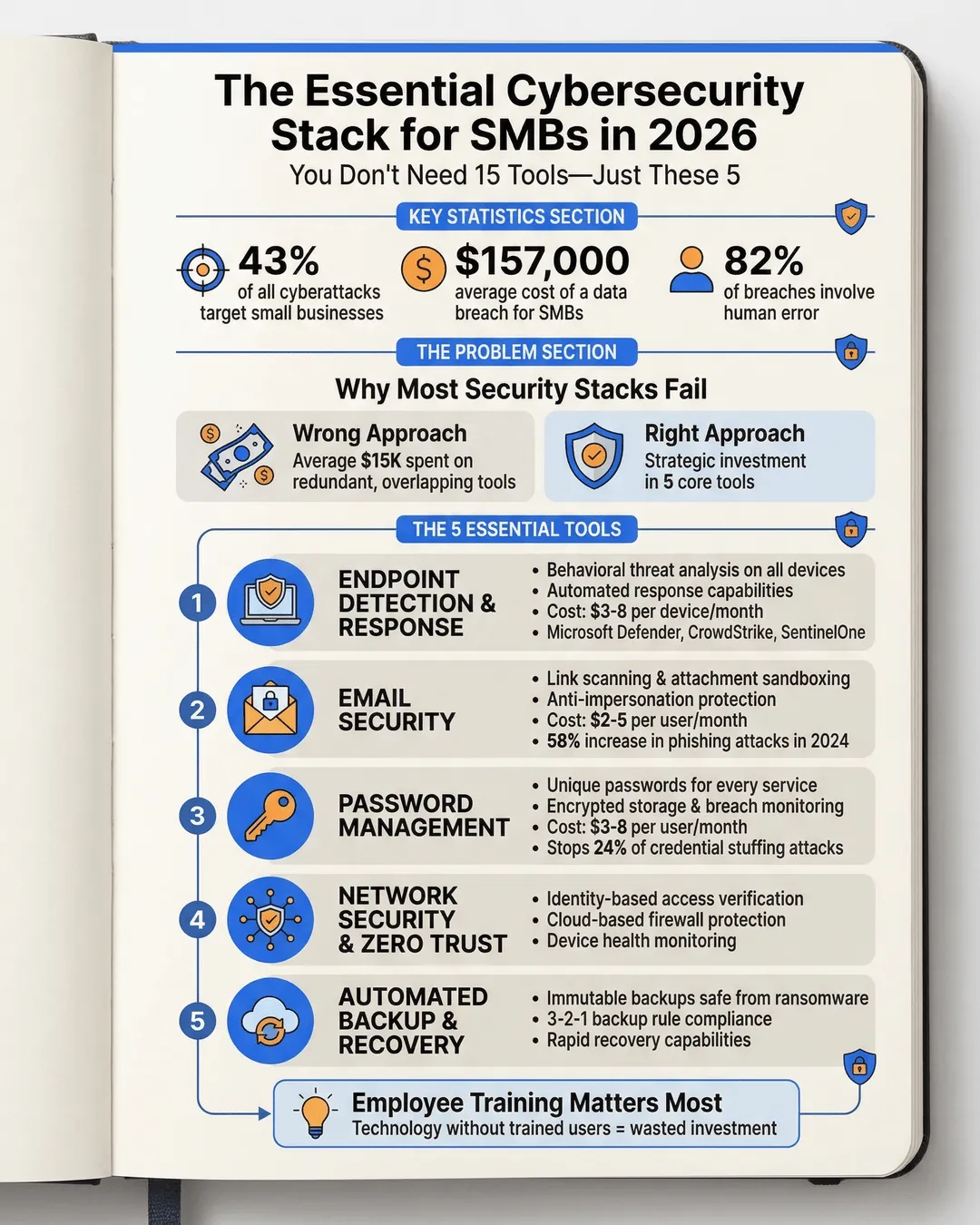
- Small businesses face 43% of all cyberattacks, but most invest in the wrong security tools¹
- A functional cybersecurity stack requires just five core components: endpoint protection, email security, password management, network security, and backup
- The average cost of a data breach for small businesses reached $157,000 in 2024, making prevention far cheaper than recovery²
- Employee training is more critical than expensive tools, as 82% of breaches involve human error³
- Cloud-based security solutions offer better protection and easier management for SMBs than traditional on-premise systems
Why Most Small Business Security Stacks Fail
Before we get to what you need, let’s talk about why most SMB security setups don’t work.
The problem isn’t budget. Small businesses spent an average of $15,000 on cybersecurity in 2024⁴, which is actually enough to build a solid defense. The problem is allocation. That money gets scattered across redundant tools, overlapping features, and solutions that require dedicated IT teams to manage.
I’ve seen companies pay for enterprise-grade SIEM platforms that nobody knows how to use. I’ve watched businesses buy advanced threat detection while leaving their Microsoft 365 accounts protected by “Password123.” It’s like installing a $5,000 security system on your house but leaving the back door unlocked.
The other issue is complexity. When you have 15 different security tools, each with its own dashboard, alerts, and management console, you end up checking none of them. Security becomes something that happens in theory but not in practice.
What you need instead is a focused stack. Five tools that cover your actual risk surface, that your team will use, and that work together without requiring a security operations center to manage.
The Five Essential Tools Every SMB Needs
Here’s your core stack. Everything else is optional until you’ve nailed these five.
1. Endpoint Detection and Response (EDR)
This is your foundation. EDR protects every device that connects to your business systems: laptops, desktops, phones, tablets.
Traditional antivirus is dead. Modern threats move too fast and morph too quickly for signature-based detection. You need behavioral analysis that catches threats based on what they do, not what they look like.
For small businesses, I recommend cloud-based EDR solutions like Microsoft Defender for Business, CrowdStrike Falcon Go, or SentinelOne Singularity. These run between $3 and $8 per device per month and include automated response capabilities.
The key feature you’re looking for is managed detection and response. You want the tool to not just alert you to threats but actively block and remove them. When ransomware hits at 2 AM on Sunday, you don’t want to be the one who has to respond.
2. Email Security Beyond Basic Filtering
Email remains the number one attack vector. Phishing attacks increased 58% in 2024⁵, and they’re getting harder to spot.
Your basic Microsoft 365 or Google Workspace email filtering isn’t enough. You need advanced threat protection that includes link scanning, attachment sandboxing, and anti-impersonation features.
Solutions like Proofpoint Essentials, Barracuda Email Security, or Microsoft Defender for Office 365 add crucial layers. They analyze links in real time (even hours after the email arrives), detonate suspicious attachments in isolated environments, and flag emails that impersonate executives or vendors.
Budget $2 to $5 per user per month. This is the highest ROI security investment you can make because it stops problems before they enter your network.
3. Enterprise Password Management
If your team is reusing passwords or storing them in browser autocomplete, you’re already compromised. It’s just a matter of time.
A password manager like 1Password, Bitwarden, or Keeper generates unique passwords for every service, stores them encrypted, and makes login easy enough that people actually use it. The business versions include admin controls, sharing capabilities for team credentials, and breach monitoring.
This solves the single biggest security weakness in most organizations. Credential stuffing attacks, where hackers use leaked passwords from one service to access others, account for 24% of all breaches⁶. A password manager makes you immune to this.
Cost runs $3 to $8 per user per month. Implement this before anything else.
4. Network Security and Zero Trust Access
You need to control who can access what, especially with remote work. Traditional VPNs are clunky and create security holes. Modern zero trust network access (ZTNA) solutions are better.
Tools like Cloudflare Zero Trust, Zscaler Private Access, or Perimeter 81 verify every access request based on identity, device health, and context. An employee can access the accounting software from their managed laptop but not from their personal tablet at the coffee shop.
This category also includes your firewall. If you’re still running an on-premise hardware firewall, consider moving to a cloud-based solution. Next-generation firewalls from providers like Sophos, Fortinet, or WatchGuard offer better threat intelligence and easier management.
For most SMBs, expect to spend $500 to $2,000 annually on network security, depending on your complexity.
5. Backup and Disaster Recovery
Security isn’t just about prevention. It’s about survival. When something breaks through your defenses, your backup is what keeps you in business.
You need automated, encrypted, offsite backups that follow the 3-2-1 rule: three copies of your data, on two different media types, with one copy offsite. Cloud backup solutions like Datto, Veeam, or Acronis handle this automatically.
The critical feature is immutable backups. This means even if ransomware infects your entire network, it can’t encrypt or delete your backups. You can restore and be operational within hours instead of paying ransom or losing everything.
Ransomware recovery without backups costs an average of $1.85 million⁷. A proper backup solution costs $50 to $200 per month for most small businesses. Do the math.
What You Don’t Need (Yet)
Notice what’s not on this list. You don’t need SIEM platforms, threat intelligence feeds, penetration testing subscriptions, or security information sharing tools. Not yet.
Those become valuable when you’ve grown beyond 100 employees or operate in heavily regulated industries. For most SMBs, they’re expensive distractions from the basics.
You also don’t need separate tools for data loss prevention, mobile device management, or insider threat detection if you’re just starting your security journey. Many of those capabilities are included in the five core tools I outlined.
Build your foundation first. Add specialized tools when you’ve mastered the essentials and have specific compliance requirements or risk scenarios that demand them.
Implementation Matters More Than Selection
Here’s the uncomfortable truth: the best security tool poorly implemented is worse than a mediocre tool properly configured.
I’ve seen businesses buy top-tier EDR solutions and never enable the automated response features. I’ve watched companies deploy email security and whitelist everything that triggers a false positive, neutering the protection. I’ve consulted with organizations that had perfect backup systems but never tested restoration.
When you implement your stack, focus on three things:
Configuration. Use the recommended security settings, not the defaults. Most tools ship with protections turned down to minimize support tickets. Turn them up.
Integration. Make sure your tools talk to each other. Your EDR should feed threat data to your firewall. Your email security should integrate with your password manager for credential monitoring.
Training. Your team needs to understand what these tools do and why the security measures exist. Security awareness training costs $20 to $40 per employee annually and reduces your breach risk by 70%⁸.
The tools are important. How you use them determines whether they actually protect you.
Conclusion
Building a cybersecurity stack for your small business doesn’t require a six-figure budget or a dedicated security team. It requires focus on the fundamentals that address your actual risk.
Start with these five core components: endpoint protection, email security, password management, network security, and backup. Implement them properly, train your team to use them, and actually monitor the alerts they generate.
Once you’ve nailed these basics and they’re running smoothly, then consider expanding. Add security awareness training platforms, deploy multi-factor authentication hardware keys, explore security orchestration tools.
But don’t skip the foundation. Every sophisticated security stack I’ve built for growing companies started with these same five elements. They work for businesses with 10 employees, and they scale to organizations with 500.
Stop chasing the latest security buzzwords. Build your essential stack, configure it correctly, and sleep better knowing you’ve addressed the threats that actually target small businesses.
Citations
- Verizon, “2024 Data Breach Investigations Report,” 2024.
- IBM Security, “Cost of a Data Breach Report 2024,” 2024.
- Stanford University, “Human Error in Cybersecurity Study,” 2024.
- Kaspersky, “IT Security Economics Report 2024,” 2024.
- SlashNext, “State of Phishing Report 2024,” 2024.
- Akamai, “Credential Stuffing Attack Analysis,” 2024.
- Sophos, “State of Ransomware 2024,” 2024.
- KnowBe4, “Security Awareness Training Effectiveness Study,” 2024.